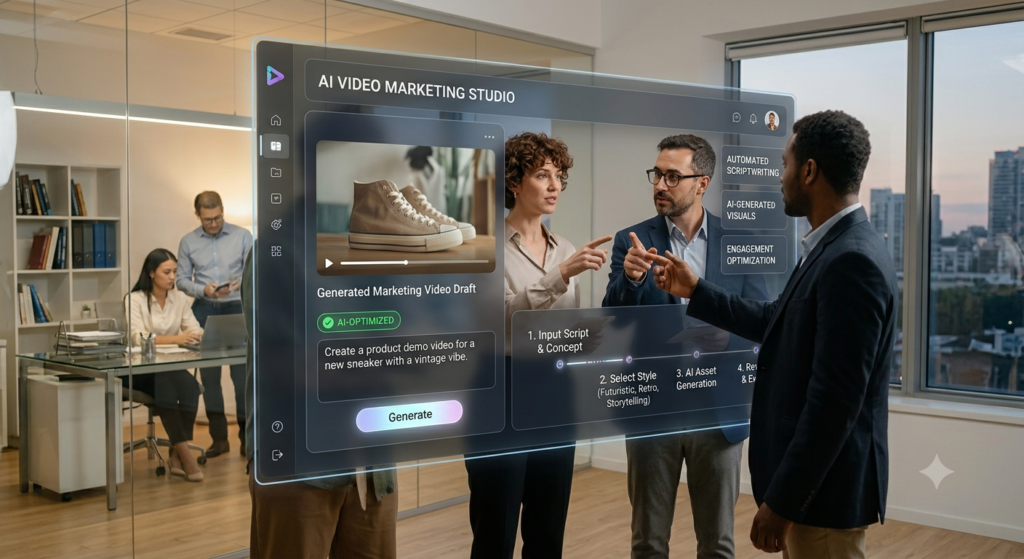
Creating marketing content takes time, effort, and creative thinking. Businesses need videos, images, social media posts, and advertisements to connect with their target audience. However, producing all these materials regularly can become expensive and difficult.
This is where artificial intelligence (AI) can help.
AI marketing video creation, AI image generation, and AI ad creatives are changing how businesses produce digital marketing content. Today, marketers can use AI tools to write video scripts, generate product images, edit videos, and design advertisements without starting everything from scratch.
For example, a small business can use an AI video maker to create a product promotion video. It can use AI image generation to prepare social media graphics and use AI writing tools to create advertising headlines.
These tasks once required several tools and professional design skills. Now, AI makes many of them easier and faster.
However, AI isn’t a complete replacement for human creativity. It works best when marketers provide clear instructions, review the results, and add their own ideas.
In this guide, you’ll learn how to use AI to create marketing videos, images, and advertising creatives. You’ll also discover useful tools, practical prompts, and a step-by-step AI content creation workflow.
Know More: How AI Can Help Developers Learn New Programming Languages Faster: 5 Powerful Ways
1. How to Use AI Create Marketing Videos, Images: Understanding
AI-powered marketing content creation uses artificial intelligence to plan, write, design, and produce promotional materials.
These tools can understand written instructions and create different types of content. Depending on the platform, they can generate text, images, videos, voiceovers, and design layouts.
For marketers, this means less time spent on repetitive production tasks.
What Is AI Marketing Content?
AI marketing content includes any promotional material created or improved with artificial intelligence.
Some common examples include:
- Product promotion videos.
- Social media graphics.
- Website banners.
- Display advertisements.
- Email marketing visuals.
- Product images.
- Promotional presentations.
- Short-form video advertisements.
- Blog images and infographics.
Businesses can use these materials across websites, social media platforms, search campaigns, and email marketing campaigns.
How Does Generative AI Work?
Generative AI uses trained models to produce new content based on user instructions.
For example, you can enter a prompt asking an AI tool to create an image of a modern office with professionals working together. The tool processes your instructions and generates an image based on the requested subject and style.
Similarly, an AI video generator can turn a written script into a video with scenes, captions, music, and voiceovers.
Large language models in marketing can also help with campaign planning, headline writing, audience research, and content ideas. The quality of the result depends on the instructions, available features, and human review.
Why Are Businesses Using AI Creative Tools?
Businesses are adopting AI creative tools for several reasons.
|
Marketing Need |
How AI Helps |
|
Video production |
Creates video drafts and animations |
|
Image design |
Generates promotional images |
|
Advertising |
Produces multiple ad variations |
|
Social media |
Creates platform-specific content |
|
Copywriting |
Suggests headlines and captions |
|
Editing |
Improves images and videos |
|
Personalization |
Supports audience-specific creatives |
|
Content planning |
Helps develop campaign ideas |
The main advantage is efficiency. Teams can create and test more ideas without producing every asset manually.
2. Types of AI Marketing Content You Can Create
AI supports several forms of digital marketing creatives. Businesses don’t need to limit themselves to written content.
AI-Generated Marketing Videos
Video is an effective way to explain products, introduce services, and communicate business messages.
AI video tools can help create:
- Product demonstration videos.
- Company introduction videos.
- Educational videos.
- Customer testimonial videos.
- Promotional advertisements.
- Social media reels.
- Explainer videos.
For example, an IT company can create a short video explaining its software development services. It can use a written script, AI-generated scenes, and a professional voiceover.
AI-Generated Marketing Images
Images help businesses communicate information quickly.
AI image generation can create:
- Product backgrounds.
- Website banners.
- Promotional graphics.
- Blog featured images.
- Social media posts.
- Campaign illustrations.
- Conceptual advertising visuals.
A business selling fitness products, for example, can generate different lifestyle backgrounds for its advertising campaigns.
AI-Generated Advertising Creatives
AI ad creatives combine visual elements and advertising messages to attract potential customers.
These creatives may include:
- Facebook and Instagram advertisements.
- Google Display advertisements.
- Promotional banners.
- Lead generation graphics.
- Product advertisements.
- Retargeting campaign visuals.
AI advertising tools can help generate different creative variations for testing.
The important point is to keep the message relevant to the audience and the actual product or service.
3. How to Use AI for Marketing Video Creation
AI marketing video creation allows businesses to produce video content with fewer manual production steps. You don’t always need a camera, studio, or professional editing team. Several AI video maker platforms can convert scripts, images, and instructions into video drafts.
Step 1: Define Your Video Marketing Goal
Before opening an AI video tool, decide what you want your video to achieve.
For example:
- Generate product awareness.
- Explain a service.
- Promote a special offer.
- Increase website visits.
- Generate leads.
- Educate potential customers.
A clear objective helps you choose the right video format. A product demonstration video needs a different structure from a brand awareness advertisement.
Step 2: Create a Video Script Using AI
A good video begins with a clear script. You can use ChatGPT for marketing content, video ideas, introductions, headlines, and calls to action.
Try this prompt:
Example AI Prompt:
“Write a 45-second marketing video script for a digital marketing agency. The target audience is small business owners. Explain three benefits of professional digital marketing services. Use simple English, a strong opening hook, short sentences, and a clear call to action.”
Review the generated script before using it.
Make sure the information is correct and the message matches your brand.
Step 3: Generate Your Video
Once your script is ready, choose an AI video generator.
Some platforms allow you to create videos from text. Others turn images, presentations, or existing footage into video content.
You can use these features to create:
- Animated scenes.
- Product presentations.
- AI avatars.
- Voiceovers.
- Background music.
- Video transitions.
- Automatic subtitles.
For better results, divide your script into short scenes. This makes the video easier to edit and understand.
Step 4: Add Voiceovers and Captions
Audio and captions make marketing videos easier to follow.
AI voice tools can convert written scripts into spoken audio. Some video editors also generate subtitles automatically.
When selecting a voice, consider your audience and brand personality.
For example, a corporate service video may need a clear and professional voice. A short social media advertisement may work better with a friendly and energetic style.
Always review the pronunciation of brand names, product names, and technical terms.
Step 5: Edit and Optimize Your Video
AI video editing tools can help remove unnecessary scenes, adjust clips, add captions, and improve the overall presentation.
Before publishing, check:
- Video quality.
- Audio clarity.
- Subtitle accuracy.
- Brand logo placement.
- Opening hook.
- Message clarity.
- Call-to-action placement.
- Mobile viewing experience.
A useful video doesn’t need complicated effects. It needs a clear message and relevant visuals.
4. How to Generate Marketing Images with AI
Images are an important part of digital marketing. They make advertisements, landing pages, and social media posts more attractive.
AI image generation helps marketers create visuals using written descriptions.
Step 1: Identify the Purpose of the Image
Start by deciding where you plan to use the image.
Different platforms and campaigns need different visual formats.
|
Image Type |
Common Marketing Use |
|
Website banner |
Homepage promotion |
|
Product image |
Product marketing |
|
Blog featured image |
Content marketing |
|
Social media graphic |
Audience engagement |
|
Infographic |
Educational content |
|
Display banner |
Paid advertising |
|
Email header |
Email campaigns |
Choosing the purpose first helps you create more relevant images.
Step 2: Write a Detailed Image Prompt
A prompt is an instruction that tells an AI tool what kind of image to generate.
A useful prompt should explain:
- Main subject.
- Background.
- Visual style.
- Lighting.
- Colors.
- Image composition.
- Intended use.
For example:
Example AI Image Prompt:
“Create a professional marketing image showing a modern technology workspace with a team of software developers working together. Use a clean corporate style, natural lighting, blue and white color tones, and a balanced composition. Leave some empty space on the right side for advertising text. Create a wide horizontal image suitable for a website banner.”
Detailed prompts give the tool better direction.
Step 3: Generate Multiple Image Variations
Don’t select the first image automatically.
Generate several versions and compare them.
Look for:
- Visual quality.
- Correct subject representation.
- Brand consistency.
- Suitable background.
- Proper composition.
- Relevant colors.
- Realistic details.
This approach helps you find a stronger creative direction.
Step 4: Edit and Customize the Image
AI design software can help improve generated images. You can adjust the background, crop the image, remove unwanted objects, and add text or branding.
However, always check whether the AI has changed important product details. For example, an AI-generated product image should not show features that the real product doesn’t have.
Step 5: Optimize Images for Different Platforms
A single image may not work equally well everywhere. Prepare suitable versions for your website, social media, and advertising platforms.
Check image dimensions, file size, readability, and mobile display. Also, use descriptive image filenames and relevant alternative text when publishing images on your website.
5. How to Create Effective AI Ad Creatives
AI ad creatives help marketers develop different versions of advertisements for different audiences and campaign goals. Instead of designing every advertisement separately, marketers can use AI to create initial concepts and variations.
Understand Your Target Audience
Before generating advertisements, understand who you’re trying to reach.
Consider:
- Age group.
- Location.
- Interests.
- Business needs.
- Buying behavior.
- Common problems.
- Purchase intent.
For example, an advertisement targeting startup founders should use a different message from one targeting enterprise decision-makers.
Create Different Advertising Angles
One product can have several advertising angles. Consider a company offering website development services. It could create advertisements around:
- Affordable website development.
- Custom website solutions.
- Faster website performance.
- Professional business websites.
- Mobile-friendly website design.
Each advertisement highlights a different customer benefit.
Use AI to Generate Ad Copy and Visuals
You can combine AI writing tools and image generators to create complete advertising concepts.
Example AI Prompt:
“Create five Facebook advertisement concepts for a company offering custom website development services. Target small business owners. Each concept should include a headline, short description, visual idea, customer benefit, and call to action. Use simple and persuasive language without making unrealistic promises.”
Once you receive the output, select the strongest concepts and create matching visuals.
Create Facebook Ads Using AI
AI can support Facebook and Instagram advertising through:
- Headline suggestions.
- Primary text generation.
- Image concepts.
- Video scripts.
- Audience-specific messages.
- Creative variations.
However, don’t rely on AI to make every advertising decision. Review the creative against your campaign objective, audience, landing page, and advertising policies.
Test Different Creative Variations
Creative testing helps identify which messages and visuals work better.
You can test:
|
Variation |
What to Test |
|
Creative A |
Product-focused image |
|
Creative B |
Customer problem-focused image |
|
Creative C |
Benefit-focused image |
|
Creative D |
Short promotional video |
|
Creative E |
Customer testimonial format |
Measure performance using relevant metrics such as click-through rate, conversion rate, cost per lead, and return on ad spend. Don’t assume that an attractive image will automatically produce better results. Actual campaign data should guide your decisions.
6. 10 Best AI Creative Tools for Marketing Videos, Images, and Ads
There are many AI creative tools available. Each platform has different features, pricing plans, and limitations.
Here are ten useful tools to explore.
1. ChatGPT – AI Marketing Content and Creative Planning
ChatGPT can help marketers develop campaign ideas, advertising copy, video scripts, social media captions, and image prompts.
It can also help organize a complete AI content workflow.
Best for: Marketing strategy, content writing, brainstorming, and prompt creation.
2. Canva – AI Design Software
Canva provides design templates and AI-assisted features for creating social media graphics, presentations, banners, and marketing materials.
It can help beginners create professional-looking designs without advanced graphic design knowledge.
Best for: Social media creatives, promotional graphics, and marketing presentations.
3. Adobe Firefly – AI Image Generation
Adobe Firefly offers generative AI features for creating and editing visual content.
Marketers can use it to explore creative concepts, generate backgrounds, and improve images.
Best for: AI image generation and professional visual editing.
4. Runway – AI Video Creation
Runway provides AI-powered video generation and editing capabilities.
It can help creative teams explore video concepts and produce visual content from prompts and reference materials.
Best for: AI-generated video scenes and creative video production.
5. Synthesia – AI Video Maker
Synthesia helps users create videos with AI avatars and generated voiceovers.
Businesses can use it for training videos, product explanations, and company presentations.
Best for: Business videos, educational content, and AI presenters.
6. InVideo AI – AI Video Generator
InVideo AI helps turn written instructions into video drafts.
It can support video creation using scripts, stock footage, voiceovers, and editing features.
Best for: Promotional videos and social media content.
7. CapCut – AI Video Editing
CapCut offers video editing features that help creators prepare short-form content.
Depending on the available version and plan, its AI-assisted features can support captions, editing, and visual effects.
Best for: Reels, Shorts, and social media videos.
8. Pictory – AI Video Creation
Pictory helps users turn written content and other source materials into videos.
It can be useful for converting educational content into visual formats.
Best for: Blog-to-video and content repurposing.
9. VEED – Online AI Video Editing
VEED provides browser-based video editing and AI-assisted features.
It can help marketers add subtitles, edit clips, and prepare videos for different platforms.
Best for: Online video editing and marketing content.
10. Adobe Express – AI Marketing Design
Adobe Express helps users create social media posts, flyers, promotional graphics, and other marketing assets.
It offers templates and AI-assisted creative features.
Best for: Marketing graphics and quick promotional designs.
AI Tool Comparison
|
Tool |
Main Purpose |
Suitable For |
|
ChatGPT |
Writing and planning |
Marketers |
|
Canva |
Graphic design |
Beginners |
|
Adobe Firefly |
Image generation |
Designers |
|
Runway |
Video generation |
Creative teams |
|
Synthesia |
Avatar videos |
Businesses |
|
InVideo AI |
Video creation |
Content creators |
|
CapCut |
Video editing |
Social media teams |
|
Pictory |
Content-to-video |
Bloggers |
|
VEED |
Video editing |
Marketing teams |
|
Adobe Express |
Marketing design |
Small businesses |
Tool features and pricing can change. Check the official websites before selecting a platform.
7. How to Use ChatGPT for Marketing Content and Creative Ideas
ChatGPT can act as an AI creative assistant during different stages of a marketing campaign. You don’t need to use it only for writing articles. It can also support visual storytelling, advertising ideas, and content planning.
Generate Marketing Campaign Ideas
Ask ChatGPT to suggest campaign concepts based on your product, audience, and marketing objective.
For example:
“Suggest ten digital marketing campaign ideas for a software development company targeting startups and small businesses.”
You can then select the best ideas and develop them into complete campaigns.
Create AI Prompts for Marketing Videos
You can ask ChatGPT to write detailed prompts for AI video generators.
For example:
“Write a cinematic video generation prompt showing a business owner using modern technology to improve daily operations. Include scene descriptions, camera movements, lighting, and visual style.”
Use the generated prompt in a compatible video tool.
Create AI Image Generation Prompts
ChatGPT can also prepare prompts for AI image generation.
Ask it to create multiple visual concepts for a website banner, product advertisement, or social media campaign.
This saves time during the planning stage.
Develop a Complete Advertising Campaign
You can use GPT-powered marketing tools to prepare:
- Campaign objectives.
- Audience descriptions.
- Advertising headlines.
- Social media captions.
- Image prompts.
- Video scripts.
- Calls to action.
- Creative testing ideas.
However, generated content should always be reviewed and adjusted before publication.
8. Step-by-Step AI Content Creation Workflow for Marketers
A structured workflow makes AI content creation more useful.
Instead of generating random videos and images, connect every creative asset to a campaign objective.
Step 1: Research Your Audience
Understand your audience’s problems, interests, and needs.
Use customer feedback, website analytics, keyword research, and market research to identify useful topics.
Step 2: Select Your Marketing Goal
Choose one clear objective.
For example:
- Increase brand awareness.
- Generate leads.
- Promote a product.
- Increase website traffic.
- Improve engagement.
Step 3: Plan Your Content
Decide what type of content you need. A campaign may require one promotional video, three social media images, and two advertising variations.
Step 4: Generate the Content
Use AI tools to create initial drafts. You can use ChatGPT for copy, an image generator for visuals, and a video maker for promotional videos.
Step 5: Review and Edit
Check all generated materials.
Correct factual errors, improve the message, verify product details, and maintain brand consistency.
Step 6: Optimize for Each Platform
Prepare the right image sizes, video formats, captions, and calls to action.
A video designed for YouTube may need a different edit for Instagram Reels.
Step 7: Publish and Measure Results
Publish your creatives and track campaign performance.
Useful metrics include:
- Impressions.
- Reach.
- Click-through rate.
- Engagement rate.
- Video watch time.
- Conversion rate.
- Cost per acquisition.
Step 8: Improve Future Creatives
Review campaign results and identify what worked.
Use these insights to improve your next set of AI-generated ads, videos, and images.
Complete AI Marketing Content Workflow
|
Stage |
Activity |
Expected Output |
|
Research |
Audience and competitor analysis |
Campaign insights |
|
Planning |
Campaign objective and content ideas |
Content plan |
|
Writing |
AI-assisted copywriting |
Scripts and captions |
|
Designing |
AI image generation |
Marketing images |
|
Production |
AI video creation |
Promotional videos |
|
Editing |
Quality and brand review |
Final creatives |
|
Publishing |
Campaign launch |
Live content |
|
Measurement |
Performance analysis |
Improvement ideas |
9. How AI Improves Social Media Marketing Creatives
Social media platforms need regular and engaging content.
Creating new content for every platform can be difficult, especially for small marketing teams.
AI social media creatives help solve this challenge by making content production more flexible.
Create Platform-Specific Content
Different platforms have different content styles.
For example:
- Instagram: Reels, stories, and visual posts.
- Facebook: Promotional images, videos, and carousel ads.
- LinkedIn: Professional graphics, company updates, and educational videos.
- YouTube: Long-form videos and Shorts.
- Pinterest: Visual graphics and informational designs.
AI tools can help adapt a single campaign idea into different content formats.
Repurpose Existing Marketing Content
You don’t always need to create something new.
You can convert an existing blog post into a short video, an infographic, or several social media posts.
This approach is known as content repurposing.
It helps businesses get more value from their existing content.
Maintain a Consistent Brand Identity
Use the same brand colors, logo, fonts, and communication style across your creatives.
AI branding tools can help develop design ideas, but human review is still important.
Consistency helps people recognize your business across different platforms.
10. Personalization and Marketing Automation with AI
Modern marketing isn’t only about creating attractive content. It’s also about delivering relevant messages to the right audience.
AI can support personalized advertising by helping marketers develop creative variations for different customer groups. For example, an online education company may create separate advertisements for:
- College students.
- Working professionals.
- Recent graduates.
- People looking to change careers.
Each group may respond to different messages.
How AI Supports Personalized Advertising
AI can help marketers:
- Develop audience-specific headlines.
- Generate different visual concepts.
- Adapt messages for different locations.
- Create multiple campaign variations.
- Repurpose existing marketing materials.
- Organize repetitive content tasks.
Marketing automation can connect these activities with campaign management systems.
However, businesses should use customer information responsibly and follow privacy and advertising requirements.
11. Major Benefits of AI Content Creation for Businesses
AI content creation offers several advantages when used with a clear strategy.
Faster Content Production
AI tools can create initial drafts, visual concepts, and video scripts quickly.
This helps marketing teams reduce time spent on repetitive tasks.
Lower Creative Production Costs
Small businesses may not have large creative teams.
AI can help them prepare basic marketing materials without outsourcing every design or video task.
However, professional campaigns may still require experienced designers, editors, and marketers.
More Creative Experiments
AI makes it easier to explore different ideas.
Businesses can test multiple headlines, backgrounds, and visual styles before selecting the strongest creative direction.
Better Content Consistency
A structured AI content workflow can help teams follow the same brand guidelines across campaigns.
Improved Productivity
Marketers can spend less time on routine production and more time on research, strategy, audience understanding, and performance analysis.
12. Challenges and Limitations of AI Marketing Creative Tools
AI offers useful features, but it also has limitations.
Understanding these limitations helps businesses avoid poor marketing decisions.
Incorrect Information
AI tools may generate incorrect product details, statistics, or claims.
Always verify information before publishing it.
Lack of Original Brand Personality
AI-generated content may sound generic.
Add real customer insights, brand experiences, and original ideas to make your content more distinctive.
Copyright and Licensing Concerns
Not every AI-generated asset is automatically free from legal or licensing concerns.
Review the tool’s terms, usage rights, and applicable laws before using assets commercially.
Inconsistent Visual Results
AI image generation may produce incorrect text, unusual details, or inaccurate product appearances.
Review images carefully, especially when advertising real products.
Overdependence on Automation
Using AI for everything can make marketing content repetitive.
Human creativity, experience, and judgment remain essential.
13. Best Practices for Creating Better AI Marketing Videos, Images, and Ads
Follow these practical recommendations to improve the quality of your creatives.
1. Start with a Clear Objective
Every creative should have a purpose. Decide whether you want awareness, engagement, traffic, or conversions.
2. Write Better AI Prompts
Avoid vague instructions.
Explain the audience, subject, style, format, and intended result.
3. Follow Brand Guidelines
Use consistent colors, fonts, logos, and messaging.
4. Review Every Generated Asset
Check text, visuals, product details, and advertising claims.
5. Focus on Mobile Users
Make sure videos, images, and text are easy to understand on smaller screens.
6. Use Real Marketing Data
Use website analytics, campaign results, and customer feedback to guide creative decisions.
7. Test Different Versions
Compare different headlines, formats, and visual concepts.
8. Keep the Message Simple
Avoid unnecessary effects and complicated text.
A clear message is often more useful than a visually crowded advertisement.
9. Protect Customer Information
Don’t enter confidential customer information into AI tools without checking their data policies and your organization’s rules.
10. Add Human Creativity
Use AI for production support, but let people guide the strategy, review quality, and make important decisions.
14. The Future of AI in Digital Marketing and Creative Automation
AI is becoming an important part of digital marketing. As AI technology develops, businesses may gain access to more advanced tools for creating personalized videos, images, and advertisements.
More Advanced Video Generation
AI video generators are developing better capabilities for creating scenes, improving motion, and supporting different video styles.
This may make video production more accessible to small businesses.
Faster Creative Automation
Creative automation can help marketing teams generate and adapt multiple assets from a single campaign idea.
This could reduce repetitive design and editing work.
More Personalized Advertising
AI may help businesses create more relevant marketing messages based on audience needs and campaign context.
However, personalization must respect customer privacy.
Better Integration Between Marketing Tools
AI writing, design, video editing, analytics, and advertising tools may become more connected.
This can help marketers manage more of their content production process in one workflow.
Human Creativity Will Remain Important
Even with advanced AI tools, successful marketing will still depend on understanding people.
Original ideas, customer trust, accurate information, and strong storytelling will continue to matter.
”FAQs”
1. How to use AI to create marketing videos?
Start by selecting a marketing objective and writing a video script. Use an AI video maker to generate scenes, voiceovers, and captions. Edit the video, check its quality, and prepare it for your selected platform.
2. What are the best AI tools for ad creative generation?
Some useful tools include Canva, Adobe Firefly, ChatGPT, Runway, InVideo AI, and Adobe Express. The right choice depends on whether you need advertising copy, images, videos, or complete designs.
3. How to generate marketing images with AI?
Choose an image generation tool and write a detailed prompt. Include the subject, background, style, colors, lighting, and intended use. Generate multiple options and review the best result before publishing.
4. Can small businesses use AI advertising tools?
Yes. Small businesses can use AI advertising tools to create promotional images, social media posts, video advertisements, and campaign copy. These tools can reduce some production work and make basic creative development more accessible.
5. Can I create Facebook ads using AI?
Yes. AI can help generate Facebook ad headlines, descriptions, image concepts, and video scripts. You can also use design tools to prepare the final advertisements. Always check the advertising policies and ensure that your claims are accurate.
6. Is AI-generated marketing content good for SEO?
AI can support content research, planning, and production. However, content should provide original value, accurate information, and a useful experience for readers. Simply publishing large amounts of unedited AI content doesn't guarantee better search rankings.
7. Can AI replace graphic designers and video editors?
AI can automate some repetitive design and editing tasks. However, professional designers and editors still provide creative direction, brand understanding, storytelling, and quality control. AI is best treated as a supporting tool rather than a complete replacement.
8. How can I make AI-generated advertisements more effective?
Start with a clear audience and campaign objective. Create multiple creative variations, use simple messaging, maintain brand consistency, and test performance. Use actual campaign data to decide which advertisements need improvement.


