

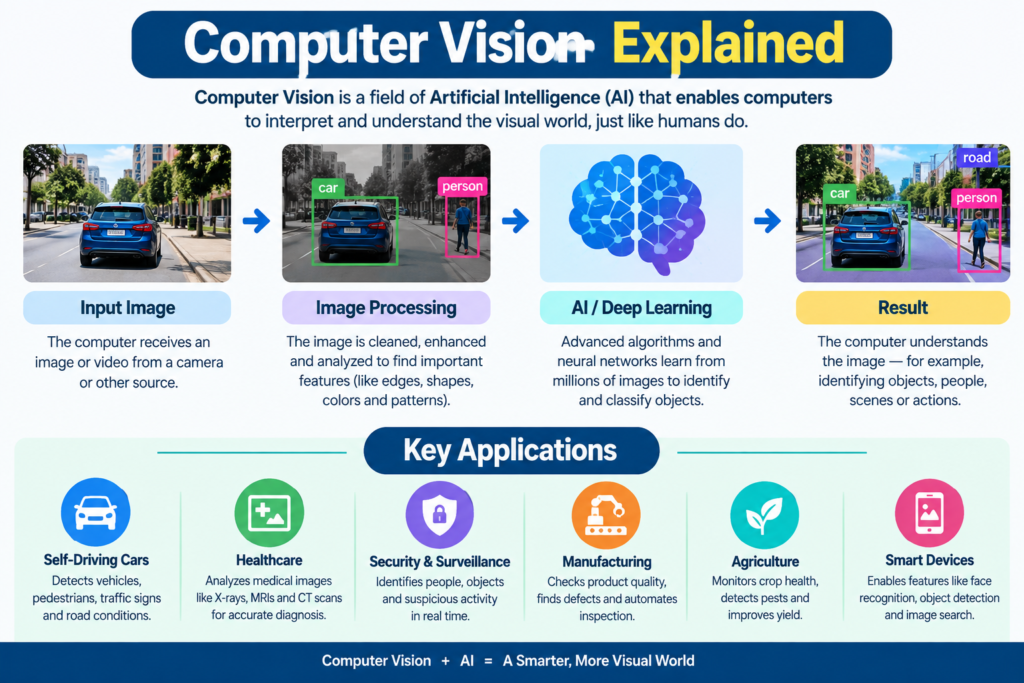
Computer Vision Explained : How AI Understands Best Images and Videos 2026
Images and videos are everywhere today. We use them on smartphones, websites, security cameras, cars, hospitals, factories, and social media. But how can a computer make sense of all this visual information?
The answer is computer vision.
Computer vision is a branch of artificial intelligence that helps computers analyze and understand images and videos. It allows machines to find objects, recognize patterns, read text, identify faces, and understand what is happening in a visual scene.
For example, when your phone groups photos by people, an AI system is working with visual data. When a car detects another vehicle on the road, computer vision is helping the vehicle understand its surroundings. When a doctor uses AI to examine an X-ray, medical imaging AI can help identify patterns that may need attention.
Modern computer vision technology uses machine learning, deep learning, neural networks, and large datasets to perform these tasks.
This guide explains how AI understands images, how it interprets videos, where computer vision is used, and what its future may look like.
What Is Computer Vision Explained in AI?
Computer vision in AI is the technology that allows computers to process and interpret visual information.
A human can look at a photo and quickly say:
“There is a dog sitting beside a person.”
A computer doesn’t see the photo in the same way. It receives digital data made of pixels. Computer vision algorithms process those pixels and look for useful patterns.
The system may identify:
- Objects
- People
- Faces
- Colors
- Shapes
- Text
- Locations
- Movements
- Patterns
- Relationships between objects
This process is often called AI-powered image analysis.
The goal isn’t simply to process an image. The goal is to extract useful information from it.
For example, an online shopping system may use computer vision to identify a product in a photograph. A factory may use it to find damaged products. A traffic system may use it to detect vehicles and pedestrians.
According to IBM, computer vision can process and interpret visual inputs such as images and videos using machine learning and AI techniques.
Why Is Computer Vision Explained Important?
Visual data is growing very quickly.
Businesses may have millions of product images, security recordings, documents, medical scans, or customer photos. Humans cannot manually inspect all of them.
Computer vision can help process large amounts of visual data much faster.
It can also work continuously. For example, a video surveillance AI system can analyze camera footage throughout the day.
However, computer vision isn’t perfect. Poor lighting, unusual angles, blurry images, hidden objects, and biased training data can affect results.
That is why good data and careful testing are important.
How AI Understands Images
One of the most common questions is: how does AI understand images?
The simple answer is that AI learns visual patterns from large amounts of data.
Imagine showing a computer thousands of pictures of cats and dogs. Each picture is labeled. Some are marked “cat” and others are marked “dog.”
During training, the model learns patterns that help separate the two groups.
These patterns may include:
- Shapes
- Edges
- Textures
- Colors
- Body parts
- Object structure
- Spatial relationships
The model does not memorize every picture. Instead, it learns mathematical patterns that can help it make predictions about new images.
This is where machine learning vision becomes important.
Pixels Are the Starting Point
A digital image is made of tiny units called pixels.
Each pixel contains numerical information about color and brightness.
For a computer, a photograph isn’t initially “a car” or “a tree.” It is a large collection of numbers.
The computer vision system transforms those numbers into useful features.
Feature Extraction AI
Feature extraction AI identifies useful visual information from an image.
Early features may include:
- Lines
- Corners
- Edges
- Curves
- Textures
More advanced models can learn complex features.
For example, a model that detects a human face may learn to recognize patterns around the eyes, nose, mouth, and overall face structure.
This process allows AI to move from simple visual signals toward higher-level recognition.
How Does Computer Vision Explained Work Step by Step?
The basic computer vision workflow can be explained in several simple steps.
Step 1: Collect Visual Data
The first step is collecting images or videos.
For example, a medical AI project may need thousands of medical images. A self-driving vehicle may use cameras and other sensors to collect road information.
The quality of this data matters.
If the training data is poor, the model may produce poor results.
Step 2: Label the Data
The data may then be labeled.
For example:
| Image | Label |
| Photo of a car | Car |
| Photo of a dog | Dog |
| Photo of a person | Person |
| Photo of a bicycle | Bicycle |
For object detection, labels can also identify where an object appears in an image.
Step 3: Preprocess the Data
Images may have different sizes, lighting conditions, or quality levels.
Image preprocessing can include:
- Resizing
- Cropping
- Brightness adjustment
- Noise reduction
- Normalization
- Data augmentation
These steps help create more consistent training data.
Step 4: Train the Model
The model studies the training examples.
It compares its predictions with the correct answers. When it makes mistakes, its internal parameters are adjusted.
This process happens many times.
Over time, the model can become better at recognizing patterns.
Step 5: Test the Model
The model is then tested using images it hasn’t seen during training.
This helps measure how well it can work with new data.
Common measurements include:
- Accuracy
- Precision
- Recall
- F1 score
- Intersection over Union
The right measurement depends on the task.
Step 6: Make Predictions
After training, the model can analyze new images.
This stage is called inference.
For example, an image may be given to an AI system, which predicts:
Dog — 96% confidence
The prediction is then used by an application.
Step 7: Take Action
The final step is using the result.
For example:
- A security system sends an alert.
- A medical system highlights an area for review.
- A robot identifies an object.
- A shopping app recommends a product.
- A vehicle detects an obstacle.
This turns visual information into useful action.
Computer Vision vs Image Processing
Computer vision and image processing are related, but they are not exactly the same.
Image processing AI focuses mainly on changing, improving, or extracting information from images.
Computer vision goes further. It attempts to understand what the image contains.
| Image Processing | Computer Vision |
| Improves image quality | Understands image content |
| Changes brightness | Identifies objects |
| Removes noise | Detects people |
| Resizes images | Tracks movement |
| Sharpens images | Understands scenes |
| Applies filters | Classifies images |
For example, making a dark photograph brighter is image processing. Recognizing that the photograph contains a car is a computer vision task. Therefore, image processing can be an important part of a computer vision system, but the two terms should not be treated as identical.
The Role of Machine Learning in Computer Vision
Traditional computer programs often depend on rules written by developers.
For example:
“If this shape is red and has these dimensions, classify it as X.”
This approach becomes difficult when images are complex.
Machine learning vision provides another approach.
Instead of writing every rule manually, developers provide training examples. The model learns patterns from the data. This makes machine learning useful for:
- Image classification
- Object detection
- Facial recognition
- Quality inspection
- Medical image analysis
- Image search
- Video analysis
Machine learning can also improve as models receive better training data and better techniques. However, the model still needs careful design, testing, and monitoring.
The Role of Deep Learning in Vision
The role of deep learning in vision has become extremely important.
Deep learning uses neural networks with many layers. These networks can learn complex patterns from large datasets. One important architecture is the convolutional neural network (CNN).
What Are Convolutional Neural Networks?
A CNN is designed to work well with visual information.
Instead of treating an entire image as one simple object, a CNN can learn smaller visual patterns.
It may first learn simple features such as:
- Edges
- Lines
- Corners
Later layers can combine these features into more complex patterns.
For example:
Edges → Shapes → Parts → Objects
This makes CNNs useful for image classification and object recognition.
Modern computer vision also uses transformer-based models and multimodal AI systems. These models can combine visual information with text and other forms of data.
Google Cloud, for example, provides vision tools for image labeling, face detection, OCR, object detection, and video analysis.
How AI Detects Objects in Images
Object detection AI answers two questions:
- What objects are present?
- Where are they located?
Suppose an image contains:
- Two people
- One car
- One bicycle
An object detection model can identify each item and draw a box around it.
This is different from simple image classification.
Image Classification
Image classification may say:
“This image contains a car.”
Object Detection
Object detection may say:
“There is a car in the center of the image.”
This difference is important.
Object detection is useful for:
- Traffic monitoring
- Security
- Retail
- Robotics
- Manufacturing
- Autonomous vehicles
- Sports analysis
It allows AI systems to understand not only what exists but also where it exists.
Image Segmentation and Scene Understanding
Object detection usually places boxes around objects.
Image segmentation goes further.
It can identify individual pixels belonging to different objects or regions.
There are several forms of segmentation.
Semantic Segmentation
Semantic segmentation AI assigns a class to each pixel.
For example, in a road image:
- Road pixels → road
- Sky pixels → sky
- Car pixels → car
- Tree pixels → tree
Instance Segmentation
Instance segmentation separates individual objects.
If there are five cars, the system can identify each car separately.
Segmentation is useful in areas such as medical imaging, autonomous driving, agriculture, and robotics.
How AI Interprets Videos
Understanding a video is more difficult than understanding a single image.
A video contains many frames.
The AI must analyze these frames and understand how objects change over time.
This is where video analysis AI becomes useful.
A system may detect:
- People entering an area
- Vehicles moving through traffic
- Objects falling
- Sports activities
- Unusual movements
- Changes in a scene
Object Tracking
Suppose a person walks across a security camera.
The system can detect the person in one frame and then track that person across later frames.
This creates continuity.
Video AI can also combine object detection with motion analysis and scene understanding.
Modern video platforms can analyze objects, places, and actions across stored or streaming video.
Major Computer Vision Tasks
Computer vision includes many different tasks.
Image Classification
The system assigns an image to a category.
Example:
Cat, dog, car, flower
Object Detection
The system finds objects and their locations.
Image Segmentation
The system separates regions or objects at the pixel level.
Facial Recognition Technology
Facial recognition technology attempts to identify or verify people using facial features.
It can be used for device authentication, security, and identity-related applications. Because facial data is sensitive, privacy, consent, security, and local laws must be considered carefully.
Optical Character Recognition
OCR allows systems to extract text from images and documents.
For example, AI can read text from:
- Receipts
- Forms
- Signs
- Scanned documents
- Product labels
Pattern Recognition
Pattern recognition helps AI identify repeated or meaningful structures in visual data.
It is widely used in medical imaging, manufacturing, security, and scientific research.
Computer Vision Applications in the Real World
The list of computer vision applications continues to grow.
1. Healthcare
Medical imaging AI can help analyze X-rays, CT scans, MRI images, and other medical data.
It can assist trained professionals by highlighting patterns that may require closer examination.
For example, AI may help identify suspicious areas in medical images.
Computer vision does not replace medical professionals. Instead, it can serve as a supporting tool.
2. Autonomous Vehicles
Autonomous vehicles vision systems use cameras and other sensors to understand roads.
The system may detect:
- Cars
- Pedestrians
- Traffic signs
- Traffic lights
- Road markings
- Obstacles
The vehicle then combines this information with other systems to make driving decisions.
3. Retail
Retail companies can use computer vision to:
- Monitor shelves
- Identify products
- Analyze customer movement
- Improve inventory tracking
- Enable visual search
A customer could upload a picture of a product and find similar products online.
4. Manufacturing
Factories use computer vision for quality inspection.
A camera can inspect products on a production line.
AI may identify:
- Cracks
- Scratches
- Missing parts
- Wrong labels
- Incorrect assembly
This can help companies find defects faster.
5. Security
Video surveillance AI can analyze camera footage.
It may detect people, vehicles, movement, or unusual activity.
However, surveillance systems should be designed with strong privacy and security controls.
6. Robotics
Computer vision in robotics allows robots to understand their environment.
A warehouse robot, for example, may use cameras to locate packages and avoid obstacles.
A robot can combine visual information with sensors, maps, and movement systems.
Applications of Computer Vision in Daily Life
You may already use computer vision without realizing it.
Here are some simple computer vision examples for students:
- Face unlock on smartphones
- Photo search
- Automatic photo organization
- QR code scanning
- Google Lens-style visual search
- Social media filters
- Camera background effects
- OCR scanning
- Product image search
- Traffic monitoring
For example, when a phone identifies text in a photograph, computer vision and OCR are working together.
When a photo application identifies people or objects, image recognition models are involved.
These examples show that computer vision isn’t only used in laboratories. It is already part of everyday technology.
Generative AI and the Future of Vision
The future of computer vision is moving toward more advanced AI systems.
Traditional computer vision may answer:
“What is in this image?”
Modern multimodal systems can go further.
They may be able to:
- Describe an image
- Answer questions about an image
- Analyze charts
- Read documents
- Compare images
- Explain visual scenes
- Generate images
- Connect images with text
This is where generative AI vision becomes important.
Multimodal AI can work with multiple types of information, including text, images, and audio.
AI Knowledge Graphs and Vision
Another interesting direction is connecting visual information with structured knowledge.
An AI knowledge graph can represent relationships between entities.
For example:
Person → holding → phone
or:
Car → located on → road
This type of relationship can help an AI system move beyond simple object recognition toward richer scene understanding.
Computer Vision Projects for Beginners
Students can learn computer vision by building small projects.
Here are some beginner-friendly ideas.
Project 1: Image Classifier
Build a simple application that classifies images into two or three categories.
For example:
Cats vs Dogs
Project 2: Object Detector
Create a program that detects common objects in photographs.
You can use existing models and libraries instead of training everything from scratch.
Project 3: Face Detection
Create a simple webcam application that detects faces.
This is different from facial identification. Detection only identifies that a face is present.
Project 4: Hand Gesture Recognition
Build a system that recognizes basic hand gestures.
This can introduce students to real-time computer vision.
Project 5: Number Recognition
Train a model to recognize handwritten numbers.
This is a classic beginner machine learning project.
Tools Students Can Explore
Students can explore tools such as:
- Python
- OpenCV
- TensorFlow
- PyTorch
- Scikit-image
- Jupyter Notebook
OpenCV is a widely used open-source computer vision library with tools for image processing, object detection, and video analysis.
Benefits of Computer Vision
Computer vision can provide several important benefits.
Faster Analysis
AI can process large numbers of images and video frames quickly.
Automation
Tasks that once required manual inspection can sometimes be automated.
Better Monitoring
AI can continuously monitor visual information.
Improved Efficiency
Businesses can reduce repetitive work and focus human effort on higher-value tasks.
New User Experiences
Computer vision makes features such as visual search, image-based shopping, and smart camera applications possible.
Support for Experts
In fields such as healthcare and manufacturing, AI can help professionals review large amounts of visual data.
Challenges of Computer Vision
Computer vision also has limitations.
Poor Image Quality
Blurred, dark, or low-resolution images can reduce accuracy.
Bias in Training Data
If training data does not represent different groups and conditions fairly, the model may perform poorly in some situations.
Privacy
Images and videos can contain personal information.
Systems must handle this data responsibly.
Security
AI systems can sometimes be fooled by unusual inputs or manipulated images.
Cost and Computing Power
Large vision models can require significant computing resources.
Human Oversight
Important decisions should not blindly depend on AI predictions.
Human review remains important in many high-risk applications.
Future of Computer Vision Technology
The future of computer vision technology looks promising.
Several trends are likely to shape the field.
More Multimodal AI
Vision models will increasingly work with text, audio, video, and other data.
Better Real-Time Video Analysis
AI systems will become more capable of analyzing live video and responding quickly.
Edge AI
More vision processing may happen directly on cameras, phones, vehicles, and other devices.
This can reduce delay and may help limit the need to send all visual data to a remote server.
Smarter Robots
Robots will use improved vision to navigate spaces, understand objects, and complete complex tasks.
Improved Healthcare AI
Medical imaging systems may become better at supporting doctors and researchers.
Better Visual Search
People will increasingly search for products, places, objects, and information using images instead of only text.
More Explainable AI
As computer vision becomes more important, people will also want to know why a model made a particular prediction.
This can improve trust and help experts review AI decisions.
Computer vision gives machines a way to process and understand visual information.
It starts with pixels but can produce much richer information. Through machine learning, deep learning, neural networks, object detection, image classification, segmentation, and video analysis, AI can recognize objects, find patterns, read text, track movement, and understand parts of a visual scene.
”FAQs”
1. What is computer vision in AI?
Computer vision is a branch of artificial intelligence that helps computers process and understand images and videos. It can identify objects, recognize patterns, read text, detect movement, and analyze visual scenes.
2. How does computer vision work step by step?
A typical computer vision system collects visual data, labels it, preprocesses the data, trains a model, tests the model, and then uses the trained model to make predictions on new images or videos.
3. How does AI detect objects in images?
AI uses trained machine learning or deep learning models to identify patterns associated with objects. Object detection models can identify an object and estimate its location within an image.
4. What is the difference between computer vision and image processing?
Image processing mainly focuses on changing or improving images, such as resizing, sharpening, or reducing noise. Computer vision focuses on understanding what an image contains and extracting meaningful information from it.
5. What is the role of deep learning in computer vision?
Deep learning allows neural networks to learn complex visual patterns from large datasets. CNNs and newer transformer-based models are commonly used for tasks such as image classification, object detection, and segmentation.
6. What are computer vision examples for students?
Students can build projects such as image classifiers, face detectors, object detectors, handwritten-number recognizers, and hand gesture recognition systems.
7. How does AI interpret videos?
AI can break a video into frames and analyze objects, actions, movement, and relationships across those frames. Object tracking helps the system follow objects as they move.
8. Is facial recognition the same as face detection?
No. Face detection identifies whether and where a face appears. Facial recognition technology attempts to identify or verify a person's identity using facial features.
9. What is medical imaging AI?
Medical imaging AI uses machine learning and computer vision techniques to analyze medical images such as X-rays, CT scans, and MRI images. It can support medical professionals but should not be treated as a replacement for professional medical judgment.
10. What is the future of computer vision technology?
The field is moving toward more accurate, multimodal, real-time, and context-aware systems. Generative AI, edge computing, robotics, autonomous systems, and advanced video analysis are likely to play important roles.







Pingback: The Rise of AI Doppelgängers: 11 Powerful Ways Artificial Intelligence Can Create a Digital Version of You
Pingback: Beyond Job Replacement: How AI Could Change the Meaning of Work, Skills, and Human Purpose in 2026