1. How to Build AI Chatbots for Websites and Apps: Introduction
Artificial intelligence is changing how businesses communicate with customers, answer questions, and deliver digital services. One of the most useful applications of this technology is the AI chatbot. Businesses can use chatbots to provide instant assistance, recommend products, collect information, and automate repetitive tasks.
In the past, chatbot development often required developers to create extensive decision trees and manually define responses. Modern artificial intelligence makes the process more flexible. AI-powered systems can understand natural language, interpret user intent, maintain conversational context, and generate relevant responses.
Learning how to use AI to build chatbots for websites and applications can help developers create useful digital experiences without building every component from scratch. AI chatbot development tools, large language models, application programming interfaces, and no-code platforms have made chatbot creation more accessible.
However, building a reliable chatbot involves more than connecting an AI model to a messaging interface. Developers must identify the chatbot’s purpose, prepare relevant information, design conversation flows, protect user data, test responses, and monitor performance after launch.
This guide explains the complete process of building an AI chatbot, from planning and choosing tools to integration, customization, testing, and deployment.
2. What Is an AI Chatbot?
An AI chatbot is software that communicates with users through text or, in some cases, voice. It uses artificial intelligence techniques to interpret messages and generate responses that help users complete tasks or find information.
Traditional chatbots usually follow predefined rules. For example, a user might select a menu option to check an order, contact support, or view business hours. These systems can be effective for simple interactions, but they often struggle with unexpected questions.
An AI chatbot can interpret different ways of asking the same question. A customer might write, “Where is my order?” or “Can you tell me when my package will arrive?” An appropriately configured chatbot can recognize that both messages concern order tracking.
Modern chatbot development may combine natural language processing, machine learning, large language models, databases, and external services.
For example, an online store could use an AI chatbot to:
- Answer questions about products and shipping.
- Recommend products based on customer requirements.
- Explain return and refund policies.
- Retrieve order information from an authorized system.
- Help customers navigate the website.
- Transfer complicated requests to a human support agent.
The best chatbot is not necessarily the one that produces the longest or most human-like responses. It is the one that helps users accomplish their goals accurately, efficiently, and safely.
3. How AI Chatbots Work
Understanding the basic architecture of an AI chatbot helps developers make better design decisions.
Natural Language Processing
Natural language processing, commonly called NLP, enables software to interpret human language. It helps a chatbot identify the meaning of a message rather than relying only on exact keyword matches.
For instance, a user might ask, “Do you deliver to my city?” The chatbot needs to recognize that the user is asking about delivery availability and may need to request the city name.
Large Language Models
Large language models can interpret instructions, summarize information, generate responses, and maintain conversational context. Developers can access these capabilities through model providers and their APIs.
The model’s behavior depends on the instructions it receives, the context supplied by the application, the available tools, and the model’s own limitations.
A model should not automatically be trusted to provide current prices, account balances, inventory levels, or other changing facts. Such information should come from an authorized, reliable source.
Conversation Management
Conversation management determines how the chatbot handles messages over time. It can store relevant conversation history, recognize follow-up questions, and keep track of the user’s current task.
For example:
User: I need a laptop for programming.
Chatbot: What is your approximate budget?
User: Around ₹60,000.
The chatbot should understand that the budget applies to the laptop request, rather than treating the second message as an unrelated question.
Developers should limit stored conversation history to what is useful and appropriate. Sensitive information should not be retained unnecessarily.
APIs and External Data
An application programming interface, or API, allows software systems to communicate. A chatbot can use APIs to retrieve product information, check appointments, create support tickets, or access authorized account data.
A secure architecture keeps sensitive credentials on the server and validates every requested action.
Response Generation
After interpreting the message and gathering the necessary information, the chatbot generates a response. The application can then display the answer in a website widget, mobile application, messaging interface, or another supported channel.
4. Benefits of Building AI Chatbots
AI chatbot development can provide benefits for both users and businesses.
Faster Customer Support
Chatbots can answer frequently asked questions at any time. Customers do not always need to wait for an employee to respond to basic inquiries.
Lower Repetitive Workloads
A chatbot can handle routine tasks such as explaining policies, collecting initial information, and directing users to the correct service. This gives human teams more time to focus on complex requests.
Personalized User Experiences
When appropriate data is available and its use is authorized, chatbots can tailor recommendations and responses to a user’s needs. Personalization should respect consent, privacy requirements, and access permissions.
Better Access to Information
A chatbot can provide a conversational way to search documentation, product catalogs, knowledge bases, and support resources.
Scalable Digital Services
A well-designed chatbot can support many conversations without requiring a separate employee for every interaction. Nevertheless, developers must account for model costs, rate limits, response times, and human escalation.
Improved Application Usability
Instead of searching through multiple menus, users can describe what they want to do in ordinary language. The chatbot can guide them through the appropriate steps. These benefits depend on implementation quality. Poorly designed chatbots can frustrate users, provide incorrect information, or create additional support work.
5. Types of AI Chatbots
Choosing the right chatbot type is an important early decision.
Rule-Based Chatbots
Rule-based chatbots follow predefined instructions and conversation paths. They are useful when interactions are predictable and the correct response is known in advance.
Examples include basic appointment menus, frequently asked questions, and simple troubleshooting flows.
AI-Powered Conversational Chatbots
These chatbots use language models or other AI techniques to interpret natural-language messages. They are more flexible than strict rule-based systems but require appropriate testing and safeguards.
Retrieval-Augmented Generation Chatbots
Retrieval-augmented generation, or RAG, allows a chatbot to retrieve relevant information from approved documents or a knowledge base before generating an answer.
A company might use RAG to answer questions about its product manuals, internal procedures, or published policies. This can improve relevance, but it does not guarantee that every answer will be correct.
Task-Oriented Chatbots
Task-oriented chatbots help users complete specific actions, such as booking an appointment, creating a ticket, or checking an order. They often combine AI with structured workflows and API integrations.
Voice-Enabled Chatbots
Voice-enabled systems accept spoken input and may respond with synthesized speech. They can be useful for accessibility, hands-free interaction, and voice-based customer service.
For most business applications, a focused chatbot with clearly defined responsibilities is a better starting point than an unrestricted assistant that attempts to do everything.
6. Essential Tools for AI Chatbot Development
The right tools depend on your budget, technical skills, hosting environment, and project requirements.
|
Tool or technology |
Main purpose |
|
OpenAI API |
Integrate language-model capabilities into applications |
|
Microsoft Bot Framework |
Build and connect conversational experiences |
|
Google Dialogflow |
Develop conversational agents and intent-based workflows |
|
Rasa |
Build customizable conversational assistants |
|
LangChain |
Connect language models with tools, data, and application workflows |
|
LlamaIndex |
Build applications that retrieve information from data sources |
|
Node.js or Python |
Develop chatbot backends and API integrations |
|
PostgreSQL or another database |
Store structured application data where appropriate |
|
Vector database |
Retrieve semantically relevant document passages |
|
React or standard JavaScript |
Create a website chatbot interface |
These technologies serve different purposes, and they are not direct substitutes for one another. Availability, features, pricing, and integration requirements can change, so review current documentation before selecting a platform.
Developers can explore official resources here:
- OpenAI API documentation: https://platform.openai.com/docs
- Google Dialogflow documentation: https://cloud.google.com/dialogflow/docs
- Rasa documentation: https://rasa.com/docs/
- Microsoft Bot Framework resources: https://learn.microsoft.com/en-us/azure/bot-service/
No-Code and Low-Code Chatbot Builders
No-code chatbot builders provide visual interfaces for creating conversation flows and connecting supported services. They can be useful for business owners, marketers, and developers who want to build a prototype quickly.
However, complex integrations, custom authorization, advanced data handling, and specialized workflows may still require programming.
Custom Development
Custom development offers more control over security, performance, data storage, and user experience. It also requires more engineering effort and ongoing maintenance.
A practical approach is to start with the simplest platform that satisfies the project’s requirements and expand only when necessary.
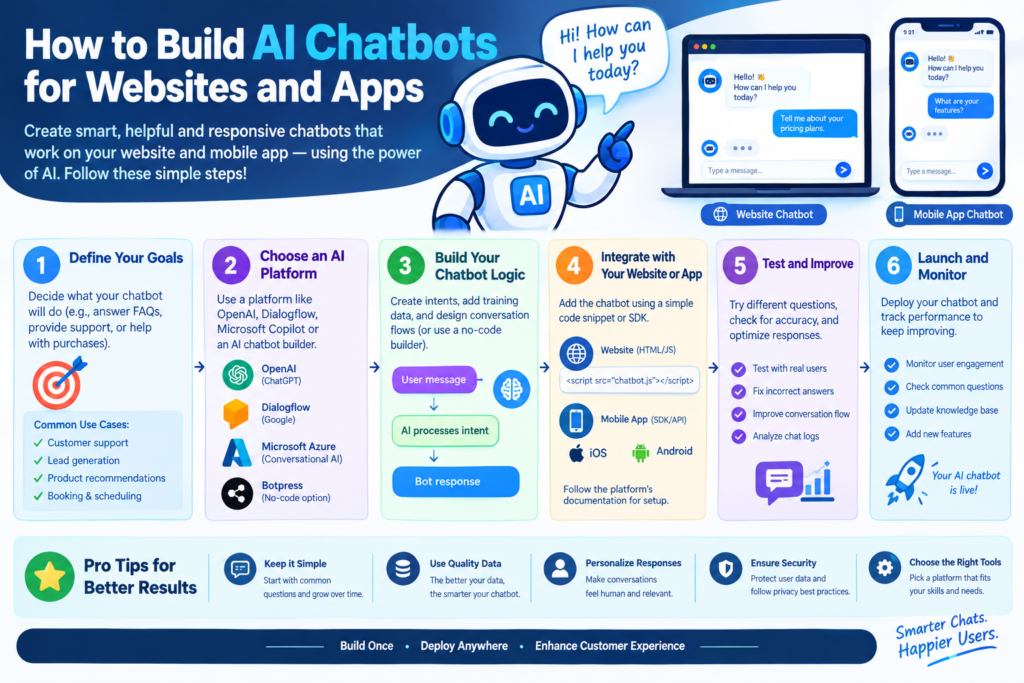
7. Step-by-Step Guide to Building an AI Chatbot
The following workflow explains how developers can build an AI chatbot from the initial idea to a working application.
Step 1: Define the Chatbot’s Purpose
Start by identifying the problem the chatbot should solve.
Will it answer customer questions, recommend products, help users navigate an application, or retrieve information from company documents?
Write down the chatbot’s main responsibilities and its limitations. A focused purpose makes development, testing, and evaluation easier.
For example, an educational website might need a chatbot that answers questions about published articles and recommends relevant learning resources.
Step 2: Identify the Target Users
Understand who will use the chatbot and what they need.
Consider their technical knowledge, preferred language, typical questions, accessibility requirements, and likely devices.
A chatbot designed for technical documentation may need precise terminology. A customer-facing chatbot may need simpler explanations and more guidance.
Step 3: Select an AI Model or Platform
Compare available tools based on response quality, latency, cost, privacy requirements, supported languages, and integration capabilities.
For a prototype, a hosted model API may reduce development time. A self-hosted model may offer greater infrastructure control, but it also introduces hosting, maintenance, security, and performance responsibilities.
Test candidate models with realistic questions instead of relying only on promotional claims.
Step 4: Design the Conversation Flow
Map out the main interactions the chatbot must support.
For example, an appointment assistant might need to:
- Identify the type of appointment.
- Ask for the preferred date.
- Retrieve available time slots.
- Confirm the user’s selection.
- Create the booking after authorization.
- Provide a confirmation message.
Use structured workflows for important actions. AI can interpret natural-language input, while deterministic application logic handles critical operations.
Step 5: Prepare the Knowledge Base
If the chatbot needs to answer questions about specific information, gather reliable source material.
Possible sources include help articles, product descriptions, documentation, policies, and frequently asked questions.
Remove outdated information, organize documents into useful sections, and define which sources are authoritative. If you use RAG, divide documents into searchable passages and retrieve relevant material for each question.
Do not assume that uploading documents automatically creates a reliable chatbot. Source quality, retrieval accuracy, permissions, and response evaluation all matter.
Step 6: Build the Backend
The backend receives user messages, applies application rules, communicates with the AI model, retrieves relevant information, and returns responses.
A typical backend may be built with Python, Node.js, or another suitable technology.
It should also manage authentication where necessary, input validation, rate limits, logging, error handling, and secure access to external services.
Step 7: Create the Chat Interface
Build a simple interface that allows users to enter messages and view responses.
Common components include a message history, text input, send button, loading indicator, error message, and option to restart or escalate a conversation.
Make the interface responsive so it works on mobile devices, tablets, and desktop screens.
Step 8: Connect the AI Model
Configure the backend to send the user’s message and relevant context to the chosen model.
Use clear system instructions to define the chatbot’s role, tone, boundaries, and response format. Avoid sending unnecessary personal information or unrelated conversation history.
The backend should handle model errors, timeouts, and rate limits gracefully.
Step 9: Add Tools and Integrations
If the chatbot needs to perform actions, connect it to authorized APIs or internal services.
Examples include searching a product catalog, retrieving an order status, or checking appointment availability.
Validate inputs and permissions before executing actions. The AI model should not have unrestricted access to databases or administrative systems.
Step 10: Test Before Launch
Test the chatbot with common questions, unusual phrasing, incomplete requests, incorrect information, and attempts to bypass its instructions.
Check whether it provides useful answers, acknowledges uncertainty, protects private data, and transfers difficult cases to human support.
Only deploy the chatbot when its performance is acceptable for the intended use.
8. How to Build a Chatbot for a Website
A website chatbot gives visitors a direct way to ask questions without leaving the page. Developers can create a custom widget or use a supported chatbot platform.
Create the Frontend Widget
The widget usually includes a chat launcher, conversation panel, message list, and input field. Keep the design consistent with the website while ensuring that the chatbot does not block important content.
Consider keyboard navigation, screen-reader support, readable text, and mobile-friendly controls.
Connect the Widget to a Backend
The frontend should send messages to a server endpoint over HTTPS. The backend communicates with the AI provider and returns the response.
Avoid placing private API keys in browser JavaScript. Any credential exposed in client-side code can be copied and misused.
Add Website-Specific Knowledge
A website chatbot can retrieve information from approved pages, documentation, product catalogs, or help-center articles.
For example, an online learning website could answer questions about course topics, explain published tutorials, and direct visitors to relevant resources.
Ensure that retrieved content is current and that the chatbot does not present unverified statements as official policy.
Add Human Support
Some questions require judgment, account-specific assistance, or a human decision. Provide a clear way to contact support or transfer the conversation when the chatbot cannot help.
The transition should preserve only the information needed for the support request and should respect the site’s privacy policy.
9. How to Build a Chatbot for a Mobile Application
AI chatbots can also be integrated into Android and iOS applications.
Choose the Integration Method
A mobile application can communicate with the same backend used by a website, which reduces duplicated logic. Native applications may use platform-specific interfaces, while cross-platform applications can share more of their frontend code.
The backend should remain responsible for secret credentials, authorization, sensitive business logic, and secure model access.
Design for Small Screens
Mobile interfaces have limited space. Use concise responses, clear loading indicators, readable message bubbles, and accessible touch targets.
Avoid displaying long blocks of text when a short answer or expandable explanation would work better.
Handle Connectivity Problems
Mobile users may have slow or unreliable connections. The application should display understandable error messages, prevent accidental duplicate requests, and provide safe retry behavior.
Do not repeat a payment, booking, or other important operation without checking whether the original request succeeded.
Consider Notifications and Voice
Depending on the use case, the application may support voice input, text-to-speech, or notifications. These features should be optional when appropriate and should respect device permissions and user preferences.
10. How to Train and Customize an AI Chatbot
Many projects do not require training a new AI model from scratch. Developers can often customize behavior through instructions, retrieval, structured workflows, and carefully selected examples.
Use Clear System Instructions
System instructions define the chatbot’s role and boundaries.
For example, a support chatbot might be instructed to answer using approved documentation, avoid inventing policy details, ask clarifying questions when necessary, and direct unresolved issues to a human.
Instructions improve consistency but cannot guarantee perfect behavior.
Use Retrieval-Augmented Generation
RAG is useful when the chatbot needs access to specialized or frequently updated information.
A typical retrieval workflow involves preparing documents, splitting them into passages, generating searchable representations, retrieving relevant passages, and providing them to the language model as context.
The chatbot should distinguish between retrieved facts and assumptions. When the available sources do not answer a question, it should say so rather than fabricate a response.
Consider Fine-Tuning When Appropriate
Fine-tuning adjusts a model using a curated dataset. It may help with specialized response formats, repeated task patterns, or consistent behavior in suitable applications.
It is not always the best way to provide changing factual information. For product prices, policy updates, and current records, retrieval from an authoritative source is often more appropriate.
Evaluate Real Conversations
Create a test dataset containing representative questions and expected outcomes. Include ambiguous requests, difficult questions, and examples where the correct answer is to ask for clarification or refuse an unsupported action.
Use the results to improve instructions, retrieval settings, workflows, and user experience.
11. How to Connect Chatbots to APIs and Databases
API integration makes an AI chatbot more useful because it can interact with real application data.
For example, an order-tracking chatbot could use a backend service to retrieve an order’s status. A booking assistant could query available appointment times.
A safe integration follows several principles.
Use least-privilege access. Give each service only the permissions it needs. A chatbot that reads order status should not automatically receive permission to modify payment records.
Validate all inputs. Check data types, allowed values, formats, and business rules before processing a request.
Authenticate users when needed. Do not reveal account information merely because someone knows an order number or asks convincingly.
Confirm important actions. Before performing a consequential operation, verify the user’s intent and authorization. Use idempotency controls where supported to reduce duplicate operations.
Protect credentials. Store API keys and secrets in appropriate server-side secret-management systems, not in public repositories or client-side code.
Log carefully. Record enough information to troubleshoot failures and investigate misuse, but avoid storing unnecessary personal information or sensitive message content.
The AI model should help interpret requests, while trusted application code enforces permissions and executes approved actions.
12. Best Practices for AI Chatbot Development
Successful chatbot development requires careful attention to quality, privacy, reliability, and usability.
Keep the Chatbot Focused
Start with a small number of valuable use cases. Expand gradually after testing shows that the initial features work reliably.
Prioritize Accuracy
Use authoritative information sources and retrieval mechanisms when answers depend on specific facts. Tell users when information is unavailable or uncertain.
Protect User Privacy
Collect only necessary information, explain relevant data practices, restrict access, and apply appropriate retention and deletion rules.
Add Security Controls
Validate inputs, protect endpoints, enforce permissions, and defend against prompt injection and attempts to misuse connected tools. Treat user messages and retrieved documents as untrusted input.
Make Human Escalation Easy
Give users a clear route to human assistance. Escalation is especially important for complaints, sensitive issues, account access problems, and cases the chatbot cannot resolve.
Monitor Cost and Performance
Track response latency, model usage, error rates, and cost per conversation. Apply suitable rate limits and caching where appropriate.
Design for Accessibility
Ensure the chatbot can be used with keyboards, screen readers, and different screen sizes. Avoid relying only on color or animation to communicate important status information.
13. Common AI Chatbot Development Challenges
Incorrect or Invented Answers
Language models can generate plausible but incorrect responses. Reduce this risk with reliable source material, retrieval, constrained workflows, and evaluation. For high-impact decisions, require appropriate human review.
Poor Knowledge Retrieval
A chatbot may provide irrelevant information if its documents are outdated, badly structured, or poorly indexed. Improve document quality, test retrieval results, and adjust passage sizes and search strategies.
Privacy and Security Risks
Chatbots may receive personal information or interact with sensitive systems. Minimize data collection, enforce access controls, protect credentials, and assess the risks of each integration.
Slow Responses
Large prompts, complex retrieval, external APIs, and model latency can make conversations feel slow. Measure each stage of the request and optimize the actual bottleneck instead of making assumptions.
Unpredictable Costs
Usage-based pricing can make expenses difficult to predict. Estimate expected traffic, monitor consumption, choose appropriate models, and set budget alerts or usage limits where available.
Limited User Trust
Users may become frustrated if the chatbot hides its limitations or repeatedly misunderstands them. Clearly explain what it can do, ask useful clarifying questions, and offer an alternative when it fails.
14. How to Test and Improve Your Chatbot
Testing should continue after deployment because user needs, content, integrations, and AI models can change.
Functional Testing
Check that the chatbot opens, accepts messages, returns responses, handles errors, and integrates correctly with connected services.
Conversation Testing
Evaluate how it handles follow-up questions, ambiguous requests, spelling mistakes, unexpected topics, and long conversations.
Security Testing
Test authorization boundaries, prompt injection, sensitive-data exposure, excessive tool permissions, and attempts to trigger unauthorized actions.
Performance Testing
Measure response time, throughput, availability, and behavior under realistic traffic. Test rate limits and failure handling for dependent services.
User Acceptance Testing
Ask representative users to complete realistic tasks. Observe where they become confused, abandon the conversation, or need assistance.
Measure Useful Metrics
Consider tracking:
- Task completion rate.
- User satisfaction.
- Correctness of answers.
- Successful human handoffs.
- Average response time.
- Error and abandonment rates.
- Cost per completed task.
Do not optimize only for conversation length or the number of messages. A good chatbot may solve a problem in two messages rather than ten.
15. The Future of AI Chatbot Development
AI chatbot development is moving toward more capable assistants that can retrieve information, use tools, and complete multi-step tasks. Improvements in language models, speech technology, and application integration may make these systems more useful across industries.
Multimodal chatbots can work with combinations of text, images, audio, and other supported inputs. This could help users troubleshoot products, understand visual information, or interact with applications through speech.
AI agents may also coordinate several steps to complete a task. However, greater autonomy introduces additional risks. Developers will need strong permissions, clear confirmation steps, reliable monitoring, and controls that prevent unauthorized actions.
Another important trend is the use of specialized knowledge sources. Instead of relying only on general model knowledge, businesses can build chatbots around their own approved documentation and data.
The long-term goal should not be to replace human judgment everywhere. It should be to build systems that combine the speed of automation with the reliability, accountability, and empathy of human support where needed.
Learning how to use AI to build chatbots for websites and applications can help developers create more interactive, useful, and responsive digital experiences. Modern AI models, chatbot frameworks, APIs, and retrieval systems make it possible to build assistants that understand natural-language questions and support practical tasks.
The development process begins with a clear purpose. Developers then select appropriate tools, prepare reliable information, create the interface, connect the backend, configure the AI model, and integrate external services where necessary.
Security, privacy, testing, and monitoring should be part of the process from the beginning. A chatbot must protect user data, follow authorization rules, acknowledge its limitations, and provide human support when automation is insufficient.
Start with a focused use case, test it with real users, and improve it using measurable results. With a thoughtful design and responsible implementation, AI chatbot development can create meaningful value for websites, mobile applications, businesses, and their customers.
Know More:
”FAQs”
1. How can I build an AI chatbot for a website?
Start by defining the chatbot's purpose and selecting a model or chatbot platform. Build a chat interface, connect it to a secure backend, and configure the model with appropriate instructions. Add a knowledge base or API integrations if needed, then test the chatbot before publishing it.
2. What are the best tools for AI chatbot development?
Suitable tools include hosted language-model APIs, Google Dialog flow, Rasa, Microsoft conversational development resources, and frameworks such as Lang Chain or Llama Index. The best choice depends on the chatbot's complexity, required integrations, budget, and security needs.
3. Can I build an AI chatbot without coding?
Yes. No-code and low-code chatbot builders allow users to create many types of chatbots through visual interfaces. However, custom APIs, advanced security controls, specialized workflows, or complex application integrations may require programming.
4. How much does it cost to develop an AI chatbot?
The cost varies according to the development approach, model usage, hosting, integrations, security requirements, and ongoing maintenance. A basic prototype may be inexpensive, while a production chatbot connected to business systems can require a larger budget. Check current provider pricing and estimate usage before launching.
5. How do I train a chatbot on my own data?
You can often connect a chatbot to your documents through retrieval-augmented generation. Prepare accurate documents, organize them into searchable passages, retrieve relevant information for each question, and provide that information to the model. Fine-tuning may be useful for certain specialized behaviors but is not always necessary.
6. Is it safe to connect an AI chatbot to a database?
It can be safe when the integration is designed properly. Use authentication, least-privilege permissions, input validation, server-side credentials, monitoring, and appropriate data protection. Never give a model unrestricted database access or rely on its instructions alone to enforce security.
7. Can an AI chatbot work on both websites and mobile applications?
Yes. A shared backend can support both website and mobile interfaces. Each interface can use its own design while sharing model access, knowledge retrieval, application logic, and authorized integrations.
8. How can I prevent an AI chatbot from giving incorrect answers?
Use reliable source material, retrieve relevant information, define clear response boundaries, and test the chatbot against realistic questions. Configure it to acknowledge uncertainty and escalate unresolved issues. No single technique eliminates every incorrect answer.
9. How long does it take to build an AI chatbot?
A simple prototype may take a short development period, while a production-ready chatbot can take considerably longer. The timeline depends on integrations, data preparation, security requirements, testing, and the complexity of the user experience.
10. Can AI chatbots replace human customer support?
AI chatbots can handle many routine questions and tasks, but they may struggle with complex, sensitive, or unusual situations. A strong support strategy combines automation with easy access to human assistance.