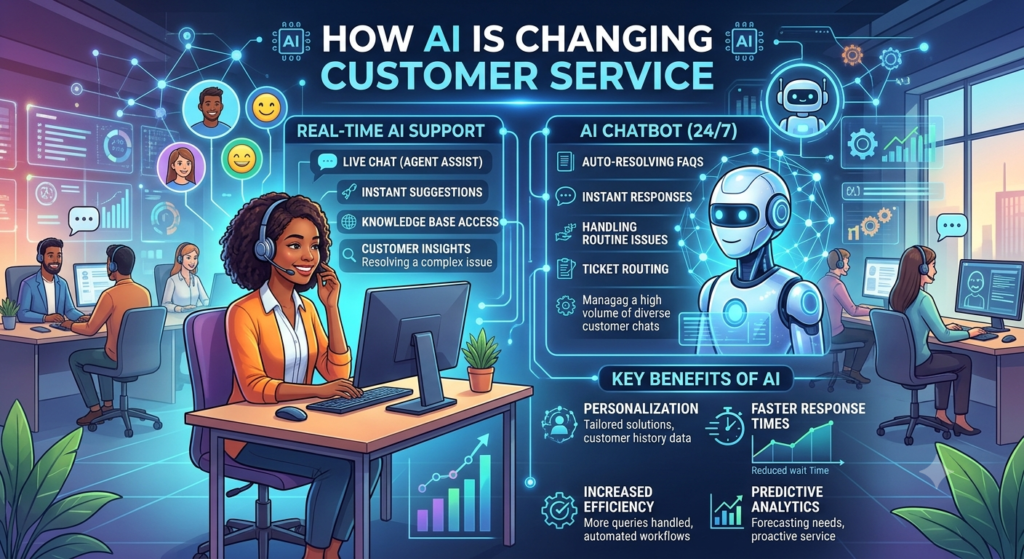
How AI Is Changing Customer Service : 9 Powerful Ways to Improve Customer Experience
Customer service is changing fast. People want quick answers, easy solutions, and helpful support. They don’t want to wait for hours to solve a simple problem.
At the same time, businesses receive more customer questions than ever. Their teams must answer emails, manage complaints, solve technical issues, and handle routine requests. This work takes time and money.
Artificial intelligence is helping businesses meet these needs. With AI customer service, companies can answer common questions, guide customers, and help support teams work faster. AI chatbots can respond to simple requests. Virtual assistants can help customers find information. AI tools can also sort support tickets and suggest answers to human agents.
These changes are making customer support faster and more flexible. They also help businesses understand what customers need.
However, AI isn’t a perfect solution. It can give wrong answers, miss the meaning of a question, or fail to understand an emotional situation. Human support is still important.
The best results come when companies combine AI with skilled employees.
In this article, we’ll explore how AI is changing customer service, the benefits it offers, real-world examples, the tools businesses can use, and what the future may look like.
What Is AI Customer Service?
AI customer service uses artificial intelligence to help businesses answer questions and solve customer problems.
It can handle simple tasks on its own. It can also help human agents complete their work.
For example, an AI chatbot on an online store can answer questions about delivery times. A support tool can sort emails by topic. An AI assistant can summarize a long customer conversation for an employee.
These tools use data and language technology to understand requests and provide useful responses.
How Does AI Customer Support Work?
AI customer support often follows five simple steps.
- Receive a request: A customer sends a message or asks a question.
- Understand the request: AI analyzes the words and identifies the customer’s needs.
- Find useful information: The system checks an approved knowledge base or connected business tool.
- Provide a response: AI answers the question or suggests a next step.
- Transfer the case if needed: A human agent takes over when the request is too complex or sensitive.
For example, a customer may ask, “How can I return my order?”
The chatbot can explain the return policy and guide the customer through the process. If the order has an unusual issue, the chatbot can send the request to a support agent.
This approach helps businesses manage routine questions while keeping human help available.
9 Powerful Ways AI Is Changing Customer Service
1. AI Chatbots Provide Faster Answers
One of the biggest changes in customer service is the use of AI chatbots. Customers often ask the same questions. They may want to know a store’s opening hours, check delivery status, or learn how to reset a password.
AI chatbots can answer many of these questions in seconds. They can also work outside normal office hours. This means customers can find basic help at night, on weekends, or during holidays.
Example: An online store receives many questions about shipping. Its chatbot answers common delivery questions and shares tracking details after checking the order through a secure system.
This saves time for both customers and employees. However, chatbots should not trap customers in endless conversations. They need a clear option to contact a human agent.
2. AI Helps Companies Offer Personalized Support
Customers want answers that match their needs. A generic response may not solve their problem.
AI can help businesses provide personalized support by using relevant customer details and past interactions.
For example, a virtual assistant may guide a returning customer to the correct account settings. It may also help a customer find a product based on stated preferences.
Personalization can make support feel more useful and direct.
However, companies must protect customer information. They should use only the data needed for the task and follow applicable privacy rules.
Personalized support works best when it helps customers rather than making them feel watched.
3. AI Makes Customer Support Available Around the Clock
Traditional support teams often work during set hours. Customers may need help when the team is offline.
AI can provide basic support at any time.
A customer can ask a chatbot about a service, find a help article, or follow a simple troubleshooting guide without waiting for the next business day.
This is useful for businesses with customers in different time zones.
For example, a software company may serve users across several countries. An AI assistant can answer common questions at night and pass difficult cases to the support team for follow-up.
Round-the-clock AI support does not mean every issue can be solved instantly. Some requests still need a human response.
Even so, it gives customers a faster way to find basic information.
4. AI Helps Human Agents Work Faster
AI doesn’t have to replace human support agents. It can help them do their jobs better.
Support agents often spend time reading long conversations, searching for information, and writing similar replies.
AI tools can reduce this work.
They may:
- Summarize customer conversations.
- Suggest replies based on approved information.
- Find relevant help articles.
- Classify incoming support tickets.
- Highlight important details in a complaint.
- Draft follow-up emails for review.
For example, an agent may receive a long email about a billing problem. An AI tool can summarize the main issue and suggest the next steps.
The agent can then review the summary and decide how to respond.
This can improve service efficiency and give employees more time to solve difficult problems.
5. AI Improves Customer Engagement
Customer engagement means how customers interact with a business.
Helpful support can encourage customers to keep using a product or service. Poor support can push them away.
AI can improve customer engagement by making it easier to find information and complete simple tasks.
For example, a customer visiting a software website may ask how a feature works. A chatbot can explain the steps and link to a useful guide.
An online store may use an AI assistant to help shoppers compare products or understand delivery options.
These interactions can make the buying process easier.
Still, companies should avoid sending too many automated messages. They should also avoid pushing products when a customer needs help with a problem.
Useful support should come first.
6. AI Helps Businesses Manage Support Tickets
Many companies receive hundreds or thousands of support tickets.
Without automation, employees may need to read each ticket, identify the topic, set its priority, and send it to the right team.
An AI help desk can assist with these tasks.
It can classify messages as billing issues, technical problems, product questions, or complaints. It can also identify urgent requests based on approved rules and available information.
For example, a software company may receive a ticket about a failed login. The system can label it as an account access issue and send it to the right team.
A message about a possible security problem may need a different process and faster human review.
AI ticket management can reduce manual sorting. However, companies should monitor errors to ensure important cases aren’t sent to the wrong team.
7. AI Helps Customers Solve Problems on Their Own
Many customers prefer to find answers without contacting support.
Self-service solutions make this possible.
Businesses can use AI to help customers search knowledge bases, follow troubleshooting steps, and understand product features.
For example, a customer who cannot connect a printer may ask an AI assistant for help. The assistant can provide a list of checks and explain each step in simple language.
If the problem continues, it can recommend contacting a technician.
This approach can reduce waiting times and help customers feel more independent.
Good self-service tools should be easy to use. They should also provide clear information and a simple way to reach a person.
8. AI Helps Businesses Understand Customer Feedback
Customer feedback can show where a business needs to improve. However, reading every review, survey response, and support conversation can take a long time. AI tools can help organize this information.
They can group comments by topic, identify common complaints, and summarize customer opinions. Some tools can also estimate whether feedback expresses a positive, negative, or neutral feeling.
For example, a company may discover that many customers struggle with its checkout process.
The company can then review the checkout page and test improvements. AI can help find patterns, but its findings need human review. A short comment may have more than one meaning, and automated sentiment analysis can be wrong.
Businesses should use AI insights as a starting point for investigation, not as the final answer.
9. AI Helps Businesses Handle More Requests
Customer requests can rise during sales, holidays, product launches, or service outages.
Hiring enough employees to handle every short-term increase may be difficult.
AI can help manage large numbers of routine requests at the same time.
For example, an online retailer may receive a sudden increase in delivery questions during a holiday sale. Its chatbot can answer common questions while human agents focus on missing parcels, damaged items, and complex complaints.
This can make support operations more flexible.
However, companies still need enough human staff to handle requests that AI cannot resolve. They must also monitor system performance during busy periods.
The goal is to manage demand without lowering service quality.
Benefits of AI in Customer Support
The nine examples above show how AI can change everyday support tasks. These changes can also create wider benefits for a business.
Faster Response Times
AI can answer common questions almost instantly. Customers may spend less time waiting for a reply. Faster responses can be especially helpful for simple issues that don’t require human judgment.
Lower Repetitive Work
Employees can spend less time sorting messages, finding basic information, and writing repeated answers. This gives them more time to focus on tasks that require experience and careful thinking.
More Consistent Information
AI tools connected to an approved knowledge base can help provide consistent answers. For this to work, the business must keep its policies and help content up to date.
Better Use of Business Resources
Companies may reduce the time spent on routine support tasks. They can then direct staff and other resources toward more complex customer needs. Actual cost savings depend on software costs, setup, maintenance, and the number of tasks automated.
Improved Customer Satisfaction
Customers are more likely to value support that is quick, clear, and useful. AI can help deliver that experience when it gives accurate answers and makes human support easy to reach. Speed alone isn’t enough. A fast but incorrect answer can create more work and reduce trust.
How Companies Use AI for Customer Service
Different industries use AI in different ways. Here are some practical examples of how companies can apply it.
|
Industry |
AI Use Case |
Customer Benefit |
|
E-commerce |
Order updates and return guidance |
Faster access to order information |
|
Banking |
Answers to general service questions |
Easier access to basic information |
|
Education |
Course and application guidance |
Clearer steps for learners |
|
Healthcare |
Appointment details and reminders |
Easier access to administrative help |
|
Software |
Basic troubleshooting and ticket sorting |
Faster support for common issues |
|
Travel |
Booking information and policy guidance |
Quick access to travel details |
|
Telecommunications |
Basic service troubleshooting |
Faster help with common problems |
AI Chatbot Customer Service Examples
Consider an online store with a busy support team. A customer asks, “Can I return my order?”
The chatbot provides the return policy and explains the next steps. If the customer needs to return a damaged item, the system collects the required details and sends the case to an employee.
Now consider a software company. A user asks, “Why can’t I log in?”
The AI assistant shares basic troubleshooting steps. If the user still cannot access the account, the system creates a ticket with the relevant details.
In both cases, AI handles routine work while human employees manage issues that need closer attention.
These examples show why AI works best when it supports a clear process rather than trying to solve every possible problem.
AI Support Tools Businesses Can Use
Companies can choose from several types of AI support tools. The right choice depends on their needs, budget, and current systems.
AI Chatbot Software
Chatbot software helps businesses answer questions through website chats, messaging platforms, or mobile apps.
Some tools use fixed rules. Others use conversational AI to understand questions and create responses. Businesses should check whether the chatbot can use approved company information, transfer conversations to human agents, and provide useful reports.
AI Help Desk Tools
An AI help desk helps support teams manage customer requests. It may classify tickets, summarize conversations, suggest answers, and route requests to the correct department.
These features can be useful for companies that receive many support tickets each day.
Virtual Assistants
Virtual assistants help customers or employees complete tasks through text or voice.
Depending on their design, they may answer questions, find information, guide users through a process, or connect to other business systems.
Companies should limit their permissions and test actions carefully before allowing an assistant to change customer records or perform other sensitive tasks.
Customer Service Analytics Tools
Analytics tools help businesses understand how their support teams perform.
They may report response times, customer satisfaction, ticket volume, and common complaint topics.
AI can also help summarize feedback and highlight patterns that deserve further review.
Before selecting any tool, companies should compare its features, security controls, integration options, and total cost.
How to Create an AI Customer Service Strategy
A clear plan helps companies get more value from AI. The following steps provide a practical starting point.
Step 1: Find Repetitive Tasks
Review the daily work of your customer service team.
Look for tasks such as answering common questions, sorting emails, and explaining standard policies.
Choose tasks that happen often and follow clear rules.
Step 2: Set a Clear Goal
Decide what you want to improve.
For example, your goal may be to reduce response times, improve ticket routing, or help customers find answers without contacting an agent.
Choose a measurable target so you can evaluate the results.
Step 3: Select the Right Tool
Compare AI support tools based on your needs.
Check whether they work with your existing website, CRM, help desk, and knowledge base. Review their security features and make sure you understand the pricing.
Avoid paying for features your team won’t use.
Step 4: Prepare Accurate Information
AI systems need reliable information to provide useful answers.
Review your FAQs, help articles, policies, and product details. Remove old information and correct errors before connecting these sources to an AI tool.
Step 5: Run a Small Test
Start with a limited group of users or one simple workflow.
Test common questions, unclear messages, and unusual requests. Check whether the system gives accurate answers and transfers difficult cases to a human.
Step 6: Train Your Team
Employees should understand what the AI tool can and cannot do.
Show them how to review AI-generated answers, identify mistakes, and take over customer conversations.
Explain that the goal is to reduce repetitive work and improve service, not to remove the human touch.
Step 7: Measure and Improve
Track performance after launch.
Review customer feedback, response times, resolution rates, and errors. Update the system when you find problems.
A successful AI strategy grows through testing and regular improvement.
Challenges of AI in Customer Service
AI offers many benefits, but businesses must also understand its limits.
Incorrect Answers
AI may provide information that sounds correct but is wrong.
Companies can reduce this risk by using approved information sources, testing responses, and requiring human review for important decisions.
Lack of Human Empathy
AI can recognize some signs of frustration, but it doesn’t replace genuine human understanding.
A customer dealing with a serious complaint may need patience, empathy, and a flexible solution.
Businesses should make it easy to speak with a person when needed.
Data Privacy Risks
Customer service systems may process names, contact details, order records, and private conversations.
Companies should limit data access, use suitable security controls, and follow relevant privacy laws.
They should also understand how their AI provider stores and uses customer data.
Setup and Maintenance Costs
AI tools may require software fees, integration work, staff training, and ongoing maintenance.
Businesses should compare these costs with measurable improvements in service quality and employee time.
Customer Trust
Some customers prefer speaking with a human. Others may be unhappy if a chatbot hides its limits or repeats the same answer.
Companies should explain the available support options and provide an easy path to human assistance.
The best approach is to use AI where it helps and keep people involved where they add the most value.
The Future of Customer Service With AI
The future of customer service with AI will likely focus on more useful assistants, better business integrations, and smoother customer journeys.
More Capable Virtual Customer Assistants
Future assistants may handle several connected steps within one conversation. For example, an assistant might explain a service plan, check available options, and prepare a change request for customer approval. These actions will still require secure access and clear limits.
Better Personalized Support
AI may help companies provide more relevant answers based on approved customer preferences and service history. This can reduce repeated questions and make support more convenient. Businesses will need to balance personalization with privacy and customer choice.
Stronger Support for Human Agents
AI tools may become better at summarizing conversations, finding useful information, and suggesting next steps. This can help employees solve problems faster while leaving important decisions to people.
More Connected Business Systems
AI may connect customer service with sales, marketing, and product teams. For example, repeated complaints about one feature could help a product team identify an issue that needs attention. These connections may improve service and help businesses make better decisions.
Greater Focus on Responsible AI
As companies rely more on AI, they will need clear rules for accuracy, privacy, security, and human oversight. They should monitor system performance and give customers a way to challenge errors or request human help. The future isn’t just about making AI more powerful. It’s about making it more useful, reliable, and trustworthy.
AI is changing customer service by making support faster, more flexible, and easier to manage. AI chatbots can answer common questions, virtual assistants can guide customers through tasks, and AI help desk tools can organize support requests.
These changes can improve customer engagement, reduce repetitive work, and help employees focus on complex problems.
However, AI works best when businesses use it carefully. They need accurate information, secure systems, clear goals, and regular testing. They must also make human support easy to access.
The key is to use AI to improve customer service, not to remove the human touch.
Companies that combine AI automation with skilled employees can create a better customer experience while making their support operations more efficient.
Start with one repetitive task, measure the results, and improve the process over time. Small, well-planned steps can help businesses build a reliable AI customer service strategy.
Know More:
”FAQs”
1. How is AI changing customer service?
AI is changing customer service by helping businesses answer common questions, manage support tickets, provide self-service options, and assist human agents. It can reduce repetitive work and help customers find information faster.
2. What are the main benefits of AI in customer support?
The main benefits include faster responses, improved service efficiency, consistent answers, reduced manual work, and better customer insights. Results depend on the quality of the AI system and how well it fits the business.
3. Can AI replace human customer service agents?
AI can handle many routine tasks, but it cannot replace every human interaction. Complex complaints, sensitive issues, and unusual requests often require human judgment and empathy. A combination of AI and human support is usually more effective.
4. What are AI chatbots used for in customer service?
AI chatbots can answer FAQs, explain policies, provide order updates, guide customers through basic troubleshooting, and collect information for support tickets. More advanced chatbots can also connect to business systems to complete approved tasks.
5. Is AI customer service suitable for small businesses?
Yes. Small businesses can use AI chatbots to answer common questions, provide information outside business hours, and reduce repetitive work. Starting with one simple task can help them test the benefits before investing in more advanced tools.
6. How does conversational AI improve customer experience?
Conversational AI helps systems understand customer questions written in natural language. It can provide relevant answers, guide users through tasks, and reduce the need to search through many pages. Its value depends on accuracy and ease of use.
7. Is AI customer support safe?
AI customer support can be used safely when businesses apply suitable security controls, restrict access to sensitive information, and test their systems. Companies should also follow applicable privacy laws and provide human assistance for sensitive requests.
8. How can a business measure AI customer service performance?
Businesses can measure first response time, resolution time, customer satisfaction, answer accuracy, escalation rates, and cost per resolved request. These metrics help show whether AI is improving service quality as well as speed.
9. What is the future of customer service with AI?
AI systems are likely to become more capable of handling connected tasks, supporting human agents, and providing relevant information. Businesses will also need to focus on responsible AI use, data privacy, accuracy, and human oversight.