AI App Integration: 15 Powerful Ways to Connect AI Tools to Apps
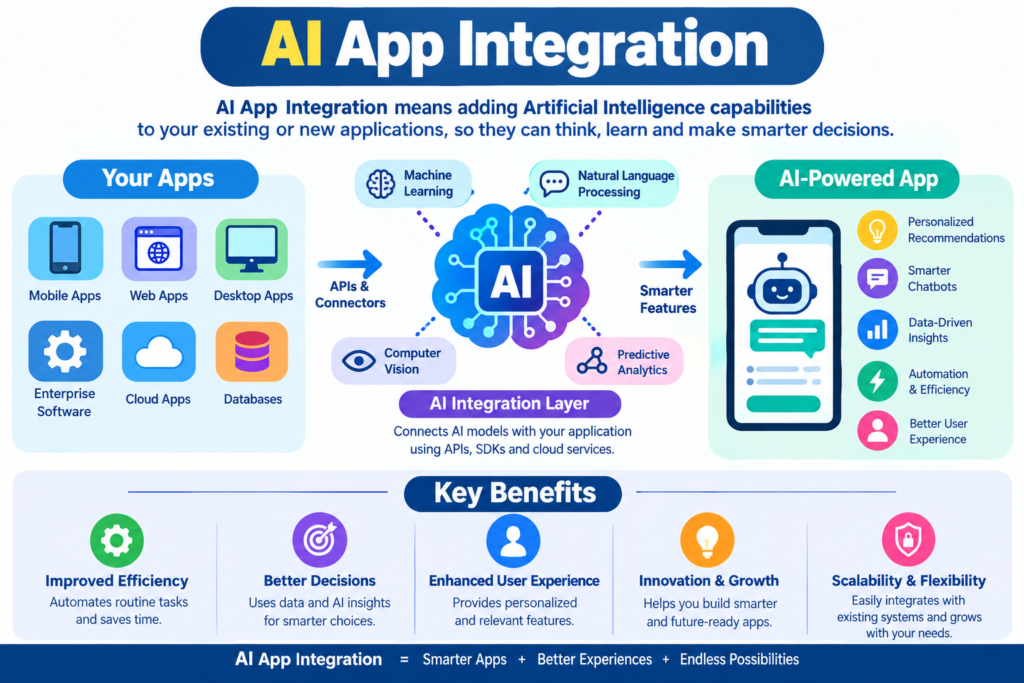
AI app integration is changing how people use software. Instead of opening several apps and moving information between them by hand, you can connect AI tools to apps and let them work together.
For example, an AI system can read a new Gmail message, summarize it, save the summary in Google Sheets, and send a notification in Slack. A student can connect AI tools to Google Docs for research and writing. A business can connect AI to a CRM and automate lead classification.
This is the basic idea behind AI app integration, AI automation, and AI workflow automation.
You don’t always need programming skills, either. No-code platforms, app connectors, webhooks, and ready-made integrations make it possible for beginners to build useful automated workflows.
This guide explains how to integrate AI with apps, how APIs work, how to connect LLMs and AI agents to software, and how to build practical AI-powered workflows.
What Is AI Integration?
AI integration means connecting an artificial intelligence system with another application so the two systems can exchange information and perform tasks together.
In simple terms:
App → AI → Decision → Action
For example:
- A customer submits a form.
- The data goes to an AI tool.
- AI reads and classifies the request.
- The result goes to a spreadsheet or CRM.
- The team receives a notification.
This is an example of AI application integration.
Traditional software integration connects two applications. AI integration adds an intelligent layer that can understand text, classify information, summarize documents, generate content, extract data, or make recommendations.
Simple AI Integration Example
Imagine you receive 100 customer emails every day. Without integration, someone must read each email and decide whether it is:
- A sales enquiry
- A support request
- A complaint
- A refund request
- General information
With AI integration, an automated workflow can read the message, classify it, and send it to the correct system.
That saves time and reduces repetitive work.
How Does AI Integration Work?
Most AI integrations use a combination of applications, APIs, authentication, triggers, actions, and data transfer.
A simple workflow looks like this:
Trigger → Data → AI Processing → Decision → Action
For example:
New Gmail email → AI reads email → AI creates summary → Save to Google Sheets → Send Slack alert
The first step is usually a workflow trigger.
A trigger tells the automation system when something should happen.
Common triggers include:
- A new email
- A new spreadsheet row
- A new form submission
- A new customer
- A new document
- A scheduled time
- A webhook request
- A new order
The AI then processes the information.
Finally, an action takes place.
Trigger and Action Example
| Trigger | AI Task | Action |
| New Gmail email | Summarize email | Save summary |
| New lead | Score lead | Update CRM |
| New document | Extract key points | Create report |
| New support ticket | Classify issue | Assign team |
| New product review | Analyze sentiment | Update dashboard |
This structure makes AI workflow automation easier to understand, even for beginners.
AI Integration vs. AI Automation
The terms AI integration and AI automation are related, but they’re not exactly the same.
AI integration focuses on connecting AI with another application.
AI automation focuses on using that connection to perform tasks automatically.
For example, connecting an AI model to Gmail is an integration.
Automatically reading new emails, summarizing them, and saving the summaries is automation.
You can think of it this way:
Integration creates the connection. Automation uses the connection to complete work.
When several connected tasks work together, you have an AI automation workflow.
Why This Difference Matters
A business might integrate AI with its CRM but still require employees to manually start every task.
A more advanced setup can automatically:
- Read new leads
- Analyze them
- Score them
- Update the CRM
- Notify sales staff
- Create follow-up tasks
That’s AI-powered automation.
Why Is AI App Integration Important?
Modern users often work with many cloud applications.
A typical business might use:
- Gmail
- Google Drive
- Google Sheets
- Slack
- Microsoft Teams
- Notion
- Trello
- CRM software
- Accounting software
- Customer support software
The problem isn’t usually a lack of software.
The problem is that these applications often work separately.
AI app integration helps connect them.
Major Benefits
1. Saves Time
AI can handle repetitive tasks that previously required manual work.
2. Reduces Manual Errors
Automated data transfer can reduce mistakes caused by copying and pasting.
3. Improves Productivity
Employees can spend more time on important work instead of repetitive administration.
4. Speeds Up Decisions
AI can process information quickly and provide structured results.
5. Connects Existing Software
Companies don’t always need to replace their current applications.
They can integrate AI with existing software.
6. Supports Scalability
An automated workflow can often handle more tasks without requiring the same increase in manual effort.
How to Connect AI Tools to Apps: A Beginner’s Guide
If you’re new to AI integration, don’t try to build a complicated system immediately.
Start with one simple workflow.
Step 1: Choose the Task
First, identify one repetitive task.
For example:
“Every time I receive a new customer email, I want AI to summarize it.”
That’s a clear automation goal.
Step 2: Select the Apps
Choose the applications involved.
For example:
- Gmail
- AI model
- Google Sheets
Step 3: Choose an Integration Method
You can use:
- A native integration
- A no-code automation platform
- An API
- A webhook
- Custom software
Beginners should usually start with a ready-made connector or no-code automation.
Step 4: Connect Your Accounts
Most platforms use authentication methods such as OAuth.
You’ll normally authorize the automation platform to access the required application.
Step 5: Create the Trigger
Choose the event that starts the workflow.
For example:
When a new Gmail message arrives
Step 6: Add the AI Step
Send the required information to your AI system.
For example:
“Summarize this email in three bullet points.”
Step 7: Create an Action
Tell the workflow what to do with the AI output.
For example:
Add the summary to Google Sheets.
Step 8: Test the Workflow
Always test your workflow before using it with real business data.
Check:
- Input data
- AI response
- Formatting
- Output
- Error handling
Step 9: Monitor Results
An automation isn’t truly finished when you turn it on.
Review it regularly to make sure it continues working correctly.
No-Code AI Integration: Connect Apps Without Coding
One of the biggest advantages of modern automation platforms is no-code AI automation.
No-code platforms provide visual interfaces where users can connect applications without writing traditional programming code.
A typical interface may look like:
Gmail → AI → Google Sheets
You select each application and configure the steps.
This makes AI automation for beginners much easier.
What Can No-Code Platforms Do?
Depending on the platform, you can create workflows for:
- Email processing
- Content generation
- Lead management
- Customer support
- Data entry
- Social media workflows
- Document processing
- Notifications
- Reporting
- Task management
Example of No-Code AI Automation
Imagine a marketing team receives a new lead through a form.
The workflow could be:
Form submission → AI analyzes lead → CRM updated → Sales team notified
No traditional programming is required.
This is useful for freelancers, small businesses, marketers, students, and teams that want to experiment with automation quickly.
AI Integration Using APIs
Developers often need more control than no-code platforms provide.
That’s where an API integration becomes useful.
API stands for Application Programming Interface.
An API provides a structured way for one software system to communicate with another.
For example, an application can send information to an AI model through an API and receive a response.
A simplified process looks like:
Application → API Request → AI Model → API Response → Application
What Is Required for an AI API Integration?
Depending on the service, you may need:
- API endpoint
- API key
- Authentication
- Request data
- JSON
- HTTP requests
- Response handling
- Error handling
Developers should also protect API keys and avoid exposing them in frontend code or public repositories.
REST API Integration
Many modern services provide REST APIs.
A REST API commonly uses HTTP methods such as:
- GET
- POST
- PUT
- PATCH
- DELETE
For example, an application may send a POST request containing customer information to an AI service.
The AI service processes the request and returns structured data. This is the foundation of many AI software integration projects.
LLM Integration and Generative AI Automation
Large language models, or LLMs, have expanded what software integration can do.
Traditional automation usually follows fixed rules.
For example:
If an order is received → send confirmation email.
An LLM-powered workflow can understand less structured information.
For example:
Read customer message → understand the issue → classify it → create a response → send it for approval.
This is called LLM integration or LLM app integration.
What Can LLMs Do Inside Applications?
An LLM can help with:
- Text classification
- Summarization
- Translation
- Content generation
- Data extraction
- Sentiment analysis
- Question answering
- Document analysis
- Email drafting
- Information transformation
This makes it possible to build LLM-powered applications instead of simple rule-based automations.
For developers, an LLM API can act as the intelligence layer inside an application.
AI Agent Integration
AI agents take this concept further.
An AI agent can receive a goal, use available tools, interact with applications, and complete multiple steps.
For example:
Customer enquiry → AI agent → Search information → Check CRM → Draft response → Update record
This is an example of an AI agent workflow.
As agent technology develops, connecting AI agents with apps will become increasingly important for business process automation.
How to Connect AI With Popular Apps
AI can be connected with many popular productivity and business applications.
The exact method depends on the application and its available integrations or API.
AI With Google Sheets
Google Sheets is useful for AI workflows because structured data can be processed easily.
Possible workflows include:
- Classifying rows
- Creating summaries
- Generating descriptions
- Cleaning text
- Categorizing leads
- Creating reports
For example:
New row → AI analyzes data → Result added to another column
This is a simple example of how to automate Google Sheets with AI.
AI With Gmail
You can connect AI with Gmail to automate tasks such as:
- Email summaries
- Email classification
- Draft generation
- Lead extraction
- Customer support routing
A workflow could be:
New Gmail message → AI summarizes → Save summary → Notify employee
AI With Google Drive
Google Drive can act as a document source. An AI workflow can process documents and create:
- Summaries
- Reports
- Extracted data
- Meeting notes
- Action items
AI With Slack
Slack can become the communication layer of an AI workflow.
For example:
New support ticket → AI analyzes issue → Slack notification
This allows teams to receive useful information without constantly checking another application.
AI With Notion
Notion can be connected with AI to automate:
- Content organization
- Database updates
- Summaries
- Task creation
- Research workflows
AI With Trello
Trello can work well for project automation.
For example:
New Trello card → AI analyzes task → AI creates checklist → Team receives notification
AI With Microsoft Excel and Teams
Businesses using Microsoft applications can build workflows around Excel and Teams.
For example:
New Excel record → AI analyzes data → Teams notification
This creates an AI-powered workflow without forcing employees to change their existing tools.
15 Practical AI Workflow Automation Ideas
You don’t need a huge enterprise project to learn AI integration.
Start with a small workflow.
Here are practical ideas:
- Gmail email summarizer
Send important emails to an AI model and generate short summaries. - AI lead classifier
Analyze new leads and assign categories. - AI spreadsheet cleaner
Standardize messy text in spreadsheet data. - Customer review analyzer
Detect positive, neutral, and negative reviews. - Content brief generator
Turn a topic into an SEO content brief. - Meeting summary workflow
Convert meeting notes into decisions and action items. - AI support ticket classifier
Automatically categorize customer problems. - AI social media workflow
Turn a long article into short social posts. - Document summarizer
Extract important information from uploaded documents. - AI task generator
Convert project descriptions into actionable tasks. - Lead enrichment workflow
Organize available customer information. - AI FAQ generator
Convert product information into frequently asked questions. - AI translation workflow
Translate approved business content into multiple languages. - AI reporting workflow
Turn raw business data into readable summaries. - AI notification workflow
Send important AI-generated alerts to Slack or Teams.
These examples can also become useful AI integration projects for students.
AI Integration for Students
Students can learn AI integration by building small projects.
You don’t need to create a complicated AI application for your first project.
Beginner AI Project Ideas
AI Study Assistant
Connect a document source with an AI model to generate summaries and questions.
AI Resume Analyzer
Build a workflow that analyzes a resume and creates suggestions.
AI Notes Summarizer
Send notes to an LLM and generate short revision points.
AI Email Assistant
Create a system that categorizes emails and suggests replies.
AI Spreadsheet Analyzer
Connect an AI model to spreadsheet data and generate basic insights.
AI Research Assistant
Create a workflow that organizes research notes and extracts important information.
These can become AI mini projects, AI API projects, or AI automation final year projects.
Students who learn API concepts, JSON, authentication, workflow design, and AI prompts will have a stronger foundation for more advanced AI application projects.
How to Build an AI-Powered Workflow
A good AI workflow should have a clear purpose.
Use this basic framework:
1. Define the Goal
Ask:
What task am I trying to improve?
2. Identify the Trigger
What starts the workflow?
3. Identify the Data
What information does AI need?
4. Choose the AI Model
Select a model suitable for the task.
5. Define the AI Instruction
Give the model clear instructions.
6. Validate the Output
Don’t assume every AI response will be correct.
7. Select the Final Action
Decide where the result should go.
8. Add Error Handling
Plan what happens when something goes wrong.
9. Monitor Performance
Track whether the workflow is actually saving time or improving results.
This approach turns a basic idea into a reliable AI automation workflow.
Webhooks and Third-Party Integrations
Webhooks are another important part of application integration.
A webhook lets one system send information to another system when a specific event happens.
For example:
New order → Webhook → Automation platform → AI → Notification
Unlike traditional polling, a webhook can send information when the event occurs.
Third-party integrations also use connectors to simplify communication between applications.
Common components include:
- App connectors
- APIs
- Webhooks
- OAuth
- API keys
- JSON
- HTTP requests
Together, these technologies form the technical foundation of modern software integration.
Security Considerations for AI Integration
AI automation can involve sensitive information, so security should be part of the design from the beginning.
Protect API Keys
Never publish API keys in public repositories.
Use Proper Authentication
Use secure authentication methods such as OAuth where supported.
Limit Access
Only give an integration the permissions it actually needs.
Protect Sensitive Data
Avoid sending confidential information to external AI systems unless the relevant policies and controls allow it.
Monitor Integrations
Check logs and workflow activity regularly.
Add Human Approval
For high-impact tasks, don’t let AI make important decisions without appropriate review.
For example, an AI system can draft a customer response, while a human approves it before sending.
This is often safer than completely autonomous automation.
Common AI Integration Mistakes to Avoid
AI integration can look simple, but poor workflow design can create problems.
Mistake 1: Automating Everything
Not every task needs AI.
Start with repetitive tasks where automation provides clear value.
Mistake 2: Using AI Without Validation
AI output should be checked when accuracy matters.
Mistake 3: Ignoring Data Quality
Poor input often produces poor output.
Mistake 4: Building Huge Workflows First
Start small. Build one successful workflow before adding more steps.
Mistake 5: Forgetting Error Handling
Applications can experience downtime, API limits, authentication failures, or unexpected data.
Your workflow should have a plan for these situations.
Mistake 6: Ignoring Costs
AI API usage and automation platforms can create costs as workflow volume grows.
Monitor usage before scaling.
Mistake 7: Exposing Sensitive Information
Always understand what information is being transferred between applications.
Best Practices for AI App Integration
A reliable AI integration follows a few simple principles.
Keep Workflows Simple
Use the minimum number of steps needed.
Use Structured Data
JSON and structured fields make data easier to process.
Give AI Clear Instructions
Specific prompts usually produce more predictable results.
Use Consistent Output Formats
If another application receives AI output, define the expected structure.
Test With Realistic Data
Don’t test only with perfect examples.
Use different inputs, including unusual cases.
Create Fallbacks
Have a backup action when an AI service or application fails.
Review Performance
Measure:
- Time saved
- Error rate
- Processing speed
- Cost
- Human approval rate
- Workflow completion rate
The goal isn’t simply to use AI.
The goal is to create a workflow that delivers measurable value.
What Is the Future of AI Integration?
AI integration is moving from simple automation toward intelligent software systems.
Earlier automation systems mostly followed predefined rules.
Modern AI systems can understand natural language, process unstructured information, use tools, and perform multiple steps.
The next stage is likely to involve more AI agents with apps.
Instead of saying:
“Run this exact sequence.”
Users may increasingly say:
“Find new leads, classify them, update the CRM, and prepare follow-up tasks.”
The AI agent can then coordinate multiple applications.
This doesn’t mean traditional automation will disappear.
Instead, AI and traditional automation will work together.
A future workflow may look like:
Event → AI agent → API calls → Business applications → Validation → Human approval → Final action
This combination of AI, APIs, application integration, and automation can create powerful digital systems.
use an AI API and connect it through backend code.
Start Small and Build Smarter AI Workflows
AI app integration makes it possible to connect the tools you already use and create smarter workflows. You don’t need to replace your entire software stack. In many cases, you can simply connect your existing applications with an AI service and automate repetitive tasks.
Beginners can start with no-code AI automation. Developers can use APIs, webhooks, and custom software integrations. Students can build small AI integration projects to develop practical skills.
The basic process is simple:
Choose a task → Select your apps → Connect AI → Build the workflow → Test it → Monitor the results.
Start with one useful workflow rather than trying to automate everything at once. Once you understand triggers, actions, APIs, authentication, app connectors, and AI processing, you can gradually build more advanced AI-powered workflows, LLM automations, and AI agent integrations.
”FAQs”
1. What is AI app integration?
AI app integration is the process of connecting an AI system with another application so information can move between them and tasks can be performed automatically.
For example, you can connect an AI tool with Gmail to summarize incoming emails.
2. How do AI tools connect to apps?
AI tools can connect to applications through native integrations, APIs, webhooks, connectors, or automation platforms. The best option depends on the applications involved and the level of control required.
3. Can I connect AI tools without coding?
Yes. No-code AI automation platforms allow beginners to connect applications through visual workflow builders. You can create workflows using triggers, actions, app connectors, and AI steps without writing traditional code.
4. How do I integrate AI with an existing application?
First, check whether the application provides an AI integration or API.
Then identify the required data, authentication method, AI service, trigger, and final action.
For custom applications, developers can use an AI API and connect it through backend code.
5. What is an API integration?
An API integration allows two software systems to communicate through defined API requests and responses.
For example, an application can send data to an AI API and receive generated or analyzed information in return.
6. How can students learn AI integration?
Students can start with simple projects such as an AI email classifier, study assistant, document summarizer, or spreadsheet analyzer.
Learning APIs, JSON, authentication, webhooks, and workflow automation provides a useful foundation.
7. What is an AI workflow?
An AI workflow is a sequence of connected steps where AI performs one or more tasks.
A basic example is:
New email → AI summary → Google Sheets → Slack notification
8. Can ChatGPT be connected to other applications?
Yes, AI models can be integrated into applications through supported integrations, APIs, automation platforms, and developer tools. The exact method depends on the application and the AI service.
For developers using OpenAI, the current API documentation is the best place to check supported capabilities and integration approaches. OpenAI API platform
9. What are the best AI automation tools for beginners?
Beginners should look for platforms that offer visual workflow builders, ready-made app connectors, templates, authentication support, and clear error reporting.
The best tool depends on the applications you want to connect and the complexity of your workflow.
10. Is AI integration difficult?
Basic AI integration can be relatively simple, especially with no-code platforms.
Advanced integrations involving APIs, custom applications, authentication, databases, and AI agents require more technical knowledge.
11. What is LLM integration?
LLM integration means connecting a large language model to an application so the application can use capabilities such as text generation, summarization, classification, reasoning, or information extraction.
12. What is AI agent integration?
AI agent integration connects an AI agent to software tools and applications so the agent can perform multiple actions.
For example, an agent might analyze a request, retrieve information, update a CRM, and create a task.