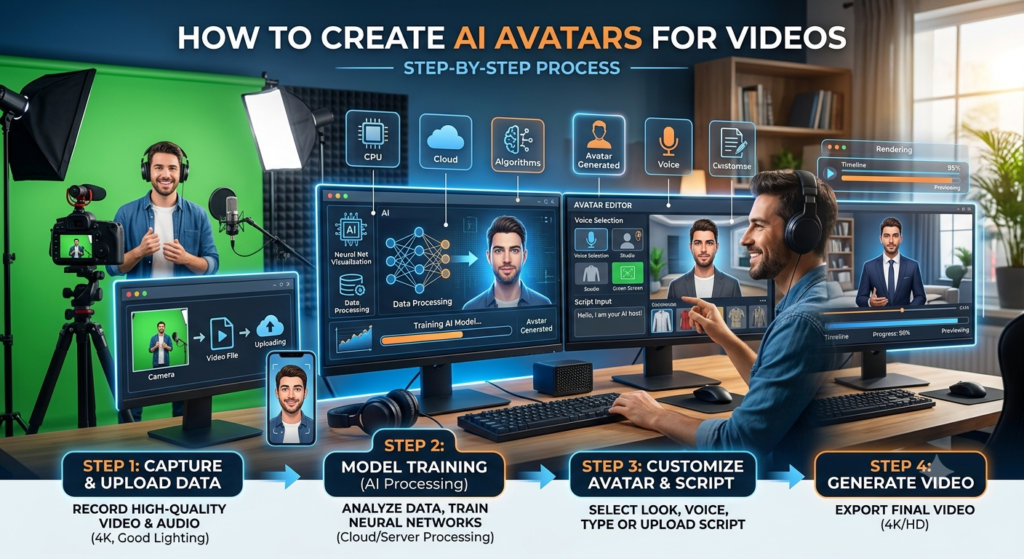
How to Create AI Avatars for Videos: A Beginner’s Guide
Have you ever wanted to make a video without standing in front of a camera? Now you can. Artificial intelligence makes it easier to create videos with digital people who speak, move, and present your message.
Learning how to create AI avatars for videos can help you save time, reduce production costs, and make content for many platforms. You don’t need an expensive camera, a studio, or advanced editing skills. With the right AI avatar software, you can turn a written script into a video with a talking digital presenter.
AI avatar video creation is useful for teachers, business owners, marketers, content creators, and online trainers. You can use it to explain a lesson, introduce a product, share company news, or create a YouTube video.
However, choosing a tool is only one part of the process. You also need a clear script, a suitable avatar, a natural voice, and good editing.
This guide explains how to create AI avatar videos step by step. You’ll learn how these tools work, which features to compare, how to control costs, and how to make your videos look more professional.
1. What Are AI Video Avatars?
AI video avatars are digital characters that appear in videos and communicate through speech, facial expressions, and movement. They may look like real people or animated characters. Some tools provide ready-made presenters, while others let users create personalized digital versions of themselves.
These avatars use artificial intelligence to turn text or audio into a video performance. Depending on the software, the system may combine text-to-speech technology, facial animation, lip-sync technology, and video generation.
For example, imagine that you want to explain a science topic to students. You write a script, select a digital presenter, choose a voice, and generate the video. The avatar speaks your words without requiring you to record yourself on camera.
That’s the basic idea behind AI avatar video creation.
How Does AI Avatar Technology Work?
Most AI avatar tools follow a simple process.
- Input: You provide a written script, an audio recording, or another supported source.
- Avatar selection: You choose a virtual presenter or upload an eligible image or recording.
- Voice generation: The tool creates speech from text or uses an uploaded audio track.
- Facial animation: The system generates mouth movements and expressions that match the speech.
- Video generation: The software combines the presenter, voice, background, and other visual elements.
- Editing and export: You review the result, make changes, and download or publish the finished video.
Not every platform supports all these options. Some focus on business presentations, while others specialize in animated characters or photo-based talking avatars.
Types of AI Avatars
- Realistic AI avatars : These digital presenters look similar to real people. They work well for business training, product demonstrations, news-style videos, and professional presentations.
- Animated avatars : These characters use cartoon, illustration, or 3D styles. They’re useful for children’s learning content, storytelling, and entertainment.
- Personalized AI avatars : These avatars represent a specific creator or an approved digital character. Depending on the service, creation may require photos, video footage, voice samples, or identity verification.
Where Are AI Avatars Used?
AI avatars can support many types of content:
- YouTube explainers and educational videos
- Online courses and training lessons
- Business presentations and internal communication
- Product demonstrations and marketing videos
- Social media reels and short videos
- Customer onboarding and support tutorials
- Multilingual learning materials
The main advantage is flexibility. A single well-prepared script can become the starting point for several video versions, provided the tool and its licence support the intended use.
2. Why Create AI Avatar Videos?
AI avatars can make video production easier, especially when you need to publish content regularly. However, they aren’t automatically better than traditional video. Their value depends on your audience, topic, budget, and production goals.
Save Time on Video Production
Traditional video production often requires a camera, suitable lighting, a microphone, a recording space, and several takes. Editing may take even longer.
AI avatar software can reduce many of these steps. You can prepare a script, select a presenter, generate the video, and make corrections without recording every scene again.
This can be particularly useful for content creators who publish several videos each week.
Reduce Production Costs
You may not need to hire a presenter or rent a studio for every video. Many AI video generators offer templates, built-in voices, and editing features.
Still, free and paid plans differ. Some restrict video length, resolution, downloads, avatar selection, or commercial use. Check the current pricing and licence before choosing a service.
Create Content Without Showing Your Face
One of the most common reasons to use AI avatars is privacy. You can create a talking presenter without appearing on camera yourself.
This approach can work for educational channels, software tutorials, career advice, and business explainers.
However, a faceless video still needs original ideas and useful information. An avatar can’t replace research, clear explanations, or genuine expertise.
Reach More Viewers Through Multiple Languages
Some AI avatar platforms offer voices in several languages. Certain services also support translation and lip-sync adjustments.
For example, you might create an English training video and prepare Hindi or Spanish versions for different audiences. Review each translated script before publishing because automated translation can miss context, technical terms, or cultural meaning.
Maintain Consistent Branding
An AI virtual presenter can help create a consistent look across your videos. You can use the same presenter, colours, background, introduction, and closing message.
Consistency is useful for brands, online educators, and creators who want viewers to recognize their content.
Nevertheless, consistency shouldn’t make every video feel identical. Change the examples, visuals, pacing, and presentation style to suit each topic.
3. How to Create AI Avatars for Videos Step by Step
If you’re wondering how do I create an AI avatar for videos, start with a simple project. You don’t need to learn every feature at once. Follow these seven steps to build your first video.
Step 1: Decide What Your Video Should Do
Before opening an AI video maker, define your goal.
Ask yourself three questions:
- Who will watch the video?
- What should viewers learn or do?
- Where will you publish the video?
For example, a YouTube video explaining career options after Class 12 may need a friendly educational presenter. A company introduction may need a formal virtual presenter.
Your goal will guide the script, avatar, voice, and visual style.
Step 2: Write a Clear Video Script
A good script is the foundation of a good AI avatar video.
Use short sentences and simple words. Write as if you’re speaking to one person. Avoid long paragraphs, complex phrases, and unnecessary repetition.
Here’s a basic example:
Topic: Benefits of learning digital marketing
Opening: “Do you want to learn a skill that businesses need? Digital marketing can help you understand how companies attract customers online.”
Main section: Explain three benefits with practical examples.
Closing: “Start by learning SEO, social media marketing, and analytics. Then practise these skills with a small project.”
Read the script aloud before generating the video. This helps you find awkward sentences and unnatural wording.
For a beginner, a short script of around 100–200 words is a manageable starting point. You can create longer videos after learning how the software handles pauses, pronunciation, and scene changes.
Step 3: Choose an AI Avatar Generator
The next step is to select an AI avatar video maker.
Look for these features:
- Ready-made presenters or custom avatar creation
- Natural-sounding voices
- Accurate lip-sync technology
- Support for your preferred language
- Background and scene editing
- Subtitles and branding options
- Suitable export quality
- Clear commercial-use terms
Don’t select a platform based on appearance alone. Generate a short test video before paying for a subscription.
Step 4: Select or Create Your Avatar
Most tools provide a library of virtual presenters. You can often choose their appearance, clothing, background, and presentation style.
For a professional video, select an avatar that matches your subject. A formal presenter may suit corporate training, while a friendly animated character may be better for younger students.
If you want a personalized AI avatar, check whether the platform supports custom creation. Some services require you to record yourself following specific instructions. Others can animate an uploaded photo or use an existing digital character.
Only upload images and recordings you own or have permission to use. Don’t create a digital copy of another person without appropriate consent.
Step 5: Add a Voice and Generate the Video
Now turn your script into speech.
You may be able to choose a built-in AI voice, upload a recorded voice track, or use a supported voice-cloning feature.
Listen to a sample before generating the complete video. Pay attention to pronunciation, speed, tone, and pauses.
If the avatar speaks too quickly, add punctuation or divide the script into shorter sections. Spell out difficult abbreviations when needed. For technical subjects, check how the tool pronounces specialist terms.
When everything sounds right, generate a short preview.
Step 6: Edit the Video
AI-generated footage often needs a little editing.
Review the video for:
- Incorrect pronunciation
- Unnatural mouth movements
- Strange facial expressions
- Long pauses
- Poor scene transitions
- Missing subtitles
- Incorrect on-screen text
Add relevant images, screen recordings, diagrams, or demonstrations when they help explain the topic.
For example, an avatar discussing website SEO could appear alongside a keyword research example. This makes the video more useful than a talking head alone.
Step 7: Export and Publish
Before publishing, watch the entire video from beginning to end.
Check the audio level, spelling, captions, image quality, and aspect ratio. Use a horizontal layout for most standard YouTube videos and a vertical layout for platforms that favour short-form video.
Choose a clear title and thumbnail. Add a useful description and relevant links.
Finally, review viewer retention, comments, clicks, and other available analytics. Use that information to improve your next video.
4. Best AI Avatar Creation Tools to Consider
The best AI avatar video generator depends on your needs. Some tools are built for realistic business presenters, while others focus on creative videos or animated characters.
Here are several established options to investigate. Features, pricing, and plan limits can change, so check the official websites before deciding.
Synthesia
Suitable for business training, presentations, and corporate learning. Investigate its presenter library, supported languages, and team features.
Official website: synthesia.io
HeyGen
Worth exploring for personalized avatars, AI-generated presenter videos, and multilingual video workflows.
Official website: heygen.com
D-ID
Explore this option if your project involves talking portraits, digital humans, or animation from supported images and audio.
Official website: d-id.com
VEED
Consider it when you want to combine video editing, subtitles, and AI-powered production features in one workflow.
Official website: veed.io
How to Compare AI Avatar Video Creation Tools
Use the following table to compare the features that matter most.
|
Feature |
What to Check |
|
Avatar quality |
Does the presenter look natural? |
|
Voice quality |
Is speech clear and easy to understand? |
|
Lip-sync |
Do mouth movements match the words? |
|
Languages |
Does it support your target audience? |
|
Editing |
Can you add images, captions, and scenes? |
|
Pricing |
Are there limits on minutes or exports? |
|
Privacy |
How are uploaded photos and recordings handled? |
|
Commercial use |
Does your plan permit business or monetized videos? |
There isn’t one universal winner. Test the same short script in two or three tools and compare the results. This is a better way to choose than relying on a promotional demo.
5. How to Make Realistic Talking AI Avatar Videos
A realistic avatar needs more than a convincing face. The voice, timing, expressions, gestures, and background all affect the final result.
Choose a Natural AI Voice
Text-to-speech technology converts written text into spoken audio. Modern AI voice generators can offer different accents, tones, and speaking styles.
Choose a voice that fits your audience. A calm voice may work well for education, while a more energetic voice may suit a product introduction.
Avoid setting the speaking speed too high. Viewers need enough time to understand the information.
Improve Lip-Sync and Facial Animation
Lip-sync technology matches mouth movements to speech. Facial animation may also generate blinking, head movement, and expressions.
However, results vary across tools. Watch for delayed mouth movements, stiff expressions, or unusual facial motion.
To improve the result, use clean audio, a supported voice, and short script sections. If the tool allows separate audio uploads, make sure the recording has minimal background noise.
Use Appropriate Gestures
Avatar gestures should support the message rather than distract viewers.
A small head movement or natural hand gesture may make a presentation feel more engaging. Repeated gestures, exaggerated movements, or a constantly smiling face can make it feel artificial.
Choose a tool that offers suitable control over gestures and expressions when these features matter to your project.
Make the Background Useful
A plain background can work well for simple explanations. More complex videos may benefit from diagrams, product images, screenshots, or short clips.
For example, an online course video about spreadsheets could show the relevant spreadsheet beside the avatar. A marketing video could display product features as the presenter explains them.
The goal is to help viewers understand the subject, not to fill every second with decoration.
6. How to Create AI Avatar Videos from Text Scripts
One of the most useful features of AI avatar software is its ability to convert a script into a presentation.
This process is often called script-to-video production. Depending on the platform, it may combine text-to-speech, virtual presenters, automatic scene creation, subtitles, and background visuals.
Here’s a simple workflow.
- Write an original script with a clear beginning, middle, and end.
- Divide it into sections based on the main ideas.
- Match each section with an avatar or suitable visual.
- Choose a voice and language.
- Generate a preview for each section.
- Correct errors and adjust timing.
- Combine the scenes and export the video.
Example: Turn a Written Script into a Video
Suppose you’re creating a two-minute video about the benefits of learning SEO.
|
Scene |
Content |
Visual |
|
1 |
Introduce SEO |
Avatar greeting viewers |
|
2 |
Explain keyword research |
Keyword research screenshot |
|
3 |
Discuss on-page SEO |
Example webpage |
|
4 |
Explain performance tracking |
Analytics chart |
|
5 |
Summarize the lesson |
Avatar with key takeaways |
This structure gives viewers variety and helps them follow the explanation.
Can You Generate AI Avatar Videos Without Editing Skills?
Yes, many AI avatar tools are designed for beginners. Templates and automated scene generation can reduce the need for advanced editing. Still, basic editing knowledge is helpful. You’ll get better results if you know how to trim pauses, add captions, adjust audio, and place visuals.
Start with a short video rather than a long production. Once you understand the workflow, reuse your best templates for future videos.
7. How to Create AI Avatars for YouTube Videos
AI avatars can help YouTube creators publish tutorials, explainers, educational videos, and product reviews without appearing on camera.
However, an avatar alone won’t make a channel successful. Your content must answer real questions, provide useful information, and give viewers a reason to keep watching.
Choose a Suitable YouTube Format
Consider these formats for your channel:
- Educational videos: Explain school subjects, career options, and technical concepts.
- How-to tutorials: Show viewers how to complete a task using software or online tools.
- Product explainers: Describe product features and demonstrate how they work.
- List videos: Present useful tips, mistakes, or recommendations.
- News explainers: Discuss developments after checking reliable sources.
Select one primary format first. This helps you develop a consistent production process.
Create a Strong Opening
The first few seconds should tell viewers what they’ll gain from watching.
Instead of starting with a long introduction, ask a relevant question or state the problem directly.
For example:
“Want to create professional videos without recording yourself? In this guide, you’ll learn how to turn a simple script into an AI avatar video.”
This opening gives viewers a clear reason to continue.
Combine Avatars with Original Visuals
Avoid showing the same talking avatar throughout a long video if the topic requires demonstrations.
Use screen recordings, original graphics, examples, and supporting footage where appropriate. These elements can make the content more useful and engaging.
For YouTube monetization, remember that AI-generated content isn’t automatically disqualified, but mass-produced, repetitive, or low-value content may not meet YouTube’s monetization requirements. Review the latest YouTube monetization policies and disclose realistic synthetic content when required by its rules.
8. How to Create AI Avatars for Educational Videos and Online Courses
AI avatars can help teachers, trainers, and educational businesses prepare learning materials more efficiently.
For example, an instructor could use an AI virtual presenter to introduce a chapter, explain key terms, or summarize a lesson. The same script could support a presentation, a short revision video, and an online course.
Make Lessons Easy to Understand
Start each lesson with a learning objective. Explain one main idea at a time and use examples that students can understand.
For complicated topics, combine the avatar with diagrams, demonstrations, and simple on-screen text.
Keep the presenter focused on explaining the lesson rather than reading large blocks of text from a slide.
Create Multilingual Learning Content
If your audience speaks different languages, AI translation and voice generation may help you produce alternative versions of a lesson.
For example, you could prepare an English lesson and then create a Hindi version. Review the translated script carefully, especially when it includes scientific terms, exam instructions, or technical definitions.
Protect Educational Quality
AI avatars should support good teaching rather than replace subject expertise.
Check every fact before publication. Avoid invented examples that might confuse learners, and ensure that diagrams and subtitles match the spoken explanation.
If students depend on your content for exams, accuracy matters more than production speed.
9. How to Use AI Avatars for Business and Marketing
Businesses can use AI spokesperson videos to introduce products, explain services, train employees, and guide customers through common tasks.
For example, an online store might create a short video explaining how to place an order. A software company could use an avatar to introduce a new feature.
Personalize Your Marketing Videos
A personalized AI avatar can help maintain a recognizable brand identity.
Use consistent colours, approved logos, clear language, and a suitable presenter. Keep each video focused on one customer problem or product benefit.
Don’t make unsupported claims about product performance. The script should accurately reflect what the business offers.
Produce Multiple Versions Efficiently
You may be able to adapt one approved script for different audiences, languages, or platforms.
For instance, a longer product explanation could become a short social media video and a customer onboarding tutorial. Each version should be edited for its audience instead of simply being shortened without review.
Use AI Responsibly
If a video uses a real person’s likeness or cloned voice, obtain the necessary permission. Never present an invented endorsement as a real customer’s statement.
Businesses should also review the platform’s privacy terms and determine whether uploaded material may be stored or reused.
10. Can You Create AI Avatar Videos for Free?
Yes, you can often begin with free tools, trials, or limited free plans. However, the available features depend on the service and may change over time.
A free plan may limit video length, monthly credits, available avatars, resolution, downloads, or commercial usage.
How to Choose a Free AI Avatar Video Generator
Before signing up, check the following:
- Does the free plan allow you to generate an actual talking-avatar video?
- Can you download the result?
- Is there a watermark?
- How many video minutes or credits are included?
- Are commercial and monetized uses allowed?
- Do you need to provide payment information?
- What happens to your uploaded images and voice recordings?
Don’t assume that a free trial allows unlimited use or commercial publication.
A Low-Cost Workflow for Beginners
You can start with a simple process:
- Write your own script using a document editor.
- Test an avatar tool using a short sample.
- Use a built-in voice if it meets your needs.
- Add captions and relevant visuals.
- Edit only the sections that need improvement.
- Upgrade only when you know which paid features you need.
This approach helps you test AI avatar video creation without committing to a costly subscription.
11. Common AI Avatar Video Creation Mistakes to Avoid
Even good AI avatar software can produce weak videos when the workflow isn’t planned carefully.
Using Long, Complicated Scripts
Long sentences can sound unnatural when converted to speech. Break complex ideas into smaller sentences and use clear transitions.
Ignoring Voice Quality
A realistic avatar with a poor voice track can still feel artificial. Check pronunciation, pauses, tone, and audio clarity before exporting.
Choosing the Wrong Presenter
The avatar should suit the topic and audience. A formal presenter may work for a business tutorial, while a cartoon character may be more suitable for a children’s lesson.
Publishing Without Reviewing
Always watch the complete video. Check for factual errors, visual glitches, incorrect subtitles, and mismatched mouth movements.
Making Every Video Look the Same
Templates save time, but repetitive videos can become boring. Vary the examples, visual structure, and presentation style.
Ignoring Copyright and Consent
Use licensed music, permitted images, and authorized recordings. Check whether your avatar and voice license allows the planned use.
Expecting AI to Guarantee Results
AI can simplify production, but it can’t guarantee views, sales, search rankings, or audience engagement.
Measure performance and improve your content based on real feedback.
Start Creating AI Avatar Videos Today
Learning how to create AI avatars for videos is easier when you follow a simple workflow. Start with a clear topic, write a useful script, choose a suitable avatar, generate natural speech, and review the final video carefully. You don’t need expensive equipment or advanced editing skills to begin. A short test video can teach you how the software works and help you identify the features you actually need.
For YouTube creators, educators, marketers, and businesses, AI avatar video creation can save production time and support content in different formats and languages. The key is to use AI as a production tool, not a replacement for original ideas, accuracy, or human judgment. Focus on helping your audience, test different approaches, and improve each video based on feedback.
Start with one short video today. Once you’re comfortable with the process, you can build a repeatable workflow for creating more useful and engaging AI avatar videos. Article complete. The requested post-article message wasn’t included after the final colon in your prompt, so I haven’t invented one.
Know More:
”FAQs”
1. How do I create an AI avatar for videos?
Choose an AI avatar video maker, write a script, select a presenter, add a voice, generate the video, and review the result. Then add captions or supporting visuals and export it in the format you need.
2. What tools can create AI avatar videos?
Platforms such as Synthesia, HeyGen, and D-ID offer AI avatar-related video creation features. VEED is another option to investigate if you need AI features alongside video editing. Compare their current features and pricing before choosing.
3. Can I create AI avatar videos for free?
Yes. Some services offer free plans or trials. These may have restrictions on video length, credits, watermarks, resolution, and commercial use. Check the current terms before publishing your videos.
4. How can I create AI avatar videos from text?
Write your script and upload or paste it into a supported AI avatar tool. Select the presenter and voice, generate the speech and animation, and edit the resulting scenes. Some platforms can also suggest visuals or create subtitles automatically.
5. How do I create an AI avatar with my own voice?
Choose a service that supports voice recording or voice cloning. Follow its recording instructions and complete any required consent or identity checks. Connect the approved voice to your avatar and test a short script before generating a full video.
6. How can I create AI avatar videos without showing my face?
Select a stock avatar or an animated character provided by a suitable tool. Enter your script, choose a voice, and generate the video. You don't need to appear on camera when using a ready-made avatar.
7. How do I make realistic talking AI avatar videos?
Choose a high-quality avatar, use natural speech, and check lip-sync accuracy. Short sentences, suitable pauses, clean audio, and relevant visuals can improve the result. Review the final video for unnatural expressions or movements.
8. Which is the best AI avatar video generator for beginners?
There isn't one best option for everyone. Synthesia may suit structured presentations, HeyGen may be worth exploring for personalized avatars, and D-ID may fit talking-portrait projects. Test each relevant option against your budget and requirements.
9. Can I use AI avatar videos for YouTube monetization?
Potentially, yes. AI-generated videos must still comply with YouTube's monetization and other applicable policies. Original, useful content is important, and realistic synthetic content may require disclosure. Avoid relying on repetitive, mass-produced videos without meaningful value.
10. How do I create AI avatar videos for educational content?
Prepare a lesson script with clear learning objectives, select a suitable presenter, and generate the narration. Add diagrams, examples, and captions to support understanding. Review all educational facts before publishing.
11. Can I generate multilingual AI avatar videos?
Yes, some platforms support multiple languages, translated scripts, and localized voices. The available languages and lip-sync features vary. Have a fluent speaker review important translations before publication.
12. Do AI avatar videos require advanced editing skills?
No. Many AI avatar creation tools offer templates and automated production features. Basic editing skills are still useful for correcting timing, improving sound, adding subtitles, and making the final video more engaging.