
ElevenLabs AI Tutorial: Introduction
A good voiceover can make an ordinary explanation feel personal, memorable and easy to follow. Yet recording every revision of a tutorial, advertisement or training lesson can consume considerable production time. Text-to-speech technology offers another approach: prepare a script, generate a spoken version, listen to the result and refine it before publishing. ElevenLabs is one platform that supports this process. It is particularly useful when teams need to update narration frequently or create versions for different audiences without recording each version from scratch.
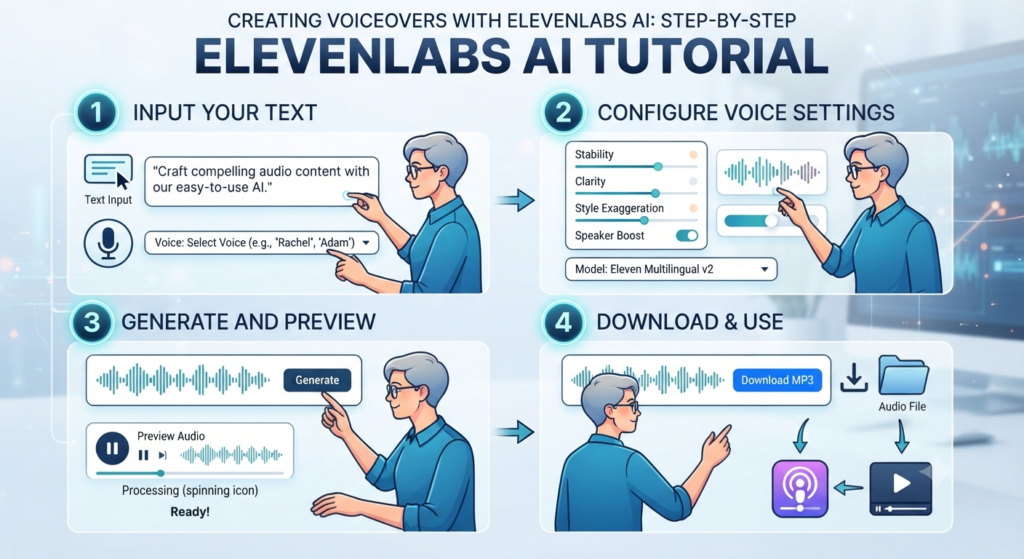
This ElevenLabs AI tutorial explains how to move from a blank script to an edited audio asset. It is designed for beginners, video creators, educators and marketing professionals who want practical control over the result. Rather than assuming that every generated voice will sound convincing, the guide focuses on listening tests, pronunciation, editorial accuracy and the relationship between the narration and the visuals. The examples are original sample scripts; they are not claims about real products or demonstrations of audio that has already been generated.
Know More: How AI Helps Developers Refactor and Optimize Existing Code: 10 Powerful Ways to Boost Code Quality
What is ElevenLabs AI?
ElevenLabs provides speech generation and voice tools through a web interface and developer services. Text-to-speech, often abbreviated to TTS, converts written language into spoken audio. A creator can select a synthetic or appropriately licensed voice and use it to narrate a script. Voice design and voice cloning are separate options for developing a more distinctive voice identity. The platform also supports different speech models, so a user can choose between priorities such as expressive delivery, consistency and response speed. See official references 1–3 for the product overview.
Unlike a conventional recording session, a TTS workflow allows the spoken wording to be changed directly in the script. This is useful when an instructor discovers an error after recording a lesson or a marketing team needs to replace a campaign date. However, a generated performance still needs direction. A technically clear voice may be a poor fit for an emotional story, while an expressive character voice may distract listeners during a safety briefing.
Choose the right workflow
|
Workflow |
Best fit |
Review priority |
|---|---|---|
|
Text-to-speech |
Narration from a finished script |
Accuracy, cadence, pronunciation |
|
Voice Design |
Original fictional or brand voices |
Distinctiveness and consistency |
|
Voice cloning |
Authorised replication of a voice |
Consent, licensing and fidelity |
|
Human recording |
Personal testimony or nuanced performance |
Authenticity and performance direction |
ElevenLabs AI Tutorial: step-by-step
1. Define the audience and outcome
Before opening the generator, decide where the recording will appear. A sixty-second explainer needs a different rhythm from an audiobook chapter. Write down the listener, language, intended duration and purpose. For instance, a beginner technology video might target viewers who have never encountered the subject and use a calm, friendly delivery. A clear production brief helps you reject unsuitable voices early instead of spending time adjusting a poor match.
2. Create an account and find text-to-speech
Open elevenlabs.io and follow its sign-in or registration process. Locate the text-to-speech workspace in the available creation tools. Review the account allowance and permitted use before generating audio, particularly if the project is a paid advertisement or monetised video. Interface labels and available controls can change. Keep the script open in a separate editable document so changes are not lost when switching between projects.
3. Prepare a spoken script
Rewrite text for the ear rather than copying a blog post word for word. Shorter sentences, explicit transitions and concrete examples make a lesson easier to understand. Read the script aloud once. Replace difficult abbreviations with words or letter-by-letter spellings where appropriate. Remove navigation labels, citations that are not meant to be spoken and instructions intended for the video editor. Save the approved version before starting the audio generation process.
4. Audition voices
Select a small group of candidate voices and listen to them using the same excerpt. Consider the accent, apparent energy, clarity and suitability for the audience. A voice that sounds attractive in a short library demonstration may be tiring during several minutes of instruction. Test a question, a statement and a sentence containing a technical term. Record your observations rather than choosing solely on the basis of the voice description.
5. Select a speech model
Choose a model that suits the project and is available in your account. The expressive Eleven v4 and v3 families, Multilingual v2 and faster variants are documented options. A finished narration and an interactive application have different latency requirements. Avoid switching models midway through a continuous recording unless you are willing to audition the transition. Feature support varies, so consult the model-specific guide before using advanced markup.
6. Adjust voice settings carefully
Start with the model defaults and change one setting at a time. A more consistent delivery can suit procedural instructions; a more varied performance can work well for storytelling. Where available, similarity affects resemblance to the reference voice, while other controls depend on the model. Do not assume that a particular numerical setting produces the same sound with every voice. Save the settings that work for your selected sample.
7. Generate a short test
Paste a representative excerpt into the speech workspace and generate audio. Listen to the complete recording, preferably on headphones and a phone speaker. Check whether pauses occur at meaningful boundaries and whether important terms are spoken correctly. If a phrase sounds awkward, try rewriting it before changing multiple controls. Keep a good take even if you intend to try another version, because successive generations can differ.
8. Assemble longer narration
Divide a lengthy script at natural topic or scene boundaries. Give each section an identifier, such as lesson-01-introduction or lesson-02-example. Use a consistent voice and review the beginning and end of neighbouring segments together. This makes corrections less costly because a revised explanation does not require replacing the entire recording. Avoid cutting in the middle of a phrase merely to match a fixed character count.
9. Export and edit the audio
Download the selected takes in a format suitable for your editing workflow. MP3 is convenient for distribution, while a higher-quality editing format may be preferable when available. Import the files into a video or audio editor, align them with the visuals and remove unwanted gaps. Keep background music below the narration and avoid abrupt changes in volume. Save a clean voice-only master separately from the mixed version.
10. Perform the publishing review
Listen to the final export from start to finish while following the approved script. Confirm names, numbers, claims, timings and the call to action. Check that subtitles match the spoken words. Record the voice licence and any consent documentation, and apply relevant synthetic-media disclosures. Publish only after reviewing both the message and the soundtrack; a polished delivery cannot compensate for inaccurate information.
Speech model comparison
|
Model family |
Typical selection rationale |
|---|---|
|
Eleven v4 / v3 |
Expressive narration or character performance |
|
Multilingual v2 |
Consistent narration across longer passages |
|
Eleven v4 Turbo / Flash |
Interactive projects where responsiveness matters |
These are selection guidelines, not independent performance benchmarks. Test the actual model and voice combination with your own script. Official references 1 and 2 describe model capabilities and settings.
Practical scripts and prompts
YouTube technology explainer
Sample input: Welcome! Today we are exploring how artificial intelligence turns written instructions into useful responses. We will start with a simple example, then look at three ways you can apply this idea in everyday work.
Production notes: Choose a conversational narrator. Leave enough time for the on-screen example to appear before the next sentence. Avoid an exaggerated introduction if the remainder of the video is educational.
Short promotional video
Sample input: A little preparation makes a busy morning easier. Discover a smarter way to organise your daily tasks, keep your notes together and focus on what matters. Explore the features and decide what works for you.
Production notes: Use a warm, confident delivery. Confirm every product claim against approved marketing copy. Time the final sentence to the closing visual instead of speeding up the whole recording.
E-learning lesson
Sample input: An internal link connects one page of a website to another page on the same website. Imagine a chapter that points you to a related lesson. That connection helps readers discover useful information without starting a new search.
Production notes: Use a measured voice and introduce a short pause after the definition. Show a diagram while the example is spoken. Repeat the key phrase in the lesson summary, not in every sentence.
Podcast opening
Sample input: Welcome to our weekly conversation about practical technology. In this episode, we examine how small changes in your workflow can save time and make collaboration easier. First, let us look at a familiar problem.
Production notes: Test the opener against the tone of the main episode. If the programme includes real interviews, make sure listeners understand which segments are synthetic and which are authentic recordings.
Business training
Sample input: Before sharing a project file, check that the recipient has the appropriate access. If the document contains confidential information, follow your organisation’s approved sharing procedure. Ask your team lead if you are unsure.
Production notes: Prioritise clarity over dramatic expression. Check the script against the actual company policy. Leave room for a visual checklist so employees can follow the process at their own pace.
Voice Design description
Sample input: A friendly adult narrator with a clear, grounded delivery, natural conversational rhythm, moderate energy and a neutral professional tone. Suitable for beginner educational videos.
Production notes: Use this description in a voice-design tool rather than pasting it into the narration field. Preview candidate voices and avoid requests to imitate a real person. Select an original voice that can be used under the applicable terms.
Improve pronunciation, pacing and realism
Speech errors are easier to diagnose when you isolate the cause. A misread number may be a script problem, a strange accent may be a voice-selection problem, and an abrupt transition may be an editing problem. Write ambiguous dates, currency and measurements in the form you want the listener to hear. If an acronym should be pronounced as separate letters, test that spelling in a complete sentence. Keep a pronunciation sheet for recurring names and terms rather than improvising with each new episode.
|
Problem |
First correction to try |
|---|---|
|
Flat delivery |
Use a more suitable voice; vary sentence structure |
|
Rushed explanation |
Break the idea into sentences and add a natural pause in editing |
|
Incorrect name |
Confirm pronunciation and test an alternative spelling |
|
Unwanted spoken directions |
Remove editorial notes from the narration input |
|
Uneven transitions |
Compare adjacent clips and align levels in the editor |
Audio tags and pronunciation markup are model-dependent. Do not copy a control code from one model into another without checking its documentation. For example, the official best-practices guide explains that SSML breaks are not supported by Eleven v4 and v3. When uncertain, generate separate sentences and adjust pauses in an audio editor. This is often easier to control than repeated regeneration of a long passage. See reference 4.
Create multilingual voiceovers
Start with a translation written for the target listener rather than a literal conversion of the original wording. A translated sentence may take more time to say, so leave flexibility in the video timeline. Ask a fluent speaker to review idioms, names and technical terminology. Audition a voice that sounds appropriate for the intended region and test sentences that contain local expressions. If the original script includes English product names within another language, verify those transitions separately.
Keep a separate script, audio master and subtitle file for each language. This prevents a correction in one version from accidentally affecting another. For an educational publisher, a useful pilot is a short introductory lesson in English and Hindi, followed by feedback from actual listeners. Do not infer that support for a language guarantees perfect pronunciation of every regional accent or specialised word.
Responsible voice cloning and commercial use
Voice cloning can help a creator maintain a consistent personal narration style, but it introduces important rights and consent questions. Use your own voice or a voice you are explicitly authorised to reproduce under the platform’s rules. Professional cloning may require identity or voice verification by the speaker. Never use a clone to impersonate someone, manufacture an endorsement or mislead a listener about who actually spoke. Keep written records of permissions and the intended scope of use.
|
Option |
Suitable purpose |
Consideration |
|---|---|---|
|
Library voice |
Quick production with a suitable existing voice |
Check ongoing availability and usage terms |
|
Original designed voice |
Distinct fictional narrator |
Review previews and licensing |
|
Instant cloning |
Authorised personal voice workflow |
Quality depends on source audio |
|
Professional cloning |
Higher-fidelity authorised voice project |
Additional recording and verification requirements |
Commercial eligibility must be checked independently of audio quality. The official text-to-speech overview distinguishes commercial permissions from free access. Before publishing a sponsored video, customer training course or monetised channel episode, confirm that the subscription and voice rights cover the intended use. Also ensure that your script, music, sound effects and other media are properly licensed. A speech subscription does not automatically grant rights to unrelated copyrighted assets.
Compare AI speech with other production methods
|
Method |
Strength |
Trade-off |
|---|---|---|
|
ElevenLabs web tools |
Fast script revisions and voice choices |
Needs listening review and usage allowance |
|
Operating-system TTS |
Convenient for basic reading |
May offer less production control |
|
Professional narrator |
Human interpretation and authentic performance |
Scheduling and recording revisions |
|
Self-recorded narration |
Personal connection and direct control |
Requires recording and editing time |
Budget and duration planning
Estimate narration length before generating the full project. For example, a 750-word script read at an assumed 150 words per minute would take around five minutes, excluding unusually long pauses. Actual duration varies by voice and delivery. A three-language version may require three separate sets of listening tests and corrections. Build time for those reviews into the production schedule rather than treating the first generation as a completed asset.
Usage limits and billing rules can change. Check the current plan details instead of relying on an old screenshot or a fixed price in a tutorial. If you create audio regularly, track script length, the number of generated takes and the amount of usable final audio. This helps identify whether revisions, pronunciation problems or voice selection are consuming the most resources. A short pilot can reveal these issues before committing to a monthly production schedule.
”FAQs”
1. What is ElevenLabs AI?
It is a platform for generating and working with synthetic speech and voices.
2. Can beginners use it?
Yes. The web-based speech workspace lets beginners enter a script and select a voice without programming.
3. Is ElevenLabs free?
Free access is available subject to usage restrictions. Check the current account terms for limits and permissions.
4. Can I use it for YouTube?
It can produce narration for videos. Confirm commercial rights, platform disclosure rules and the accuracy of your content.
5. Can it speak Hindi?
Hindi is supported by documented multilingual speech models. Test the selected voice and pronunciation.


