
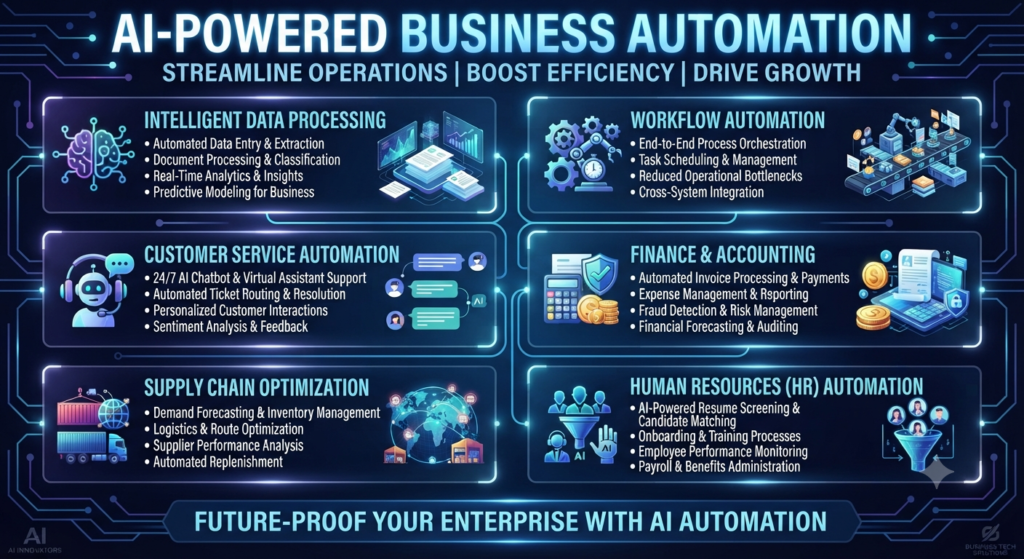
AI-Powered Business Automation: A Complete Guide for Modern Companies
Artificial intelligence is changing how businesses work. Companies once depended on employees to complete almost every daily task. Teams had to manage emails, enter data, prepare reports, answer customer questions, and update records manually.
Today, things are different.
Businesses can use artificial intelligence to complete many of these tasks faster and with less manual effort. AI can understand information, identify patterns, make predictions, and help teams manage complex activities. When combined with workflow automation, it creates smarter systems that can handle business processes with limited human involvement.
This is where AI-powered business automation becomes important.
Companies of all sizes are exploring AI automation to improve productivity, reduce operating costs, and provide better customer experiences. It can help a small business manage customer requests or allow a large company to coordinate operations across multiple departments.
However, successful automation isn’t just about installing new software. Businesses need to understand their processes, select suitable tools, and create a clear implementation plan.
In this complete guide, we’ll explore how business automation with AI works, its major applications, useful tools, benefits, challenges, and future opportunities.
Know More: How AI Finds Profitable Keywords: AI Keyword Research 2026
1. What Is AI-Powered Business Automation?
AI-powered business automation is the use of artificial intelligence to perform, manage, and improve business activities with less manual work.
It combines AI technologies with automated workflows to help companies complete tasks, process information, and make decisions.
Traditional automation follows fixed instructions. For example, software may send an email whenever someone fills out a contact form.
AI automation can do much more. It can understand the message, identify the customer’s needs, classify the request, and suggest an appropriate response.
This makes automation more flexible and useful.
Businesses can use intelligent automation for activities such as:
- Responding to customer questions.
- Managing sales leads.
- Processing invoices.
- Organizing business documents.
- Analyzing customer feedback.
- Preparing performance reports.
- Managing employee requests.
- Monitoring business operations.
The main purpose is simple: allow employees to spend less time on repetitive activities and more time on work that requires human skills.
1.1 How AI Automation Works
AI automation combines different technologies to complete business tasks.
Some important technologies include:
Machine Learning: Machine learning helps systems identify patterns in data and improve their predictions over time.
Natural Language Processing (NLP): NLP allows computers to understand human language. It supports chatbots, email classification, and automated customer communication.
Generative AI: Generative AI creates content, summaries, responses, and other information based on user instructions.
Computer Vision: This technology helps computers understand images, scanned documents, and visual information.
Robotic Process Automation (RPA): RPA uses software bots to perform repetitive computer tasks, such as copying information between systems.
AI Agents: AI agents can work toward specific goals, use connected tools, and complete multiple steps with limited human guidance.
Together, these technologies support automated business processes across different departments.
1.2 AI Automation vs Traditional Business Automation
Both technologies help businesses reduce manual work. However, they work in different ways.
|
Comparison |
Traditional Automation |
AI-Powered Automation |
|
Working method |
Fixed rules |
Rules and intelligent models |
|
Decision-making |
Predefined conditions |
Context-based recommendations |
|
Data handling |
Structured information |
Structured and unstructured information |
|
Flexibility |
Limited |
More adaptable |
|
Learning |
Doesn’t normally learn |
Can improve through model updates and feedback |
|
Customer support |
Fixed responses |
Context-aware responses |
|
Applications |
Repetitive tasks |
Repetitive and complex tasks |
For example, traditional automation can send a standard payment reminder after a specific date.
AI automation can analyze payment history, identify overdue invoices, prepare a suitable reminder, and send it after approval.
This additional intelligence makes AI-based automation systems useful for more complex business activities.
2. Why Modern Companies Need AI Business Automation
Modern companies manage large amounts of information and handle many activities at the same time.
Employees may work with customer databases, accounting software, communication platforms, project management tools, and reporting systems.
Managing these activities manually can consume valuable time.
Business automation with AI helps companies connect different processes and reduce unnecessary work.
2.1 Growing Demand for Intelligent Automation
Several factors are increasing the demand for intelligent automation.
Increasing Business Data
Companies collect information from websites, applications, customer interactions, and internal systems. AI helps organize and analyze this information.
Higher Customer Expectations
Customers expect quick responses and smooth communication. AI assistants can answer common questions and direct complex requests to the right employees.
Remote and Hybrid Work
Distributed teams need connected systems to manage tasks, share information, and track progress.
Operational Cost Pressure
Businesses want to control expenses while maintaining service quality. Automated workflows can reduce repetitive work and improve resource management.
Competition
Companies that improve their operations can respond to customers faster and adapt to market changes more easily.
2.2 How AI-Powered Automation Improves Business Efficiency
AI automation can improve efficiency in several ways.
- Reduces repetitive work: Employees spend less time entering information and completing routine activities.
- Improves response time: Automated systems can handle common requests without waiting for manual action.
- Supports better decisions: AI can analyze large datasets and identify useful patterns.
- Reduces manual errors: Automated validation can identify missing information and incorrect entries.
- Improves collaboration: Connected systems help departments share information.
- Supports business growth: Companies can manage increasing workloads without increasing every manual activity.
For example, a company receiving hundreds of customer inquiries every day can use AI to classify incoming messages.
Simple questions can receive automated answers, while complex requests can be assigned to the appropriate support employee.
This approach helps teams manage their workload more effectively.
3. 10 Powerful Applications of AI-Powered Business Automation
AI automation can support almost every department in a modern organization. The best applications depend on the company’s size, industry, goals, and existing technology. Here are ten important examples of AI business automation.
3.1 Customer Service Automation
Customer service is one of the most common applications of AI automation.
Businesses receive questions through websites, emails, social media, and messaging platforms. Handling every request manually can become difficult.
AI-powered customer service systems can:
- Answer frequently asked questions.
- Identify customer issues.
- Classify support requests.
- Recommend suitable solutions.
- Route complex requests to employees.
- Summarize previous conversations.
For example, an online store can use an AI chatbot to answer questions about order status, delivery policies, and product information. If a customer reports a damaged product, the system can identify the issue and forward the request to the support team.
This creates a faster and more organized support process.
3.2 Sales and Marketing Automation
Sales and marketing teams perform many repetitive activities, including lead management, email communication, campaign reporting, and customer follow-ups.
AI automation can simplify these activities.
Common applications include:
- Lead scoring and classification.
- Automated email campaigns.
- Customer segmentation.
- Sales forecasting.
- Personalized content recommendations.
- CRM data updates.
- Campaign performance analysis.
For example, an AI system can analyze incoming leads based on their industry, company size, website activity, and previous interactions.
It can then recommend which leads should receive attention first. AI can also help marketing teams understand customer interests and prepare relevant campaign content. However, employees should review important customer communication before sending it.
3.3 Finance and Accounting Automation
Finance departments handle invoices, payment records, expenses, budgets, and financial reports. Many of these activities involve repetitive data processing.
AI-powered finance automation can help with:
- Invoice data extraction.
- Expense classification.
- Payment reminders.
- Transaction monitoring.
- Financial document analysis.
- Budget tracking.
- Report preparation.
For example, a company may receive hundreds of invoices every month.
An intelligent document processing system can extract invoice numbers, dates, supplier details, and payment amounts.
The extracted information can then be transferred to accounting software for verification.
This reduces manual data entry and helps finance teams process documents more efficiently.
Financial approvals and payments should still follow proper authorization procedures.
3.4 Human Resource Automation
HR teams manage recruitment, employee records, attendance, onboarding, and internal requests.
AI automation can reduce the administrative workload.
Some common applications include:
- Resume information extraction.
- Interview scheduling assistance.
- Employee onboarding workflows.
- Leave request routing.
- HR policy chatbots.
- Employee document management.
- Training recommendations.
For example, when a new employee joins a company, an automated workflow can create an onboarding checklist.
It can notify HR, inform the IT department, request required documents, and schedule orientation activities.
However, hiring decisions should involve human judgment. AI should support recruitment rather than make unfair or unexplained decisions about candidates.
3.5 Data Entry and Document Processing
Data entry is a time-consuming activity in many organizations. Employees often transfer information between spreadsheets, emails, forms, and business applications.
AI-based automation can extract, organize, and validate information.
Examples include:
- Reading scanned documents.
- Extracting information from PDFs.
- Organizing customer details.
- Identifying missing fields.
- Classifying business documents.
- Updating database records.
For example, an insurance company can use AI to extract information from claim forms and supporting documents.
Employees can then review the extracted information before approving the claim.
3.6 Inventory and Supply Chain Automation
Inventory management requires companies to monitor stock levels, supplier information, product demand, and delivery schedules.
AI can help businesses analyze this information and improve planning.
Important applications include:
- Demand forecasting.
- Inventory monitoring.
- Stock replenishment alerts.
- Supplier performance analysis.
- Delivery tracking.
- Supply chain risk identification.
For example, a retail business can analyze historical sales data to estimate future product demand.
The system can recommend stock levels based on previous sales patterns and seasonal changes.
This helps businesses avoid unnecessary inventory shortages and excess stock.
3.7 IT Operations Management
IT departments manage infrastructure, software, access permissions, technical issues, and security alerts.
AI operations management can help teams identify problems and manage routine activities.
Some applications include:
- IT ticket classification.
- Automated system monitoring.
- Incident summarization.
- Log analysis.
- Software troubleshooting assistance.
- Access request management.
- Security alert prioritization.
For example, when employees report a technical issue, an AI system can classify the ticket and assign it to the appropriate IT team.
It can also summarize previous troubleshooting steps.
Critical system changes should require proper testing and authorization.
3.8 Project and Workflow Management
Project teams manage deadlines, tasks, resources, communication, and progress reports.
AI workflow automation can help coordinate these activities.
Businesses can automate:
- Task assignments.
- Project status updates.
- Deadline reminders.
- Meeting summaries.
- Progress reports.
- Approval notifications.
- Task prioritization.
For example, after a project meeting, an AI assistant can summarize the discussion and identify action items.
The project manager can review the summary and add approved tasks to the project management platform.
This makes team coordination easier.
3.9 Business Reporting and Data Analysis
Businesses need accurate information to understand their performance.
Preparing reports manually can take considerable time, especially when information comes from multiple systems.
AI-powered reporting can help with:
- Data summarization.
- Performance analysis.
- Trend identification.
- Automated report generation.
- Anomaly detection.
- Business dashboard summaries.
For example, a marketing team can use AI to summarize website traffic, campaign performance, and customer engagement data.
Managers can review these insights and identify areas that need improvement.
AI-generated reports should be checked against the original data before important decisions are made.
3.10 AI-Powered Decision-Making
Business decisions often require information from different departments.
AI can help analyze available data and provide recommendations.
Applications include:
- Customer behavior analysis.
- Sales forecasting.
- Market trend analysis.
- Business performance monitoring.
- Risk assessment.
- Resource planning.
For example, a company can analyze sales performance across different regions.
AI may identify that certain products perform better in specific markets.
Managers can use this information when planning inventory, marketing campaigns, and sales strategies.
AI provides useful insights, but final business decisions should consider human experience and organizational goals.
4. Best AI Automation Tools for Companies
Selecting the right software is an important part of implementing AI business automation.
Companies should consider their business requirements, existing applications, security needs, budget, and technical capabilities.
Here are some popular tools and platforms.
4.1 ChatGPT Automation Workflows
ChatGPT can help businesses work with information, create content, summarize documents, and support daily tasks.
Companies can use it for:
- Preparing business emails.
- Summarizing meetings.
- Creating reports.
- Analyzing documents.
- Generating customer support responses.
- Developing workflow ideas.
- Supporting internal knowledge management.
With suitable integrations and APIs, businesses can build GPT-powered automation workflows that connect AI capabilities with other applications.
For example, a company can create a workflow that collects customer feedback, summarizes common complaints, and prepares a report for the management team.
Sensitive information should only be processed through approved systems and appropriate data controls.
4.2 Microsoft Copilot Automation
Microsoft Copilot provides AI assistance across supported Microsoft products and services.
Businesses can use Microsoft AI capabilities to support activities such as:
- Preparing documents.
- Summarizing meetings.
- Working with spreadsheets.
- Drafting emails.
- Searching information.
- Supporting team collaboration.
Microsoft Power Automate can also connect different applications and automate business workflows.
For example, a company can create an approval workflow that sends a notification when an employee submits a business expense request.
Depending on the available licenses and configuration, AI capabilities can make these workflows more intelligent.
4.3 Robotic Process Automation Tools
Robotic process automation uses software bots to perform repetitive tasks across digital systems.
Popular RPA platforms include:
- UiPath.
- Automation Anywhere.
- Microsoft Power Automate.
These platforms can help companies automate data transfer, document processing, application updates, and routine administrative activities.
RPA is especially useful when businesses work with older applications that don’t have suitable integrations.
When combined with AI, RPA can handle more complex processes involving documents and unstructured information.
4.4 AI Workflow Automation Platforms
Workflow automation software helps companies connect different applications and create automated processes.
Popular platforms include:
Zapier: Connects different applications and supports automated workflows between services.
Make: Provides visual workflow building for connecting applications and managing automated processes.
n8n: Offers workflow automation with flexible integrations and AI-related capabilities.
Workato: Supports enterprise integration and business process automation.
These platforms can help businesses automate tasks such as lead collection, email notifications, customer data updates, and document processing.
4.5 How to Choose the Right AI Automation Tools
Before selecting any platform, companies should evaluate the following factors.
|
Selection Factor |
What to Check |
|
Business requirements |
Does the platform solve a real business problem? |
|
Integration |
Can it connect with existing software? |
|
Security |
Does it provide suitable access and data controls? |
|
Scalability |
Can it support future business growth? |
|
Pricing |
Does the cost match the expected value? |
|
Ease of use |
Can employees use it without extensive training? |
|
Reporting |
Can managers measure automation performance? |
The best tool isn’t always the one with the most features. It’s the one that solves the company’s actual problems.
5. Major Benefits of AI-Powered Business Automation
AI-powered business automation offers several advantages when implemented correctly.
5.1 Improved Productivity
Employees can spend less time on repetitive activities. Automated workflows can handle routine tasks while employees focus on planning, communication, problem-solving, and other important responsibilities.
5.2 Reduced Operating Costs
Automation can reduce the time and effort needed to complete certain activities.
For example, automated invoice processing can reduce manual data entry and document handling.
However, companies should consider software, integration, maintenance, and training costs when calculating savings.
5.3 Better Accuracy
Manual processes can lead to errors, especially when employees handle large amounts of information.
Automated validation and data extraction can reduce certain types of errors.
Human review remains important for sensitive and high-impact activities.
5.4 Faster Customer Responses
AI assistants can handle common customer questions and provide information outside normal business hours.
This helps support teams manage customer requests more efficiently.
5.5 Better Business Insights
AI can analyze large amounts of information and identify patterns that may be difficult to notice manually.
Managers can use these insights to improve operations and plan future activities.
5.6 Greater Business Agility
Automated systems help businesses adjust their workflows as requirements change.
Companies can update processes, connect new applications, and respond to changing workloads.
5.7 Improved Employee Experience
Automation can reduce repetitive administrative work.
Employees can spend more time on meaningful tasks, creative work, and customer relationships.
6. Challenges and Risks of AI Automation
Although AI automation offers many opportunities, it also creates challenges.
Companies should understand these risks before introducing new systems.
6.1 Data Privacy and Security
AI systems may process customer information, employee records, financial documents, and confidential business data.
Companies should establish clear data protection policies.
Important measures include:
- Restricting access to sensitive information.
- Using approved AI platforms.
- Applying encryption where appropriate.
- Monitoring system activity.
- Reviewing data retention policies.
6.2 Implementation Costs
AI automation may require software subscriptions, technical integrations, employee training, and ongoing maintenance.
Businesses should calculate the total cost before starting a project.
A small pilot project can help evaluate whether the investment provides sufficient value.
6.3 Integration Problems
Some companies use multiple applications that don’t communicate easily. Connecting these systems may require APIs, middleware, custom development, or additional software. Businesses should review their existing technology before selecting an automation platform.
6.4 AI Errors and Incorrect Outputs
AI systems can generate incorrect information or misunderstand requests.
This is especially important when using generative AI for financial, legal, technical, or customer-facing activities.
Human approval should be included wherever errors could cause significant problems.
6.5 Employee Training and Resistance
Employees may feel uncomfortable when new automation systems change their daily responsibilities.
Companies should explain why automation is being introduced and provide proper training.
The goal should be to support employees, not simply replace their work with software.
6.6 Lack of Clear Business Goals
Implementing AI without a specific objective can lead to unnecessary expenses.
Before selecting tools, companies should identify the problems they want to solve.
For example, reducing invoice processing time is a clearer objective than simply introducing AI into the finance department.
7. How to Implement AI Automation in Organizations
Successful implementation requires proper planning.
Companies shouldn’t automate every process at once. Instead, they should begin with a few activities that offer clear business value.
Here is a practical implementation approach.
Step 1: Identify Repetitive Business Tasks
Start by reviewing daily business activities.
Look for tasks that:
- Require frequent manual data entry.
- Follow predictable steps.
- Involve repeated communication.
- Consume significant employee time.
- Create unnecessary delays.
Prepare a list of potential automation opportunities.
Step 2: Set Clear Business Objectives
Define what the company wants to achieve.
Possible objectives include:
- Reducing document processing time.
- Improving customer response speed.
- Reducing manual reporting work.
- Improving data accuracy.
- Streamlining internal approvals.
Clear objectives make it easier to measure results.
Step 3: Select the Right Automation Tools
Choose tools according to the requirements of each process.
For example, a business that wants to automate customer communication may need an AI chatbot.
A company handling large numbers of invoices may need intelligent document processing.
Avoid selecting tools only because they are popular.
Step 4: Start With a Small Pilot Project
Test automation on a limited scale.
For example, a company can automate one internal approval process before expanding automation across the organization.
A pilot project helps identify technical issues and understand employee requirements.
Step 5: Connect Existing Business Applications
Connect the automation platform with relevant systems.
These may include:
- CRM software.
- ERP systems.
- Accounting applications.
- Email platforms.
- Project management tools.
- Customer support systems.
Proper integration helps create connected digital workflows.
Step 6: Establish Human Approval and Security Controls
Not every task should operate without human involvement.
Companies should define which actions can happen automatically and which require approval.
For example, an AI system can prepare a payment recommendation, but an authorized employee should approve the actual transaction.
Step 7: Train Employees
Provide employees with practical training.
Explain how automation works, when to use it, and how to report problems.
Training helps teams adopt new technology with greater confidence.
Step 8: Monitor and Improve Performance
Measure the results after implementation.
Useful performance indicators include:
|
KPI |
What It Measures |
|
Task completion time |
Time required to complete a process |
|
Error rate |
Frequency of incorrect results |
|
Automation rate |
Percentage of eligible tasks automated |
|
Processing cost |
Cost of completing a process |
|
Customer response time |
Time taken to respond to customers |
|
Employee productivity |
Output compared with available working time |
|
Workflow success rate |
Percentage of successful automated executions |
Review these metrics regularly.
If a workflow produces errors or doesn’t provide enough value, improve its configuration before expanding it.
8. Future Trends in AI Business Automation
AI automation is continuing to evolve.
New technologies are creating opportunities for companies to build more connected and intelligent business systems.
Here are some important trends to watch.
8.1 AI Agents for Business
AI agents are becoming an important area of business automation.
Unlike basic chatbots, AI agents can work toward specific goals, interact with connected tools, and complete multiple steps.
For example, an AI agent may collect information from an approved business database, summarize the results, and prepare a report for an employee to review.
Businesses will need suitable permissions, monitoring, and approval controls as these systems become more capable.
8.2 Generative AI Automation
Generative AI can create text, summaries, reports, and other business content. Companies can use it to support marketing, customer service, research, and internal communication. GPT-powered automation can also combine content generation with existing workflows.
8.3 Autonomous Business Workflows
Autonomous AI agents may help businesses manage multiple connected activities.
For example, an automated workflow could identify a customer request, collect relevant information, prepare a response, and send it for approval.
These systems may reduce manual coordination across departments.
8.4 AI Workplace Automation
AI workplace automation is likely to become more common across everyday business applications.
Employees may use AI assistants to organize meetings, summarize documents, manage tasks, and find internal information.
This can make daily work more organized.
8.5 Predictive Business Operations
AI can analyze historical information and identify possible future trends.
Companies may use predictive systems for inventory planning, equipment maintenance, sales forecasting, and resource allocation.
8.6 Connected Intelligent Business Systems
The future of intelligent automation will involve connecting multiple business applications.
Instead of operating separate tools, companies can build integrated systems that share information and coordinate activities.
This can support better collaboration and enterprise efficiency.
Build a Smarter Business With AI Automation
AI-powered business automation is changing how modern companies manage their operations.
From customer service and marketing to finance, HR, and IT management, artificial intelligence can help organizations reduce repetitive work and improve daily workflows.
However, successful automation requires more than adopting new technology.
Companies need to identify the right processes, choose suitable tools, protect business information, and train employees. They should also monitor performance and maintain human oversight for important decisions.
Small businesses can begin with simple automated workflows, while larger organizations can explore enterprise automation and AI-driven process management across multiple departments.
The best approach is to start small, measure the results, and improve gradually.
As AI technology develops, companies that build practical and responsible automation strategies will be better prepared to improve productivity, support employees, and respond to changing business needs.
”FAQs”
1. What is AI-powered business automation?
AI-powered business automation uses artificial intelligence to manage and improve business processes with less manual effort. It combines technologies such as machine learning, natural language processing, generative AI, and workflow automation.
2. How does AI automation improve business efficiency?
AI automation improves efficiency by reducing repetitive work, speeding up information processing, organizing business data, and supporting faster decisions. It also helps employees focus on activities that require human judgment and creativity.
3. What are the best AI automation tools for companies?
Popular options include ChatGPT, Microsoft Copilot, Microsoft Power Automate, UiPath, Zapier, Make, and n8n. The right choice depends on business requirements, integration needs, security, and budget.
4. Can small businesses use AI automation?
Yes. Small businesses can use AI automation for customer support, email management, marketing, document processing, and appointment scheduling. Many platforms offer solutions that don't require advanced technical knowledge.
5. What is the difference between AI automation and robotic process automation?
Robotic process automation uses software bots to perform repetitive tasks based on predefined rules. AI automation adds capabilities such as language understanding, pattern recognition, and intelligent recommendations. Both technologies can work together.
6. Is AI automation expensive to implement?
The cost depends on the software, business size, integration requirements, and complexity of the process. Companies can begin with affordable tools and small pilot projects before investing in larger enterprise automation systems.
7. Can AI completely replace manual business processes?
Not always. AI can automate many repetitive activities, but human involvement remains important for complex decisions, approvals, customer relationships, and sensitive business operations.
8. How can companies start implementing AI automation?
Companies should first identify repetitive tasks, define clear objectives, select suitable tools, and begin with a small pilot project. They should then monitor performance, train employees, and expand automation based on results.
9. What are AI agents for business?
AI agents are systems that can work toward specific goals, use connected tools, and complete multiple steps with limited human guidance. Businesses can use them for research, information processing, reporting, and workflow coordination.
10. Is AI-powered business automation suitable for enterprise companies?
Yes. Enterprise companies can use AI automation across finance, HR, customer service, supply chains, IT operations, and other departments. However, large organizations need strong security, governance, integration, and monitoring practices.


