
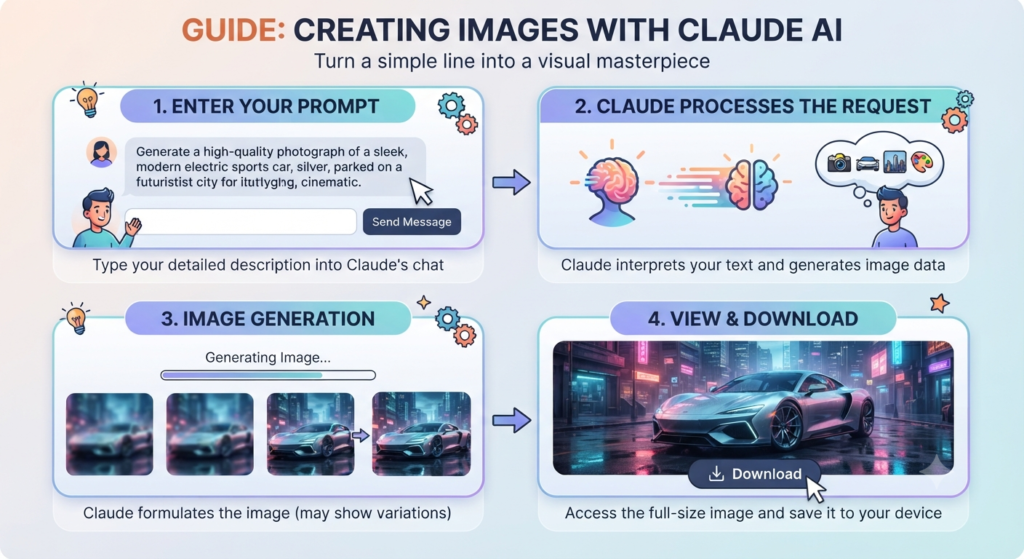
How to Use Claude AI for Content Writing, Research and Productivity: A Complete Beginner’s Guide
Artificial intelligence has become an essential part of modern digital workflows. From writing professional documents and researching complicated topics to analysing business information and developing software, AI assistants are helping individuals and organisations improve productivity. Developed by Anthropic, Claude AI combines natural language processing, reasoning, document analysis, web research and programming capabilities within a conversational interface. Whether you want to write SEO-friendly blog articles, prepare business reports, analyse spreadsheets, develop marketing strategies or learn new concepts, Claude AI can help simplify these activities. This tutorial explains how to use the platform, create effective prompts, manage projects and generate professional documents.
Know More: AI Influencer Marketing: 10 Powerful Ways to Use AI for Influencer Research and Marketing Campaigns
What Is Claude AI?
Claude AI is a generative artificial intelligence assistant developed by Anthropic. It uses large language models to understand user instructions, process information and generate relevant responses. Unlike traditional software applications that require predefined commands, Claude allows users to communicate through natural language. Users can ask questions, upload documents, request explanations, develop programming code and generate professional content. Its applications extend across education, digital marketing, software development, customer service, business management and research. Access Claude at https://claude.ai/.
How Does Claude AI Work?
Claude processes user instructions using models trained to recognise patterns and generate contextually relevant responses. It considers the available conversation context, instructions and relevant information before generating a response.
|
Stage |
Purpose |
|---|---|
|
01 User input |
Questions, instructions or uploaded documents |
|
02 Context processing |
Interpret information and requirements |
|
03 AI reasoning |
Analysis and response development |
|
04 Response generation |
Text, code, documents or other outputs |
|
05 Human review |
Verification, refinement and implementation |
This is a conceptual workflow, not a description of internal architecture. Important technical, academic and business information should always be verified.
Top 15 Features of Claude AI
|
Feature |
Primary function |
|---|---|
|
Conversational AI |
Answer questions and follow instructions |
|
Content writing |
Generate and refine written content |
|
Document analysis |
Extract insights from uploaded documents |
|
Web search |
Research online information |
|
Research mode |
Support detailed investigations |
|
Projects |
Organise ongoing work |
|
Artifacts |
Create reusable documents and interactive content |
|
Claude Code |
Assist with software development |
|
File creation |
Generate downloadable documents |
|
Data analysis |
Investigate structured information |
|
Image understanding |
Analyse supported visual inputs |
|
Design tools |
Develop visual designs and prototypes where available |
|
Presentation tools |
Create presentations where supported |
|
Connectors |
Work with supported external applications |
|
Personalisation |
Adapt responses using preferences and context |
Feature availability depends on subscription plans, account settings and supported platforms.
Understanding Claude AI Models
|
Model family |
Recommended use |
|---|---|
|
Haiku |
Quick responses and straightforward tasks |
|
Sonnet |
Balanced content creation, analysis and coding |
|
Opus |
Complex reasoning and demanding professional tasks |
Beginners can start with an available Sonnet or Haiku model. For businesses, evaluate response quality, processing requirements, operating costs and task complexity. Check the current model catalogue for newer families and availability.
How to Use Claude AI: Step-by-Step Tutorial
Step 1: Create a Claude AI Account
Visit https://claude.ai/ using your browser. Select the registration or sign-in option and complete authentication. After signing in, begin interacting through the conversational workspace. New users can start with the free subscription.
Step 2: Explore the Claude AI Dashboard
Explore New Chat, conversation history, Projects, Artifacts, attachments, model selection, settings and subscription options. Exact labels may vary according to account eligibility and platform updates.
Step 3: Create Your First Claude AI Prompt
A prompt is an instruction or question submitted to an AI model. Start with simple requests before developing more advanced instructions.
Explain digital marketing to a beginner. Include a simple definition, five major channels, practical examples, common beginner mistakes and a 30-day learning roadmap. Use simple English and clear headings.
Step 4: Learn Effective Prompt Engineering
A well-structured prompt identifies the task, provides relevant context, explains constraints and specifies the expected output. For example, define the role as an experienced SEO specialist, the task as developing a content strategy, the audience as Indian students, the output as a table and the constraint as avoiding invented search volumes.
Step 5: Upload and Analyse Documents
Claude supports various document and image formats, subject to account and processing settings. Open a conversation, attach a supported file and explain what information you want to extract. Compare important findings with the original document.
Analyse the attached business performance report. Identify major achievements, important performance changes, areas of concern, potential opportunities and five actionable recommendations. Use only information available in the report. Distinguish facts from assumptions.
Step 6: Use Claude AI for Online Research
Web search can support research into public information. Specify the topic, geography, dates and preferred sources. Review retrieved sources before publishing and avoid treating generated traffic estimates as verified analytics.
Research recent developments in artificial intelligence and search engine optimisation. Prioritise official search engine documentation, original research and authoritative industry publications. Include dates, source links and practical implications. Separate confirmed information from predictions.
Step 7: Create a Claude Project
Projects are useful when regularly working on a website, business, academic subject or development activity. Create a project, upload authorised reference materials and add instructions. This helps maintain editorial consistency.
You are an editorial assistant for an educational and technology website. Write original, informative and professional content. Use clear English, descriptive headings and practical examples. Include SEO metadata when requested. Never invent research findings, statistics or keyword search volumes. Prioritise official documentation.
Step 8: Use Claude Artifacts
Artifacts provide a workspace for reusable outputs such as documents, dashboards, designs and small interactive applications. Request a standalone item and refine it through additional instructions.
Create an interactive SEO title and meta description character counter. Include input fields, real-time counts, search result preview, copy buttons, responsive layout and light and dark mode.
Step 9: Generate Downloadable Documents
Supported file-generation capabilities can produce Word documents, spreadsheets, presentations and PDFs. Review downloaded documents for formatting, calculations, factual statements and completeness.
Create a professional editable Word document containing a digital marketing strategy. Include executive summary, business objectives, target audience, SEO, paid advertising, social media, monthly KPIs and a three-month roadmap. Use editable tables, consistent headings and page numbers.
Step 10: Refine and Export Your Work
Treat the initial response as a working draft. Ask Claude to improve clarity, technical accuracy, structure and suitability for the intended audience. Human review remains essential.
Improve this content without changing its meaning. Remove repetitive paragraphs, add practical examples, improve transitions, identify unsupported claims and maintain a professional tone.
How to Use Claude AI for SEO Content Writing
Claude can support topic research, planning, drafting, metadata creation, optimisation, internal linking, fact-checking, content updates and editorial review. Successful SEO requires more than generating large quantities of content. Publishers should focus on originality, useful information, first-hand experience and satisfying search intent.
Act as an experienced SEO content writer. Topic: What Is Artificial Intelligence? Target audience: beginners and college students. Create a comprehensive article with unique SEO title, meta description, slug, excerpt, introduction, H2 and H3 headings, practical examples, comparison tables, misconceptions, FAQs, conclusion and official references. Avoid keyword stuffing and fabricated statistics.
Supplement the generated draft with original research, screenshots, expert insights and verified references.
How to Use Claude AI for Academic Research
Students can simplify difficult explanations, prepare revision notes and organise research materials. Researchers can identify themes within academic documents and compare methodologies. Verify scientific explanations against authorised textbooks and original publications, and follow institutional academic integrity policies.
Explain Newton’s three laws of motion for a JEE Main student. Include scientific definitions, mathematical formulas, real-world examples, five solved numerical problems, common examination mistakes and ten practice questions. Provide step-by-step solutions and verify calculations.
How to Use Claude AI for Business Productivity
|
Business activity |
Practical application |
|---|---|
|
Email communication |
Draft and refine professional emails |
|
Meeting management |
Summarise meeting notes |
|
Business proposals |
Develop project proposals |
|
Performance reporting |
Analyse supplied business metrics |
|
Marketing strategy |
Generate campaign ideas |
|
Customer support |
Prepare response templates |
|
Project management |
Develop implementation plans |
|
Recruitment |
Create interview questions |
|
Training |
Develop educational materials |
|
Documentation |
Prepare standard operating procedures |
Businesses should establish clear policies regarding information employees are permitted to upload to external AI services.
Practical Example: Analyse an SEO Performance Report
The following hypothetical figures illustrate how Claude can support performance analysis.
|
Metric |
Previous |
Current |
Growth |
|---|---|---|---|
|
Organic traffic |
10,000 |
13,500 |
35% |
|
Organic keywords |
250 |
320 |
28% |
|
Referring domains |
180 |
220 |
22.22% |
|
Backlinks |
4,500 |
5,200 |
15.56% |
|
Indexed pages |
300 |
365 |
21.67% |
Analyse the supplied SEO performance data. Calculate percentage changes, identify major improvements, explain possible business implications without assuming causation and provide five recommendations for the next month. Do not invent additional metrics.
These improvements indicate positive movement across the supplied metrics. The data alone cannot establish which SEO activities caused the changes. Investigate seasonality, content updates, technical improvements and search engine changes.
10 Best Claude AI Prompts for Everyday Productivity
1. Content strategy
Create a three-month content marketing strategy for an educational website. Include topic clusters, audience requirements, publishing frequency, internal linking opportunities and performance KPIs.
2. Professional email
Draft a professional email requesting approval for a website redesign proposal. Include objectives, estimated cost, timeline and deliverables. Maintain a concise and respectful tone.
3. Competitor research
Analyse competitor websites using public information. Compare content structure, positioning, audience and potential content gaps. Do not invent traffic or revenue figures.
4. Document summary
Summarise the attached document. Identify key findings, dates, obligations, risks, unanswered questions and recommended actions. Include page references where possible.
5. Social media marketing
Develop a 30-day social media calendar for a consumer product brand. Include themes, captions, creative concepts, formats and campaign objectives.
6. Learning assistant
Teach me the fundamentals of machine learning. Create a 14-day learning programme with daily explanations, examples, exercises and assessments.
7. Technical SEO
Analyse the supplied website crawl report. Identify indexing, performance, redirect, canonicalisation and internal linking issues. Prioritise recommendations by expected impact.
8. Business proposal
Create a professional proposal using supplied requirements. Include scope, timeline, budget, deliverables, responsibilities and assumptions.
9. Fact-checking
Review the article for factual accuracy. Identify unsupported claims, outdated information, incorrect statistics and misleading interpretations. Provide reliable references for corrections.
10. Website development
Develop responsive HTML and CSS for a technology blog. Include article headings, table of contents, related posts, responsive navigation and accessible light and dark mode.
Claude AI Free vs Paid Plans
|
Feature |
Free |
Paid |
|---|---|---|
|
AI conversations |
Available with limits |
Higher usage allowances |
|
Web search |
Subject to availability |
Subject to availability |
|
File creation and Artifacts |
Account-dependent |
Account-dependent |
|
Projects |
Limited or account-dependent |
Expanded capabilities may apply |
|
Advanced research and coding |
Check eligibility |
Check eligibility |
|
Advanced models |
Limited selection |
Broader selection may apply |
Consult https://claude.com/pricing for current plans, regional prices, taxes and limits. Exact prices and newer plan names from the earlier draft are not independently verified in this conversion.
Claude AI vs ChatGPT vs Gemini vs Perplexity AI
|
Feature |
Claude |
ChatGPT |
Gemini |
Perplexity |
|---|---|---|---|---|
|
Primary focus |
Reasoning and productivity |
General assistance |
Google ecosystem |
Research |
|
Content writing |
Supported |
Supported |
Supported |
Supported |
|
Online research |
Supported |
Supported |
Supported |
Core focus |
|
Document analysis |
Supported |
Supported |
Supported |
Supported |
|
Coding |
Supported |
Supported |
Supported |
Supported |
|
Ideal use |
Documents and complex tasks |
Versatile workflows |
Google productivity |
Source-based research |
All four platforms overlap. Choose according to requirements, integrations, budget and expected output.
Advantages and Disadvantages
|
Advantages |
Disadvantages |
|---|---|
|
Natural language interface |
Responses may contain factual errors |
|
Detailed content generation |
Free usage restrictions |
|
Document processing |
Advanced features may require payment |
|
Professional writing assistance |
Requires editorial review |
|
Programming support |
Code may contain bugs |
|
Project organisation |
Uploaded data requires privacy awareness |
|
Web research |
Sources require verification |
|
Downloadable files |
Formatting may need adjustment |
|
Customisable instructions |
Responses may vary |
|
Multiple models |
Availability can change |
Common Claude AI Problems and Solutions
|
Problem |
Recommended solution |
|---|---|
|
Incomplete responses |
Divide tasks into smaller sections |
|
Incorrect information |
Request sources and verify claims |
|
File upload failure |
Check formats and size limits |
|
Repetitive content |
Specify originality and remove duplication |
|
Usage limit reached |
Review account limits and models |
|
Incorrect calculations |
Independently verify results |
|
Poor formatting |
Provide formatting specifications |
|
Outdated information |
Request current online research |
|
Irrelevant responses |
Add specific context |
|
Incorrect code |
Test and inspect errors |
Is Claude AI Safe to Use?
Avoid uploading passwords, API keys, confidential customer records, unauthorised financial documents or sensitive employee information. Review privacy policies, data-processing terms and account settings. Organisations should consider access permissions, data retention, regulatory requirements and human oversight. Legal, financial, medical and technical recommendations should be independently reviewed by qualified professionals where necessary.
Best Practices for Using Claude AI
Define a clear objective, intended audience and expected deliverable. Provide reliable reference materials. For research, request original sources and publication dates. Use structured outputs for comparisons and data analysis. Organise project-specific information and instructions for long-term activities. Review accuracy, originality, readability, calculations and compliance before publishing.
”FAQs”
1. What is Claude AI used for?
Content writing, research, document analysis, programming, education and professional communication.
2. Is Claude AI free to use?
A free subscription is available with restrictions; paid subscriptions provide additional capabilities.
3. Who developed Claude AI?
Anthropic, an AI research and development company.
4. Is Claude AI better than ChatGPT?
The better option depends on the task, integrations, subscription and preferences.
5. Can Claude write SEO-friendly articles?
Yes, with editorial review, verified information and original expertise.


