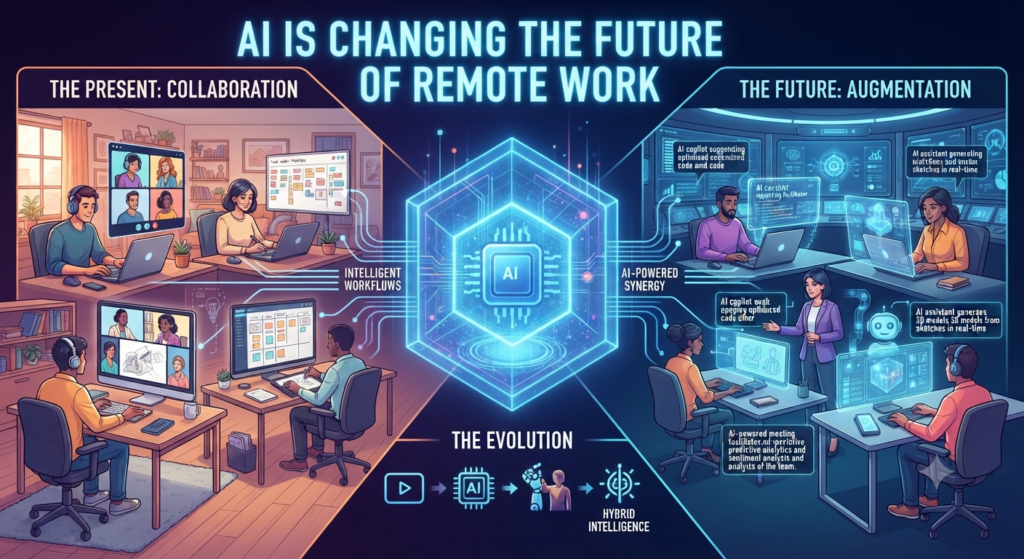
Remote work has changed the way people build their careers and how businesses manage their teams. Employees can now work from home, coffee shops, or different cities without visiting an office every day. Companies can also hire skilled people from different parts of the world. However, managing a remote team comes with challenges. Communication gaps, missed deadlines, slow workflows, and poor team coordination can affect business results.
Artificial intelligence is helping solve many of these problems.
AI and remote work are becoming closely connected. Businesses now use artificial intelligence to manage daily tasks, improve communication, organize projects, and support employees. AI tools can write emails, summarize meetings, analyze information, and help teams complete work faster.
This change isn’t only about saving time. It’s about creating a better way to work. Employees can focus on important tasks instead of spending hours on routine activities. Managers can understand project progress more clearly. Teams can also work together even when members live in different countries.
The future of remote work will depend on how people use these technologies. AI won’t replace every human role. Instead, it will change many job responsibilities and create demand for new skills.
So, how AI is changing remote work is an important question for employees, business owners, managers, and job seekers.
Let’s explore the 10 powerful ways artificial intelligence is transforming remote work environments and shaping the future of digital workplaces.
1. AI Is Changing the Future of Remote Work: Understanding the Connection Between AI and Remote Work
Artificial intelligence refers to computer systems that can perform tasks that usually require human thinking. These tasks include understanding language, finding patterns, creating content, and analyzing information.
Remote work technology includes the digital tools people use to work outside traditional offices. Examples include video meeting platforms, cloud storage, messaging applications, and project management software.
When these technologies work together, they create an AI-powered remote work environment.
For example, an employee working from home may use an AI assistant to prepare a report, a meeting tool to record important points, and a project management platform to track deadlines. These tools reduce manual work and make daily activities easier.
Why Are Businesses Adopting AI for Remote Work?
Businesses are adopting AI because remote teams need better ways to manage information and complete tasks.
Some common reasons include:
- Better productivity: AI helps employees complete routine tasks faster.
- Faster communication: AI tools can summarize messages and meetings.
- Improved planning: Smart systems help teams organize projects and deadlines.
- Flexible operations: Employees can access digital tools from different locations.
- Better decision-making: AI can identify patterns in business information.
- Reduced manual work: Automated workflows reduce repetitive activities.
AI also supports companies that work across different time zones. Employees can access information, receive task updates, and find answers without waiting for another team member to become available.
How Does an AI-Powered Remote Workplace Work?
An AI-powered workplace combines several technologies to support daily business activities.
|
Technology |
Main purpose |
Example |
|
AI assistants |
Support daily tasks |
Writing emails and reports |
|
Cloud platforms |
Store and share information |
Accessing files remotely |
|
Virtual collaboration tools |
Connect employees |
Team discussions |
|
AI analytics |
Study business data |
Reviewing project performance |
|
Automation software |
Complete routine tasks |
Sending reminders |
|
AI meeting tools |
Organize discussions |
Creating meeting summaries |
These technologies work best when businesses use them to support employees rather than create unnecessary pressure.
2. 10 Powerful Ways AI Is Changing the Future of Remote Work
Artificial intelligence is influencing almost every part of the digital workplace. Its impact goes beyond writing assistance or chatbots. It can support communication, planning, employee development, and business operations.
Here are 10 important ways AI is changing the future of remote work.
1. AI Workplace Automation Reduces Repetitive Tasks
One of the biggest benefits of artificial intelligence is automation.
Remote employees often spend time on routine activities. These include sending emails, updating spreadsheets, organizing files, entering information, and preparing basic reports.
AI workplace automation can reduce much of this manual effort.
For example, an employee may receive hundreds of customer messages every week. An AI system can sort these messages, identify common questions, and suggest suitable responses. The employee can then focus on complex customer problems.
Businesses can also automate:
- Daily task reminders.
- Data entry and information sorting.
- Email organization.
- Report preparation.
- Document management.
- Customer support requests.
- Basic approval processes.
Automated workflows help teams save time and reduce common errors.
However, automation should not remove human review from important decisions. Employees should check AI-generated information before using it in business communication or official documents.
2. AI Productivity Tools Help Employees Manage Time
Managing time is important when people work remotely. Without a traditional office routine, employees may find it difficult to organize their schedules.
AI productivity tools can help solve this problem.
These tools can suggest task priorities, organize calendars, create reminders, and break large projects into smaller activities.
For example, an employee may have five important tasks with different deadlines. An AI assistant can help organize them based on urgency and estimated effort.
Some tools can also identify repeated activities and suggest ways to reduce unnecessary work.
Common uses of AI productivity tools include:
- Creating daily work plans.
- Organizing task lists.
- Drafting documents.
- Summarizing long reports.
- Finding information quickly.
- Managing calendar events.
- Tracking project deadlines.
AI can also support work-from-home productivity by helping employees plan focused work periods and organize their daily responsibilities.
Still, technology cannot replace good time management habits. Employees must set realistic goals, take breaks, and maintain a healthy balance between work and personal life.
3. Virtual Collaboration Tools Improve Teamwork
Remote employees often work from different locations. This can make teamwork difficult, especially when a project requires input from several departments.
AI-powered virtual collaboration tools help teams share ideas and work together.
For example, an AI assistant can summarize a discussion, organize shared notes, or suggest next steps after a project meeting.
Some platforms can also help employees find information from previous conversations and shared documents.
This reduces the time people spend searching for old messages.
AI improves collaboration in remote teams through:
- Shared project documents.
- Automated meeting notes.
- Smart information searches.
- Real-time language support.
- Task assignment suggestions.
- Knowledge management systems.
These features are useful for international teams. Employees can work together even when they have different working hours or language preferences.
However, good teamwork still depends on trust, clear communication, and shared goals.
4. AI Communication Tools Make Digital Communication Easier
Communication is one of the most important parts of remote work.
Employees use emails, chat applications, video calls, and online discussion platforms every day. Too many messages can create confusion and reduce productivity.
AI communication tools can help employees manage digital communication more effectively.
For example, AI can help write a professional email, correct grammar, translate a message, or summarize a long conversation.
It can also suggest shorter and clearer ways to explain complex information.
Useful features include:
- Email drafting assistance.
- Grammar and spelling correction.
- Message summarization.
- Language translation.
- Automated customer responses.
- Smart search across conversations.
These features are especially useful for companies with international employees.
An employee in India can communicate more easily with a colleague in Germany or the United States. AI language tools can reduce communication barriers and support global teamwork.
However, employees should review AI-generated messages to ensure they sound natural and match the intended meaning.
5. AI Improves Virtual Meetings
Virtual meetings are a normal part of remote work. However, long meetings can take time away from important tasks.
AI meeting tools are making these discussions more useful.
Some tools can generate meeting transcripts, identify key topics, create summaries, and list action points.
For example, after a project meeting, an AI assistant may prepare a summary containing:
- Topics discussed.
- Important decisions.
- Tasks assigned to employees.
- Project deadlines.
- Pending questions.
This helps team members understand what happened, even if they couldn’t attend the meeting.
AI can also help employees search meeting records and find specific information.
However, businesses should inform participants when meetings are being recorded or transcribed. They should also follow applicable privacy rules and obtain required consent.
The goal isn’t to increase the number of meetings. It’s to make every meeting more useful.
6. Remote Workforce Management Becomes More Efficient
Managing a remote workforce requires clear planning and regular communication.
Managers need to understand project progress, employee responsibilities, workload distribution, and business priorities.
AI-powered solutions for managing remote employees can help organize these activities.
For example, project management systems can identify overdue tasks and show which projects need attention. AI analytics can also help managers understand workload patterns.
Businesses may use AI to:
- Organize employee schedules.
- Identify project delays.
- Distribute tasks.
- Review workload patterns.
- Support performance discussions.
- Identify training needs.
These systems can help managers make better decisions.
However, managers should avoid judging employees only through automated reports. The number of messages sent or hours spent online doesn’t always reflect the quality of someone’s work.
A better approach combines measurable results, regular feedback, employee well-being, and human judgment.
7. AI Makes Project Management Smarter
Project management is another area where artificial intelligence can make a difference.
Remote projects often involve several people, deadlines, documents, and tasks. A small delay in one activity can affect the entire project.
AI-powered project management tools can help teams organize work and identify possible delays.
For example, a project manager can use an AI assistant to divide a large project into smaller tasks. The system may also suggest deadlines based on available information.
AI can support:
- Project planning.
- Task prioritization.
- Deadline reminders.
- Progress summaries.
- Resource planning.
- Risk identification.
- Workload management.
These features help teams understand their responsibilities.
AI can also analyze past project information to identify repeated problems. Managers can use these insights to improve future planning.
Still, project managers must review AI suggestions before making important decisions. Every project has different requirements, and automated recommendations may not understand every detail.
8. Hybrid Work Solutions Become More Flexible
Many businesses now combine office work with remote work. This model is known as hybrid work.
Employees may visit the office on selected days and work from home during the rest of the week.
AI-powered hybrid work solutions help companies manage this arrangement.
For example, smart scheduling systems can help employees coordinate office visits. AI tools can also support meeting planning and shared workspace management.
Other applications include:
- Office resource scheduling.
- Employee calendar coordination.
- Remote meeting support.
- Shared document access.
- Workload planning.
- Team availability updates.
These solutions help businesses offer more flexibility.
Employees can spend less time traveling and more time completing important tasks. Companies can also recruit people from a wider talent pool.
The future of remote work may include several working models rather than one fixed arrangement. Some employees may work fully remotely, while others may follow hybrid schedules.
AI can help businesses manage these different arrangements more smoothly.
9. AI Supports Employee Learning and Career Development
Technology changes quickly. Employees must regularly learn new skills to remain effective.
AI can support professional development by suggesting learning materials, explaining difficult topics, and creating personalized study plans.
For example, a remote employee who wants to improve communication skills can use an AI learning assistant for practice and feedback.
AI can also help employees:
- Understand new software.
- Learn technical concepts.
- Practice interviews.
- Improve writing skills.
- Prepare presentations.
- Identify knowledge gaps.
- Explore career opportunities.
Businesses can use AI learning platforms to recommend training based on job responsibilities.
This can be useful for remote employees who don’t have regular access to in-person training sessions.
However, AI-generated learning content should be checked for accuracy. Employees should also develop practical skills through real projects and human feedback.
10. AI Improves Data Analysis and Business Decisions
Remote businesses generate large amounts of digital information.
This information may include customer feedback, sales reports, website activity, project updates, and employee performance data.
AI analytics tools can help organize this information and identify useful patterns.
For example, a company may use AI to understand why customer support requests are increasing. It can study available data and highlight common problems.
Businesses can use AI analytics for:
- Customer behavior analysis.
- Sales forecasting.
- Project performance reviews.
- Resource planning.
- Business reporting.
- Productivity analysis.
- Risk identification.
These insights can help managers make informed decisions.
However, AI predictions aren’t always correct. Business leaders should consider data quality, context, and human experience before taking action.
3. Benefits of AI in Remote Work Environments
The benefits of AI in remote work environments go beyond completing tasks faster. Artificial intelligence can improve how employees communicate, share knowledge, and manage responsibilities.
Improved Workplace Efficiency
AI reduces time spent on repetitive activities. Employees can focus on tasks that require creativity, problem-solving, and personal experience.
For example, an AI assistant can prepare a first draft of a report. The employee can review the information and improve the final version.
This creates a more efficient workflow.
Better Work-from-Home Productivity
Working from home offers flexibility, but it also requires discipline.
AI tools can help employees organize their calendars, set reminders, and manage daily priorities.
They can also help reduce the time needed to search for information.
Greater Workforce Flexibility
Companies can hire employees from different locations without requiring everyone to work from the same office.
AI translation, communication, and collaboration tools make it easier for international teams to work together.
Faster Access to Information
Employees often need information from old documents, emails, and project discussions.
AI search systems can help locate relevant information quickly.
This reduces delays and supports better decision-making.
Better Employee Support
AI assistants can answer common questions about company processes, software, and workplace policies.
Employees can get basic information without waiting for a manager or support team.
Comparison: Traditional Remote Work vs. AI-Powered Remote Work
|
Work activity |
Traditional remote work |
AI-powered remote work |
|
Email management |
Manual sorting |
Smart sorting and drafting |
|
Meeting notes |
Manual preparation |
Automated summaries |
|
Task planning |
Manual scheduling |
AI-assisted prioritization |
|
Communication |
Manual translation |
AI language support |
|
Project tracking |
Regular manual updates |
Automated progress insights |
|
Reporting |
Manual data collection |
AI-assisted analysis |
|
Employee learning |
General training |
Personalized learning support |
|
Information search |
Manual document searches |
AI-assisted search |
AI doesn’t make every activity automatic. Instead, it helps employees complete many activities with less effort.
4. Challenges of AI-Powered Remote Work
Although artificial intelligence offers many benefits, businesses must also understand its risks. Technology should make work easier, not create new problems.
Data Security and Privacy
Remote employees often use personal devices, cloud platforms, and online communication systems.
AI tools may process confidential business information. This creates security risks if companies use unapproved platforms or share sensitive data without proper protection.
Businesses should:
- Use trusted AI services.
- Set clear data access rules.
- Protect company accounts.
- Train employees on cybersecurity.
- Review privacy policies.
- Avoid uploading confidential information without approval.
Data protection should remain a priority during digital workplace transformation.
Employee Monitoring Concerns
Some businesses use software to monitor employee activity.
AI can analyze work patterns, system usage, and project information. However, excessive employee monitoring can reduce trust.
Employees may feel uncomfortable if every activity is tracked.
Businesses should focus on work quality, completed tasks, and agreed goals rather than constant surveillance.
Monitoring should be transparent, necessary, proportionate, and compliant with applicable laws.
Overdependence on Artificial Intelligence
AI can save time, but depending on it for every task can weaken important human skills.
Employees still need to think critically, solve problems, communicate clearly, and make responsible decisions.
AI-generated information may contain mistakes. Therefore, human review is essential.
Skill Gaps and Training Requirements
Not every employee knows how to use AI tools.
Some workers may need training to understand new systems and apply them correctly.
Companies should provide practical learning opportunities instead of expecting employees to understand every new tool immediately.
Bias and Incorrect Recommendations
AI systems learn from data. If the data contains errors or unfair patterns, the system may produce biased results.
This can become a problem in recruitment, performance reviews, and employee management.
Businesses should regularly review AI systems and keep humans involved in important decisions.
5. The Future of Remote Work in the Age of AI
The future of remote jobs in the age of AI will involve changes in both technology and employee responsibilities.
Some tasks may become automated. At the same time, new opportunities may develop in AI operations, cybersecurity, data analysis, digital marketing, automation, and technology management.
The impact of artificial intelligence on virtual teams will also become more visible as businesses adopt connected digital systems.
Will AI Replace Remote Employees?
AI will automate some tasks, but that doesn’t mean it will replace every remote employee.
Jobs usually involve several responsibilities. AI may handle routine activities, while people manage communication, judgment, creativity, and complex problems.
For example, AI can help a content writer research a topic and prepare an outline. However, the writer must check facts, understand the audience, and create meaningful content.
Similarly, AI can help a project manager track deadlines, but human leadership remains important for handling conflicts and motivating employees.
The future will likely involve more cooperation between people and intelligent systems.
New Skills Remote Employees Will Need
Employees who understand AI will be better prepared for changes in the workplace.
Important skills include:
- AI literacy and responsible AI use.
- Critical thinking.
- Data interpretation.
- Digital communication.
- Problem-solving.
- Creative thinking.
- Cybersecurity awareness.
- Project management.
- Adaptability and continuous learning.
Technical skills are important, but human skills will remain valuable.
Employees who combine technology knowledge with communication and problem-solving abilities can adapt more easily to changing job requirements.
New Opportunities in AI-Driven Workplaces
AI adoption may increase demand for professionals who can develop, manage, and support digital systems.
Some growing areas include:
|
Career area |
Potential responsibilities |
|
AI operations |
Managing AI-powered business systems |
|
Data analysis |
Understanding business information |
|
Automation development |
Building automated workflows |
|
Cybersecurity |
Protecting digital systems |
|
AI content operations |
Reviewing and managing AI-assisted content |
|
Digital project management |
Coordinating technology-based projects |
|
AI training and support |
Helping employees use AI tools |
These roles require different levels of technical knowledge. Many also need communication, analytical thinking, and business understanding.
6. How Employees and Businesses Can Prepare for AI-Powered Remote Work
Preparing for the future doesn’t require adopting every new AI tool. It requires understanding business needs and choosing suitable technologies.
Steps for Employees
Remote employees can prepare by following these practical steps:
- Learn basic AI concepts: Understand what AI can and cannot do.
- Explore useful tools: Try AI assistants, writing tools, and productivity platforms.
- Improve digital skills: Learn project management and collaboration software.
- Check AI-generated content: Verify facts before sharing important information.
- Protect private data: Avoid sharing sensitive information with unapproved tools.
- Develop human skills: Improve communication, creativity, and problem-solving.
- Keep learning: Follow changes in your industry and update your skills.
Small improvements can make daily work more effective.
Steps for Businesses
Companies should create a clear AI adoption plan.
They can begin by identifying tasks that take too much time or involve repeated manual work.
Next, they should test suitable AI tools and measure their results.
A practical adoption process includes:
- Identify business problems.
- Select suitable AI solutions.
- Review security and privacy requirements.
- Train employees.
- Test tools with a small team.
- Measure productivity and work quality.
- Improve the process using employee feedback.
Businesses should also create guidelines for responsible AI use.
Employees need to know which tools are approved, what information they can share, and when human review is required.
The best approach is to introduce AI gradually and focus on real business needs.
”FAQs”
1. How is artificial intelligence changing the future of remote work?
Artificial intelligence is improving remote work through task automation, smarter communication, AI-powered meetings, and better project management. It helps employees reduce repetitive work and focus on important responsibilities. It also allows businesses to manage distributed teams more effectively.
2. What are the best AI tools for remote workforce productivity?
Useful AI tools depend on the work being performed. ChatGPT can assist with writing and research. Microsoft Copilot supports productivity within Microsoft applications. Google Gemini can help with writing and information tasks. Notion AI supports document and knowledge management. Other AI-enabled project and meeting platforms can help teams organize tasks and discussions.
3. Will AI replace remote jobs in the future?
AI may automate certain tasks within remote jobs, but it won't necessarily eliminate entire professions. Many roles require human judgment, creativity, communication, and problem-solving. Employees who learn to work with AI can adapt more effectively to changing job responsibilities.
4. What are the main benefits of AI in remote work environments?
The main benefits include improved productivity, faster communication, automated workflows, better project planning, flexible working arrangements, and easier access to information. AI can also support employee training and help managers understand business performance.
5. How does AI improve collaboration in remote teams?
AI improves collaboration by summarizing meetings, organizing documents, translating messages, and helping employees find shared information. These features reduce communication gaps and make teamwork easier across different locations and time zones.
6. Is AI-powered employee monitoring safe?
AI-powered monitoring can create privacy concerns if businesses collect unnecessary information or track employees without transparency. Companies should follow applicable laws, explain monitoring practices, protect personal information, and focus on work outcomes rather than constant surveillance.
7. What skills will remote employees need in the age of AI?
Remote employees will benefit from AI literacy, digital communication, critical thinking, data analysis, problem-solving, cybersecurity awareness, and project management skills. Creativity and adaptability will also remain important.
8. What is the future of hybrid and remote work models?
Hybrid and remote work models are likely to become more technology-driven. AI may support flexible scheduling, virtual collaboration, project management, and employee training. However, the right model will depend on the company's business needs and employees' responsibilities.


