How to Use AI to Generate Unit Tests and Improve Code Coverage: 9 Powerful Strategies
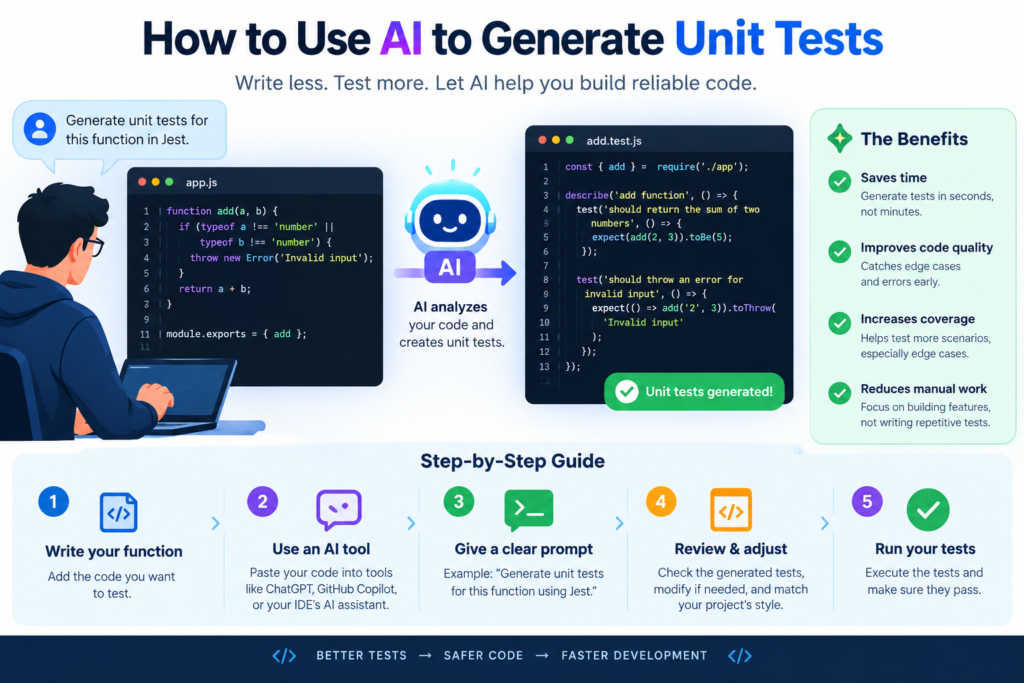
Software developers spend a lot of time writing, testing, and fixing code. Testing is important because even a small mistake can cause an application to fail. However, writing unit tests for every function can take time, especially when a project contains thousands of lines of code.
This is where AI unit test generation can help. AI-powered tools can examine source code, suggest test cases, create test scripts, and identify areas that need more testing. They can also help developers find edge cases that might be easy to miss during manual testing.
For example, imagine you’re building an online shopping website. A function calculates the final price of an order. It must handle discounts, taxes, empty carts, and invalid quantities. An AI testing tool can suggest tests for these situations and help you build a stronger test suite.
Still, AI isn’t a replacement for developers or quality assurance teams. Generated tests may contain incorrect assumptions, miss important business rules, or repeat the same mistakes as the original code. Human review remains essential.
In this guide, you’ll learn how to generate tests with AI, select suitable tools, improve code coverage, and use automated testing to build more reliable software.
1. What Is AI Unit Test Generation?
AI unit test generation is the process of using artificial intelligence to create tests for individual units of software, such as functions, methods, or small classes.
A unit test checks whether a specific piece of code behaves as expected. Developers usually provide an input and compare the actual result with the expected result.
AI coding tools can study code, identify possible inputs, and suggest test cases. Depending on the tool, they may also generate test files, execute tests, and help explain failures.
How Does AI-Assisted Unit Testing Work?
The process often follows these steps:
- Analyze the code: The tool examines a function, its inputs, and its dependencies.
- Identify test scenarios: It suggests normal inputs, invalid values, and unusual conditions.
- Generate test code: It creates tests using a suitable testing framework.
- Run the tests: The developer or automated system executes the generated tests.
- Review the results: The team checks failures, incorrect assumptions, and missing cases.
- Improve the test suite: Developers add useful tests and remove redundant ones.
For instance, consider a function that divides two numbers. A basic test might check whether dividing 10 by 2 returns 5. More complete tests would examine division by zero, negative numbers, decimal values, and invalid input types. AI can help create these scenarios faster.
AI Testing vs. Traditional Testing
|
Feature |
Traditional Testing |
AI-Assisted Testing |
|
Test creation |
Mostly manual |
AI suggestions with human review |
|
Edge-case discovery |
Depends on developer experience |
Can suggest additional scenarios |
|
Test execution |
Manual or automated |
Manual or automated |
|
Debugging support |
Developer-led |
AI may explain failures |
|
Test maintenance |
Requires regular updates |
AI can suggest updates |
|
Reliability |
Depends on test design |
Depends on test design and review |
Both approaches can work together. Traditional testing provides proven methods, while AI can reduce repetitive work and help developers explore more scenarios.
Where Is AI Unit Test Generation Useful?
AI-assisted testing can be useful when:
- A project has many functions that need tests.
- Developers are working with unfamiliar code.
- Existing tests don’t cover important conditions.
- A team wants to automate repetitive testing tasks.
- Legacy code needs stronger test coverage.
- Developers want to improve their development testing process.
The main goal isn’t to produce the largest possible number of tests. It’s to create useful tests that detect real problems and protect important behavior.
2. Why Code Coverage Matters in Software Development
Code coverage measures how much of a program is executed when tests run. It helps developers understand which parts of the code have been tested and which areas may need more attention.
Code coverage improvement is an important part of software quality assurance because untested code can hide defects. However, high coverage doesn’t automatically mean an application is free from bugs.
Types of Code Coverage
Different coverage metrics provide different views of a test suite.
|
Coverage Type |
What It Measures |
Example |
|
Line coverage |
Lines executed during tests |
80 of 100 lines run |
|
Statement coverage |
Executed program statements |
Most statements are tested |
|
Branch coverage |
Decision outcomes tested |
Both sides of an if condition run |
|
Function coverage |
Functions called by tests |
18 of 20 functions are tested |
|
Condition coverage |
Boolean conditions evaluated |
True and false outcomes are checked |
Each metric has a purpose. Line coverage is easy to understand, while branch coverage can reveal missing tests for important decision paths.
Why High Coverage Isn’t Enough
Suppose a function calculates a discount:
def calculate_discount(price, discount): return price – (price * discount / 100)
A test might verify that a price of 100 with a discount of 10 returns 90.
This test executes every line in the function. The line coverage may therefore be 100%.
However, several questions remain:
- What happens when the price is negative?
- What happens when the discount exceeds 100%?
- Should a discount below zero be allowed?
- How should invalid input be handled?
The code has been executed, but its behavior hasn’t been fully examined.
This is why AI code testing should focus on meaningful test cases, not just coverage percentages.
How AI Helps Find Coverage Gaps
AI testing tools can review existing tests and suggest missing scenarios. For example, they may identify a conditional statement that has only been tested for one outcome.
They can also recommend tests for:
- Empty or missing values.
- Boundary values.
- Invalid data types.
- Large inputs.
- Unexpected combinations of inputs.
- Error handling and exceptions.
A developer can then run a coverage report to confirm whether the new tests execute previously untested lines or branches.
Set a Realistic Coverage Target
A useful coverage target depends on the project.
For example, a team might aim for high branch coverage in payment processing while using a more flexible target for simple display code. Critical business logic deserves more attention than code with little impact on application behavior.
Rather than chasing 100% coverage everywhere, focus on meaningful tests, high-risk functions, and important user journeys.
3. How AI Generates Unit Tests Automatically
AI software testing combines code analysis, pattern recognition, test generation, and feedback from test execution. The exact process varies between tools.
Some tools generate tests from source code. Others use an existing test suite, project documentation, execution results, or code changes to suggest additional tests.
Step 1: Analyze the Source Code
First, provide the AI tool with the function or module you want to test.
For example:
def is_eligible_for_discount(total): return total >= 100
The tool can identify that the function accepts a numeric value and returns a Boolean result.
However, it may not know whether negative totals are allowed or whether the business requires a different threshold. Developers should provide this context.
Step 2: Define the Expected Behavior
Clear requirements help the AI generate better tests.
You could explain that customers qualify for a discount when their order total is at least 100 and that negative totals must be rejected.
The tool can then generate cases for:
- A total below 100.
- A total equal to 100.
- A total above 100.
- A negative total.
- An invalid input, if the function is expected to reject it.
This approach makes the generated tests more relevant to real requirements.
Step 3: Generate Test Cases
AI tools can turn these scenarios into tests using frameworks such as pytest for Python or JUnit for Java.
For example:
def test_discount_below_threshold(): assert is_eligible_for_discount(50) is Falsedef test_discount_at_threshold(): assert is_eligible_for_discount(100) is Truedef test_discount_above_threshold(): assert is_eligible_for_discount(150) is True
These tests check three important cases.
Notice that they don’t test negative values or invalid input. Those cases still need attention if the requirements demand them.
Step 4: Execute the Tests
Generated code should be executed in a suitable development or testing environment.
Running tests can reveal syntax errors, missing dependencies, incorrect assumptions, and unexpected behavior.
AI may also help explain why a test failed. However, a failure doesn’t always mean the original code is wrong. The test itself may contain an incorrect expectation.
Step 5: Refine the Test Suite
Once the tests run, examine their value.
Ask:
- Does each test check a distinct behavior?
- Are the expected results correct?
- Are important boundary conditions covered?
- Could a test pass even when the function is broken?
- Are the tests stable and repeatable?
This feedback loop is central to effective unit testing automation.
Step 6: Add Tests to the Development Workflow
After review, save the tests in the project’s test directory. Run them locally and, where appropriate, through a continuous integration pipeline.
This makes testing part of the normal development lifecycle rather than a task left until the end.
4. AI Unit Test Generator Tutorial: A Practical Example
Let’s build a small example to understand how developers can generate tests with AI.
We’ll use Python and pytest. The same general method can be applied to other programming languages and testing frameworks.
Step 1: Write the Function
Imagine you’re building a shopping application. The function below calculates a final price after applying a percentage discount.
def calculate_final_price(price, discount): if price < 0: raise ValueError(“Price cannot be negative”) if discount < 0 or discount > 100: raise ValueError(“Invalid discount”) return price – (price * discount / 100)
The function checks that the price isn’t negative and that the discount stays between 0 and 100.
Step 2: Ask AI to Generate Test Cases
Use a clear prompt like this:
Review the Python function calculate_final_price. Generate pytest unit tests for normal inputs, zero discount, full discount, decimal prices, negative prices, discounts below zero, and discounts above 100. Use pytest.raises to test expected ValueError exceptions. Do not change the function. Explain any assumptions before generating the tests.
This prompt describes the required behavior and tells the tool how to handle invalid input.
Step 3: Review the Generated Tests
A suitable test suite could look like this:
import pytestdef test_normal_discount(): assert calculate_final_price(100, 10) == 90def test_zero_discount(): assert calculate_final_price(100, 0) == 100def test_full_discount(): assert calculate_final_price(100, 100) == 0def test_decimal_price(): assert calculate_final_price(50.5, 10) == 45.45def test_negative_price(): with pytest.raises(ValueError): calculate_final_price(-10, 10)def test_negative_discount(): with pytest.raises(ValueError): calculate_final_price(100, -5)def test_discount_above_100(): with pytest.raises(ValueError): calculate_final_price(100, 110)
These tests cover ordinary use, boundary conditions, and expected errors.
For financial applications, consider using Decimal instead of floating-point arithmetic. Floating-point values can produce small rounding differences, so production systems need suitable precision and rounding rules.
Step 4: Install and Run pytest
Install the testing framework:
pip install pytest
Save the function in pricing.py and the tests in test_pricing.py. Then run:
pytest -v
The command executes the tests and displays their results.
Step 5: Check Code Coverage
Install the coverage plugin:
pip install pytest-cov
Run:
pytest –cov=pricing –cov-report=term-missing
The report shows how much of pricing.py was executed and identifies missing lines.
If you want a more detailed view, generate an HTML report:
pytest –cov=pricing –cov-report=html
Open the generated coverage report in your browser to inspect the results.
Step 6: Improve the Tests
Even if the report shows 100% line coverage, ask whether all relevant behavior is tested.
You might add tests for:
- A price of zero.
- Integer and decimal input combinations.
- Invalid strings or None, if those inputs are possible.
- Expected rounding behavior.
- Very large values, if the application supports them.
Only add cases that match the function’s intended behavior. For example, testing a string input is useful if the application must reject it gracefully, but the function’s type requirements should be clear first.
This tutorial demonstrates how to use AI to generate unit tests automatically while keeping developers responsible for correctness.
5. Best AI Testing Tools for Code Coverage Improvement
The best AI testing tools depend on your programming language, development environment, security requirements, and budget.
Some tools help developers write tests through code suggestions. Others specialize in automated test generation, regression testing, or testing workflows.
The following examples are established tools and platforms worth evaluating. Features, pricing, and language support may change, so verify current documentation before choosing one.
|
Tool |
Main Use |
Potential Benefit |
|
GitHub Copilot |
AI-assisted coding and test suggestions |
Generate and refine unit tests in the development environment |
|
Qodo |
AI code review and testing assistance |
Help identify test scenarios and improve test quality |
|
Diffblue Cover |
Java unit test generation |
Generate tests for supported Java codebases |
|
JetBrains AI Assistant |
IDE-based coding support |
Assist with test creation and code explanations |
|
CodiumAI |
Historical product name |
Check current Qodo product documentation for the relevant capabilities |
|
pytest-cov |
Python coverage reporting |
Measure executed code and identify missing lines |
How to Choose the Right Tool
Before adopting an AI unit test generator, consider the following factors.
- Language and framework support : Choose a tool that works with your programming language and existing test framework. A Java-focused tool may not be suitable for a Python project.
- Quality of generated tests : Test generation should produce clear assertions, realistic inputs, and meaningful edge cases. Don’t judge a tool only by the number of tests it creates.
- Coverage reporting : Some tools generate tests but don’t provide detailed coverage reports. You may need a separate coverage tool to measure progress.
- Integration with development tools : Consider whether the tool works with your IDE, repository, build system, and continuous integration pipeline.
- Security and privacy : Review how the vendor handles source code, prompts, logs, and proprietary data. Follow company policies before sending code to external AI services.
- Cost and maintenance : Compare subscription costs, usage limits, setup time, and the effort required to maintain generated tests.
For a beginner working with Python, pytest and pytest-cov provide a straightforward starting point. An AI coding assistant can then help create and refine tests. For larger teams, evaluate how AI fits into existing quality engineering practices rather than replacing the entire testing process.
6. Nine Powerful Strategies to Improve Code Coverage With AI
AI can help developers increase code coverage, but the best results come from a structured process. These nine strategies provide a practical starting point.
Strategy 1: Focus on Untested Code First
Run a coverage report before generating tests. Identify files, functions, and branches with low coverage. This prevents unnecessary work on code that’s already well tested.
Strategy 2: Test Boundary Values
Many bugs occur at the edges of accepted input ranges.
For a function that accepts values from 1 to 100, test 1, 100, values outside the range, and values just below or above the boundaries.
Ask AI to suggest boundary cases based on the function’s documented rules.
Strategy 3: Cover Error Handling
Developers sometimes test successful outcomes but forget failure scenarios.
Ask AI to identify conditions that could raise exceptions, return error responses, or trigger fallback behavior.
Then confirm that the tests reflect the application’s actual requirements.
Strategy 4: Generate Tests for Changed Code
When a developer changes a function, use AI to suggest tests related to that change.
This supports regression testing by checking that new behavior works and existing behavior remains intact.
However, changed-code tests shouldn’t replace the full test suite when broader regressions are possible.
Strategy 5: Use Parameterized Tests
When several inputs follow the same rule, parameterized tests can reduce duplication.
For example, pytest supports testing multiple discount values through one test function:
import pytest@pytest.mark.parametrize( “price, discount, expected”, [ (100, 0, 100), (100, 10, 90), (100, 50, 50), (100, 100, 0), ],)def test_calculate_final_price(price, discount, expected): assert calculate_final_price(price, discount) == expected
This approach makes test cases easier to maintain and expand.
Strategy 6: Combine AI With Mutation Testing
Mutation testing makes small changes to code to check whether tests detect them.
For example, it may change a comparison from >= to >. If the test suite still passes, a useful boundary test may be missing.
Tools such as mutmut can help evaluate whether tests detect certain code changes.
Mutation testing complements coverage reports because it examines whether tests can catch some defects, not merely whether code runs.
Strategy 7: Test Business Rules Explicitly
AI can misunderstand business requirements when it sees code without context.
Provide clear rules for calculations, permissions, discounts, account access, or data validation.
Review generated assertions against those rules instead of assuming that the AI’s expected results are correct.
Strategy 8: Automate Testing in CI/CD
Run unit tests whenever code is committed or a pull request is opened.
A continuous integration pipeline can report failed tests and coverage changes before code is merged.
Use sensible thresholds and avoid blocking every change because of a tiny coverage fluctuation.
Strategy 9: Review and Remove Weak Tests
More tests aren’t always better.
Remove duplicate tests, unclear assertions, and tests that depend on unstable external services when they should be isolated unit tests.
A smaller suite of meaningful tests can be more useful than a large suite that creates false confidence.
7. Benefits of AI-Powered Software Testing
AI software testing can support faster development, better test coverage, and more consistent testing practices.
Faster Test Creation
Writing tests manually can be repetitive. AI can generate an initial draft, leaving developers to focus on requirements, review, and difficult edge cases.
The time saved depends on code complexity and the quality of the generated tests.
Better Edge-Case Discovery
AI may suggest inputs and execution paths that developers haven’t considered.
This is particularly useful when reviewing unfamiliar code or working with functions that have many conditions.
Improved Software Reliability
A strong test suite can catch regressions before they reach users. When AI helps developers add useful tests, it can contribute to software reliability and application stability.
However, reliability still depends on good design, appropriate testing, monitoring, and careful release practices.
More Consistent Testing
Teams can use shared prompts, coding standards, and review rules to encourage consistent test structure.
This helps new developers understand how tests should be written and maintained.
Support for Legacy Code
Legacy systems often have incomplete documentation and few tests.
AI can help explain code and suggest an initial test suite. Developers should verify the existing behavior before refactoring, particularly when the code contains undocumented business rules.
Stronger Collaboration Between Developers and QA
AI can support collaboration by producing candidate tests for review by developers and QA engineers.
This doesn’t remove the need for dedicated testing expertise. Instead, it gives the team more opportunities to discuss requirements, expected behavior, and risk.
8. Challenges and Limitations of AI Unit Test Generation
Despite its advantages, AI-assisted testing has limitations that teams must understand.
Incorrect Test Expectations
AI may generate tests that reflect its assumptions rather than the intended business rules.
Solution: Provide clear requirements and verify expected results independently.
False Confidence From High Coverage
A report showing 95% coverage doesn’t mean 95% of possible bugs have been found.
Coverage measures execution, not complete correctness.
Solution: Combine coverage analysis with code review, boundary testing, mutation testing, and requirement-based tests.
Repetitive or Low-Value Tests
Some AI tools may generate multiple tests that check almost the same behavior.
Solution: Review each test and retain cases that protect meaningful requirements.
Fragile Tests
Generated tests can depend on implementation details, unstable data, or external services. Such tests may fail after harmless code changes.
Solution: Prefer stable assertions and isolate dependencies where appropriate.
Security and Privacy Risks
Source code may contain confidential business logic, credentials, or customer information.
Solution: Use approved tools, remove secrets from prompts, and follow organizational security rules.
Increased Maintenance
AI-generated tests need updates when requirements change. Poorly maintained tests can slow development rather than improve it.
Solution: Treat generated tests as production code. Review them, maintain them, and remove obsolete cases.
Overreliance on AI
AI can help with test creation, but it doesn’t understand every business context or guarantee that the application behaves correctly.
Solution: Keep developers responsible for requirements, test quality, and final approval.
9. Testing Best Practices for an Effective AI Developer Workflow
To gain lasting value from AI testing tools, integrate them into a clear development process.
Start With Clear Requirements
Write down what each function should do, including valid inputs, invalid inputs, and expected errors. AI-generated test cases are more useful when the requirements are precise.
Follow Test-Driven Development Where Appropriate
Test-driven development (TDD) generally follows a cycle:
- Write a test that describes expected behavior.
- Run it and confirm that it fails for the intended reason.
- Implement the required code.
- Run the tests again.
- Refactor while keeping the tests passing.
AI can assist with writing candidate tests, but developers should verify that each test represents the requirement rather than the current implementation.
Keep Unit Tests Isolated
A unit test should usually focus on a small piece of code. If a test requires a real database, external API, or live payment service, it may be closer to an integration test.
Use mocks or test doubles when appropriate, but don’t mock so much that the test stops checking meaningful behavior.
Review AI-Generated Code
Before accepting generated tests, check that they:
- Use correct assertions.
- Test expected business rules.
- Cover relevant boundary conditions.
- Handle exceptions properly.
- Avoid exposing confidential information.
- Don’t rely on unpredictable external systems.
Measure More Than Coverage
Track failed tests, escaped defects, flaky tests, test execution time, and the risks associated with important code paths.
These measurements provide a broader picture of software quality than a single percentage.
Use Official Documentation
Testing frameworks and AI tools change over time. Use official documentation to verify supported features and recommended usage.
Useful resources include:
These resources explain testing and development workflows that can support an effective AI-assisted approach.
AI unit test generation offers developers a practical way to reduce repetitive testing work and identify gaps in existing test suites. It can help create test cases, explore edge conditions, support regression testing, and improve code coverage.
However, AI-generated tests are only useful when they reflect the application’s actual requirements. Developers must review the results, verify assertions, and maintain the test suite as the code changes.
Start with a small function, use a suitable testing framework, and measure coverage before and after adding tests. Then expand the process to more important modules and integrate reviewed tests into your development workflow.
The goal isn’t simply to generate more tests. It’s to build a stronger testing process that supports better code quality, software reliability, and long-term application stability.
Know More:
”FAQs”
1. How to use AI to generate unit tests automatically?
Start by providing the AI tool with your source code, testing framework, and expected behavior. Ask it to generate normal cases, boundary conditions, and error scenarios. Review the output, run the tests, and check coverage using a tool such as pytest-cov.
2. Can AI improve code coverage?
Yes. AI can suggest tests for untested lines, conditional branches, and edge cases. However, developers must verify that the generated tests are correct and meaningful. Increasing coverage alone doesn't guarantee better software quality.
3. What are the best AI tools for code coverage improvement?
The right tool depends on your programming language and workflow. GitHub Copilot and Qodo can assist with coding and testing tasks, while Diffblue Cover focuses on Java unit test generation. Tools such as pytest-cov measure Python code coverage. Compare current features before selecting a solution.
4. Are AI-generated test cases reliable?
They can be useful, but they aren't always correct. AI may misunderstand requirements, produce weak assertions, or miss unusual cases. Review every generated test and validate its expected results before relying on it.
5. Can beginners use AI for software testing?
Yes. Beginners can use AI to learn testing concepts, create sample tests, and understand test failures. Starting with a simple function and a framework such as pytest is a practical way to learn. Beginners should also study assertions, exceptions, boundary testing, and coverage reports.
6. Does 100% code coverage mean an application is bug-free?
No. A test suite can execute every line and still miss incorrect results, security problems, race conditions, or misunderstood requirements. Code coverage is a useful measurement, but it should be combined with other testing methods.
7. Can AI automate the entire software testing process?
AI can automate parts of test creation, execution, and analysis, depending on the tools used. However, full testing also involves requirements analysis, integration testing, security testing, usability checks, and release decisions. Human oversight remains important.
8. How can developers integrate AI unit testing into CI/CD?
Developers can use AI to draft tests and then add reviewed tests to their repository. Configure the CI/CD pipeline to run the test suite on commits or pull requests, publish coverage reports, and enforce reasonable quality checks. Generated tests should be reviewed before being merged.