

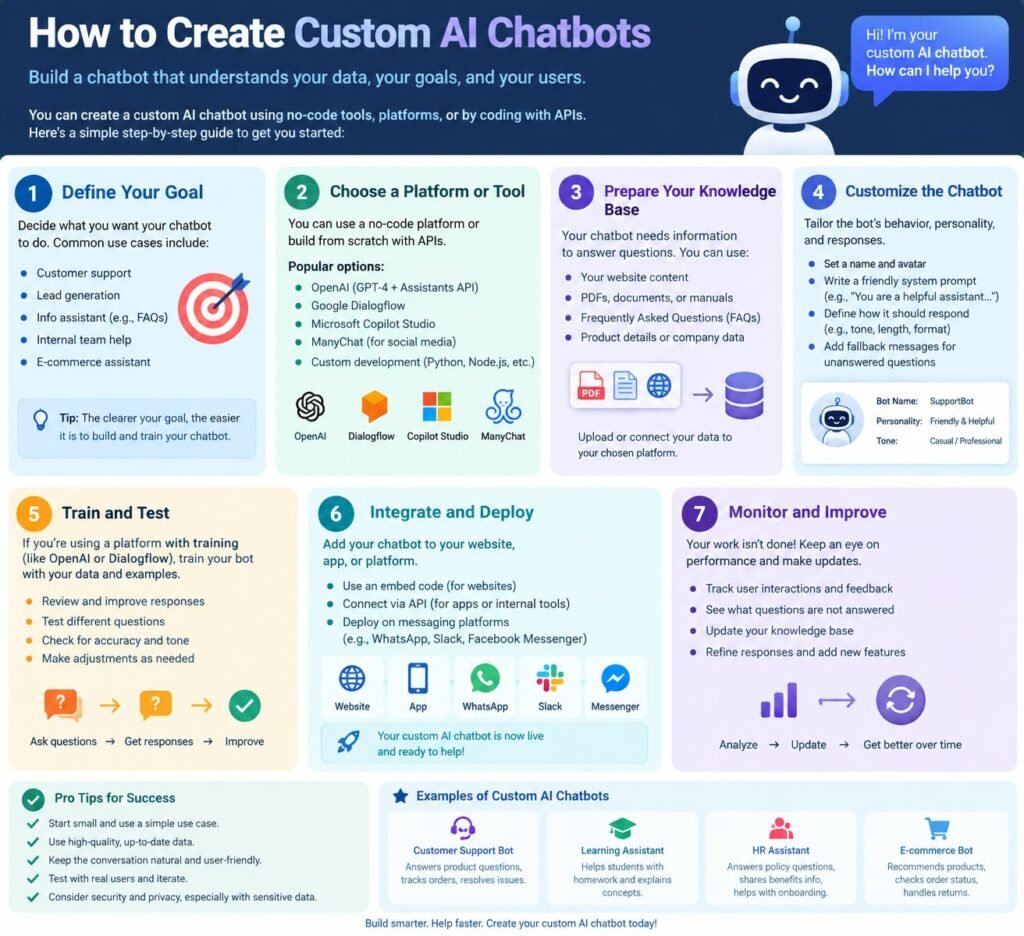
How to Create Custom AI Chatbots for Your Website: Top Beginner’s Guide 2026
Building a custom AI chatbot for your website can help you answer customer questions, guide visitors, collect leads, and provide support 24/7. You don’t need to build everything from scratch, either. Modern AI tools, large language models, chatbot APIs, and no-code platforms make AI chatbot development much easier than it used to be.
A well-designed AI chatbot for a website can understand natural language, search your business information, remember conversation context, and provide useful answers. With the right setup, your chatbot can work like an AI virtual assistant for your website.
This guide explains how to create an AI chatbot for a website, how LLMs and RAG work, what data your chatbot needs, how to integrate it with a website, and how students and beginners can build their own chatbot projects.
Overview
| Feature | What It Does |
| AI chatbot | Answers questions using artificial intelligence |
| Website chatbot | Communicates with website visitors |
| LLM chatbot | Uses a large language model to understand and generate text |
| Knowledge base | Provides business-specific information |
| RAG chatbot | Retrieves relevant information before generating an answer |
| Chatbot API | Connects the AI system with your website or application |
| Chatbot widget | Displays the chatbot interface on a website |
| AI assistant | Helps users complete tasks or find information |
| Chatbot automation | Handles repetitive customer conversations |
How to Create Custom AI Chatbots for Your Website and What Is an AI Chatbot?
An AI chatbot is software that uses artificial intelligence to communicate with people through text or, in some cases, voice. Unlike a basic rule-based chatbot, an AI-powered chatbot can understand natural language and generate responses based on the user’s question.
For example, a traditional chatbot may require a user to select:
- Sales
- Support
- Pricing
- Contact us
An intelligent chatbot can understand a question such as:
“How much does your premium plan cost, and what features are included?”
It can then search the available information and provide an answer.
Modern chatbots often use natural language processing (NLP), machine learning, and large language models to understand user messages.
A website chatbot can be used for:
- Customer support
- Product recommendations
- Lead generation
- FAQ answers
- Appointment booking
- Course information
- Technical support
- Sales assistance
- Internal knowledge search
- Student assistance
The key difference is customization.
A generic AI chatbot knows general information. A custom AI chatbot can be designed around your website, business, products, services, documents, and customer needs.
How to Create Custom AI Chatbots for Your Website and How Does an AI Chatbot Work?
Understanding the basic workflow makes chatbot development much easier.
A typical AI chatbot follows this process:
User question → chatbot interface → backend → AI model → knowledge retrieval → response → user
For example, imagine a user asks:
“Do you provide a refund for online courses?”
The chatbot receives the question. It then identifies the user’s intent and searches its knowledge base for the relevant refund policy.
If the chatbot uses a RAG-based chatbot system, it retrieves relevant information before generating the final response.
The response may then be:
“Yes. Refunds are available within 7 days of purchase, subject to the conditions listed in our refund policy.”
The main technologies involved can include:
Natural Language Understanding
Natural language understanding helps the system understand what the user means.
Intent Recognition
Intent recognition identifies the purpose of a question.
For example:
- “What is the price?” → Pricing intent
- “How can I contact you?” → Contact intent
- “Where is my order?” → Order tracking intent
Large Language Models
A large language model can understand context and generate natural-sounding responses.
This is why an LLM chatbot can handle many different ways of asking the same question.
Knowledge Retrieval
A chatbot with a knowledge base can search relevant information before responding.
This approach is especially useful for businesses with large amounts of content.
How to Create Custom AI Chatbots for Your Website and Why Create a Custom AI Chatbot for a Website?
A custom AI chatbot for a website gives you much more control than a generic chatbot.
1. 24/7 Customer Support
Your chatbot doesn’t need to sleep or take breaks.
Visitors can ask questions at any time.
2. Faster Answers
Users don’t have to search through dozens of pages to find basic information.
3. Better Website Engagement
An interactive chatbot can encourage visitors to stay longer and explore more pages.
4. Lead Generation
Your chatbot can ask visitors for:
- Name
- Phone number
- Company
- Requirements
This can turn website conversations into business leads.
5. Lower Support Workload
An AI customer support chatbot can answer repetitive questions before a human agent becomes involved.
6. Personalized Conversations
A chatbot can provide different responses based on the user’s needs, previous messages, or selected products.
7. Better Customer Experience
Visitors can receive immediate help instead of waiting for an email response.
How to Plan Your AI Chatbot
Before you start coding, define what your chatbot should actually do.
This is one of the most important parts of custom chatbot development.
Start with the following questions:
Who Will Use the Chatbot?
Your audience could include:
- Customers
- Students
- Employees
- Website visitors
- Existing clients
- Sales prospects
What Problems Should It Solve?
Don’t try to make your chatbot do everything on day one.
Choose a clear purpose.
For example:
E-commerce: Product questions and order support
Education: Course information and student questions
Healthcare: General information and appointment assistance
SaaS: Product support and documentation
Corporate website: Lead generation and FAQs
What Questions Will Users Ask?
Create a list of 50–100 common questions.
This list will help you create the chatbot’s knowledge base and test its responses.
Choose the Right AI Model
The AI model is the brain behind your chatbot.
For modern applications, developers often use an LLM through an API.
An AI chatbot using LLM technology can understand more complex questions than traditional rule-based systems.
Depending on your requirements, you may use:
- Commercial LLM APIs
- Open-source language models
- Cloud AI platforms
- Specialized AI models
The right choice depends on:
- Cost
- Response quality
- Speed
- Privacy requirements
- Context length
- API availability
- Development complexity
If you’re learning, start with an API-based solution rather than building a language model from zero.
Create a Chatbot Knowledge Base
One of the biggest advantages of a custom chatbot is that you can give it your own information.
Your chatbot knowledge base may contain:
- Website pages
- FAQs
- Product descriptions
- PDF documents
- Help articles
- Company policies
- Course material
- Manuals
- Pricing information
- Support documentation
For example, an education website could create an AI chatbot with information about courses, admission requirements, fees, exams, and study material.
What Is RAG?
Retrieval augmented generation, commonly called RAG, is a popular method for building useful knowledge-based chatbots.
A RAG chatbot doesn’t rely only on the model’s existing knowledge.
Instead, it:
- Receives a user question.
- Converts the question into a searchable representation.
- Searches relevant information.
- Retrieves useful documents.
- Sends the relevant content to the LLM.
- Generates a response using that information.
This can make the chatbot more useful for private or frequently updated information.
Embeddings and Vector Databases
RAG systems often use embeddings to represent text as numerical vectors.
These vectors can be stored in a vector database.
When a user asks a question, the system searches for content with similar meaning. This allows the chatbot to find relevant information even when the user’s wording doesn’t exactly match the original document.
Build the Chatbot Backend
The backend controls the main chatbot logic.
It can manage:
- User messages
- API requests
- AI responses
- Conversation history
- Authentication
- Knowledge retrieval
- Database operations
- Rate limits
- Security
Popular programming options include:
- Python
- JavaScript
- Node.js
- PHP
- Java
A beginner can start with a simple AI chatbot with Python or AI chatbot with JavaScript project.
Basic Backend Flow
A simple architecture may look like this:
Website Visitor
↓
Chatbot Widget
↓
Website Backend
↓
Chatbot API
↓
Knowledge Base
↓
LLM
↓
Generated Response
↓
Website Visitor
Your backend should also protect API keys. Never expose private API credentials directly inside browser-side JavaScript.
Build the Chatbot Frontend
The frontend is what the visitor sees. A basic chatbot interface usually includes:
- Chat window
- Message area
- Text input
- Send button
- Loading indicator
- Welcome message
- Error message
You can build a chatbot UI using HTML, CSS, and JavaScript.
A simple website chatbot might appear as a small button in the bottom-right corner of the screen. When the visitor clicks it, the chatbot window opens. This is commonly called a chatbot widget.
How to Add an AI Chatbot to a Website
There are several ways to connect an AI chatbot to a website.
Method 1: JavaScript Widget
You can create a JavaScript chatbot widget and add its script to your website.
This is useful when you want complete control over the design.
Method 2: API Integration
Your website can communicate with your chatbot backend through an API.
This method gives developers more flexibility.
Method 3: Plugin or No-Code Builder
Many platforms provide ready-made chatbot widgets.
You configure the chatbot and paste a small script into your website.
Method 4: Custom Application
For complex projects, you can build the complete chatbot system yourself.
This approach gives maximum control but requires more development work.
How to Create an AI Chatbot Using an API
An API-based chatbot connects your application to an AI service.
The general process is:
- Create an AI platform account.
- Generate API credentials.
- Create your backend application.
- Send user messages to the AI API.
- Receive the model response.
- Display the response in your chatbot interface.
- Add your knowledge base if required.
- Test the system.
- Deploy it.
For developers using OpenAI, the official API documentation is a useful starting point.
Customize the Chatbot’s Personality
A custom chatbot shouldn’t sound random.
Use prompt engineering to define how the chatbot should communicate.
You can specify:
- Tone
- Language
- Response length
- Brand personality
- Allowed topics
- Restricted topics
- Escalation rules
- Formatting rules
For example, a college chatbot might be instructed to:
- Use simple English.
- Give short answers.
- Avoid making unsupported claims.
- Direct students to official admission pages.
- Ask clarifying questions when necessary.
This makes the AI assistant more consistent.
Train an AI Chatbot With Custom Data
People often ask how to train an AI chatbot for a website.
In many cases, you don’t need to train the underlying LLM from scratch.
Instead, you can connect the chatbot to your own information using a knowledge base and RAG.
You can:
- Collect your documents.
- Clean the information.
- Split documents into smaller sections.
- Create embeddings.
- Store them in a vector database.
- Search relevant content.
- Send retrieved content to the LLM.
- Generate the answer.
This approach is often easier and more practical than building a custom language model.
Test Your AI Chatbot
Testing is essential before deployment.
Create test questions that represent real users.
Test:
- Simple questions
- Complex questions
- Misspelled words
- Follow-up questions
- Unclear questions
- Out-of-scope questions
- Questions with multiple meanings
- Questions in different languages
Also test what happens when the chatbot doesn’t know an answer.
A good chatbot shouldn’t confidently invent information.
Instead, it can say:
“I don’t have enough information to answer that accurately. Please contact our support team.”
This helps reduce hallucinations.
Improve AI Chatbot Responses
If your chatbot gives poor answers, don’t immediately assume the AI model is the problem.
Check the entire system. Possible causes include:
- Poor knowledge base
- Incorrect documents
- Weak prompts
- Bad retrieval
- Missing context
- Poor chunking
- Incorrect API settings
- Limited conversation history
You can improve the system through better prompt engineering, cleaner data, stronger retrieval, and better testing.
No-Code AI Chatbot Development
You don’t always need programming knowledge.
A no-code AI chatbot builder can help beginners create a website chatbot using visual tools.
Typical steps include:
- Choose an AI chatbot platform.
- Add your website or documents.
- Configure chatbot instructions.
- Customize the chatbot appearance.
- Test conversations.
- Copy the website integration code.
- Publish the chatbot.
No-code tools are useful for small businesses and beginners.
However, custom development gives you greater control over:
- APIs
- Database connections
- Authentication
- User profiles
- Advanced workflows
- CRM integration
- Custom UI
- Business logic
AI Chatbot Projects for Students
An AI chatbot project for students can be an excellent way to learn AI development.
Students can build projects such as:
1. College Admission Chatbot
Answer questions about:
- Courses
- Fees
- Eligibility
- Admission dates
- Documents
2. Student Study Assistant
Create an AI assistant that explains study material and answers questions.
3. College Website Chatbot
Build a chatbot that answers common questions from college website content.
4. Document Question-Answering Bot
Create a chatbot that answers questions from uploaded PDFs.
5. AI Career Assistant
Build a chatbot that suggests career paths based on student interests.
6. RAG-Based Educational Chatbot
Use documents, embeddings, a vector database, and an LLM to build a knowledge-based chatbot.
These are useful AI project ideas for students, final-year projects, and chatbot mini projects.
Technologies Students Can Learn
A beginner chatbot development project can use:
- HTML
- CSS
- JavaScript
- Python
- APIs
- Databases
- LLMs
- Embeddings
- Vector databases
- RAG
Students can begin with a simple AI chatbot with HTML CSS JavaScript and later add a Python backend and AI API. This provides a practical path for anyone who wants to learn chatbot development.
How Much Does It Cost to Build an AI Chatbot?
The cost of building an AI chatbot depends on its complexity.
| Chatbot Type | Typical Complexity |
| Basic FAQ chatbot | Low |
| No-code AI chatbot | Low to Medium |
| Custom website chatbot | Medium |
| LLM chatbot | Medium |
| RAG chatbot | Medium to High |
| Enterprise AI assistant | High |
| Custom AI agent | High |
The main costs may include:
- AI API usage
- Hosting
- Database
- Vector database
- Development
- UI design
- Security
- Maintenance
- Third-party integrations
A small chatbot can be inexpensive, while an enterprise custom AI chatbot development project can require a significant budget.
Common AI Chatbot Development Mistakes
Avoid these common mistakes when you build an AI chatbot.
1. Trying to Do Everything
Start with a focused purpose.
2. Using Poor Data
Your chatbot can only provide reliable knowledge if the source information is reliable.
3. Ignoring Security
Protect API keys and user information.
4. Not Testing Real Questions
Test the questions your actual users ask.
5. No Human Escalation
Some conversations need a real person.
Give users an option to contact human support.
6. Making the Chatbot Too Long
Users usually want direct answers. Keep responses useful and easy to scan.
7. Ignoring Mobile Users
Your chatbot interface should work well on smartphones.
8. Not Measuring Results
Track useful metrics such as:
- Conversations
- Successful answers
- Leads
- Escalations
- User satisfaction
- Conversion rate
Best Practices for a Website AI Chatbot
Follow these practical rules:
- Keep the chatbot focused.
- Use reliable business data.
- Write clear system instructions.
- Test before launch.
- Protect API credentials.
- Add human support.
- Monitor conversations.
- Update your knowledge base.
- Optimize mobile UX.
- Measure chatbot performance.
- Tell users when they are talking to AI.
- Avoid unsupported claims.
A good AI chatbot for websites isn’t simply an AI model connected to a chat box. It’s a complete system made up of data, prompts, retrieval, APIs, frontend design, backend logic, security, and testing.
Creating a custom AI chatbot for your website is now accessible to businesses, developers, and students. You don’t need to build a large AI model from scratch to create a useful solution.
”FAQs”
What is an AI chatbot?
An AI chatbot is software that uses artificial intelligence to understand user messages and generate responses. Modern chatbots may use NLP, machine learning, and large language models.
How do AI chatbots work?
AI chatbots receive a user's message, analyze its meaning, retrieve relevant information when needed, and generate a response using an AI model.
How do I create an AI chatbot for a website?
You can create one by choosing an AI model, building or selecting a backend, connecting a chatbot API, creating a chat interface, adding your knowledge base, testing responses, and embedding the chatbot into your website.
Can I create an AI chatbot without coding?
Yes. No-code AI chatbot builders allow beginners to create website chatbots without writing much code. However, custom coding provides more control.
How do I add ChatGPT to a website?
You generally need to use an appropriate AI API or chatbot platform, connect it to your website backend, build a chat interface, and configure the system according to your requirements.
What is an LLM chatbot?
An LLM chatbot uses a large language model to understand and generate natural-language responses. It can handle more flexible conversations than many traditional rule-based chatbots.
What is a RAG chatbot?
A RAG chatbot combines information retrieval with generative AI. It retrieves relevant information from a knowledge base and gives that information to an LLM to help generate the response.
Can I train an AI chatbot using my documents?
Yes. You can create a chatbot with custom data by processing documents and connecting them to a retrieval system. RAG is a common approach for this.
How much does it cost to build an AI chatbot?
The cost depends on features, development time, AI API usage, hosting, data storage, integrations, security, and maintenance. A simple FAQ bot costs much less than an enterprise AI assistant.
Can students build an AI chatbot project?
Absolutely. Students can build chatbot projects using Python, JavaScript, APIs, LLMs, RAG, and databases. A document question-answering chatbot is a strong beginner project.
How can I improve AI chatbot responses?
Improve your source data, prompts, retrieval system, conversation flow, testing process, and model configuration. You should also review failed conversations and update the knowledge base.
Can an AI chatbot replace human customer support?
Usually, it should complement human support rather than replace it completely. Chatbots are excellent for repetitive questions, while complex or sensitive cases may require human agents.







Pingback: Large Language Models (LLMs) Explained: How They Work, Uses and Future
Pingback: Environmental Cost of AI : Top 7 Ways to Make AI Sustainable