1. AI and Robotics in the Workplace – Introduction
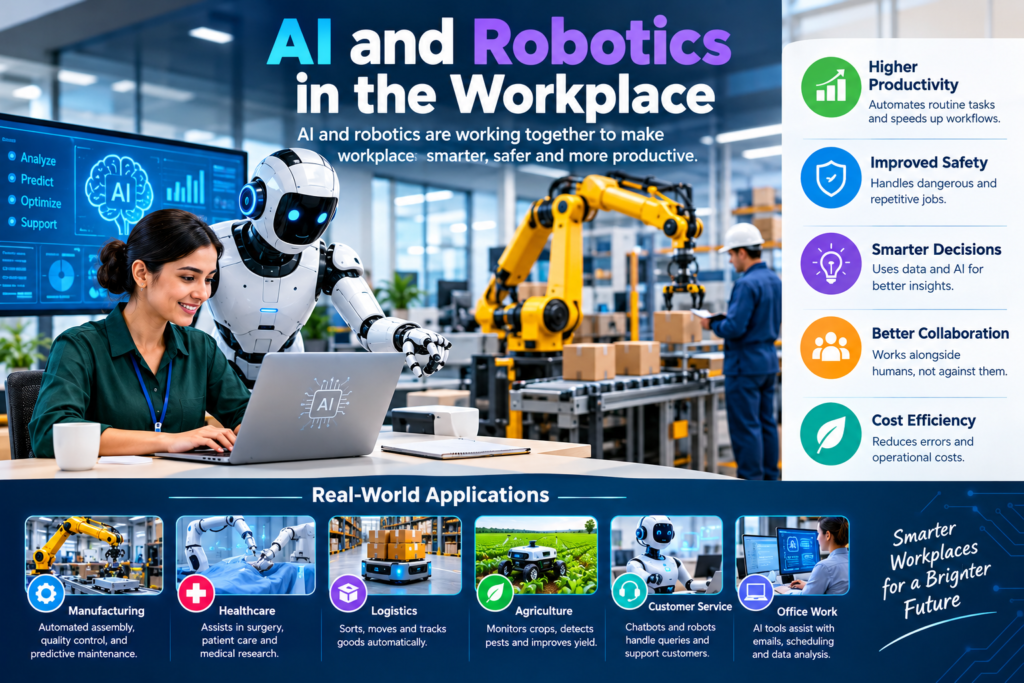
Work is changing faster than ever. Businesses now use smart software, robots, and digital tools to complete tasks that once required hours of human effort. From answering customer questions to moving goods in warehouses, technology is changing how work gets done.
AI in workplace environments helps people process information, find patterns, and make better decisions. Robotics in workplace settings helps businesses perform physical tasks with greater speed and consistency. When these technologies work together, they can create new ways to solve old problems.
This change is often called workplace automation. It can help companies save time, improve service, reduce errors, and support employees. However, it also raises important questions about jobs, privacy, safety, and the skills people will need.
The future isn’t simply about replacing people with machines. It’s about finding the right balance between human judgment and machine capability.
For example, an AI tool can review customer feedback and identify common complaints. A human employee can then decide how to respond. In a warehouse, a robot can carry heavy boxes while a worker checks product quality and handles unusual situations.
These examples show how AI and robotics can support people rather than work against them.
In the coming years, businesses that use technology responsibly may gain an advantage. Employees who learn new skills can also find better ways to work and grow their careers.
2. How AI and Robotics Are Changing Workplaces
AI and robotics are changing both office work and physical operations. They help businesses handle repeated tasks, organize information, and improve daily processes.
AI in Daily Business Tasks
AI can support many common office activities. Employees can use AI-powered productivity tools to draft emails, summarize reports, organize information, and answer routine questions.
For example, a sales team can use AI to review customer records and identify people who may be interested in a product. A support team can use AI to sort incoming questions and send simple requests to the right department.
Common uses include:
- Writing and editing business documents.
- Summarizing meetings and long reports.
- Finding patterns in sales and customer data.
- Answering common customer questions.
- Supporting recruitment and employee training.
- Helping teams plan tasks and manage schedules.
These tools don’t always produce perfect results. Employees should check important facts, protect private information, and use their own judgment before acting on AI recommendations.
Robotics in Physical Work
Robots are useful when work involves heavy lifting, repeated movements, or tasks that require high precision.
Factories use robotic arms to assemble products. Warehouses use mobile robots to move goods. Some hospitals use robotic systems to support surgery, delivery, or equipment handling.
Robotic automation can also reduce exposure to dangerous environments. A robot may inspect a hot industrial area or handle certain hazardous materials without placing a worker directly in harm’s way.
However, robots need proper setup, maintenance, and safety checks. They may also struggle with unexpected objects, changing conditions, or tasks that require flexible human judgment.
AI and Robotics Working Together
The biggest change happens when AI and robots work as one system.
AI can analyze information and help plan the next action. A robot can then carry out a physical task. Sensors provide feedback, allowing the system to respond to changing conditions.
For instance, an AI-powered warehouse system can identify which orders need attention. Mobile robots can move products to packing areas, while workers check orders and resolve problems.
This combination supports intelligent automation, where technology handles suitable tasks and people oversee the wider process.
3. Key Workplace Automation Trends
Workplace technology is moving beyond simple machines and basic software. New systems can process more information, respond to changing conditions, and support decisions.
Here are five important workplace automation trends to watch.
3.1 Intelligent Automation
Intelligent automation combines AI, software, and automated processes.
Traditional automation follows fixed rules. Intelligent automation can also use data to recognize patterns and support more flexible decisions.
For example, an automated finance system can match invoices with purchase orders. AI may flag unusual amounts for review, allowing finance staff to focus on cases that need attention.
This approach can improve speed while keeping people involved in important decisions.
3.2 Collaborative Robots
Collaborative robots, often called cobots, are designed to work near people in suitable environments.
They can help with assembly, packaging, inspection, and material handling. Depending on their design and safety controls, they may support workers without requiring the same type of setup as some traditional industrial robots.
A worker might place parts into a machine while a cobot performs a repeated fastening task. The worker can then inspect the finished product.
Cobots are especially useful when businesses need a mix of human flexibility and machine consistency. Even so, every setup needs a proper risk assessment and suitable safety measures.
3.3 AI-Powered Workplaces
Smart workplaces use connected systems to help people manage tasks and resources.
AI can help employees find company information, identify scheduling problems, or summarize project updates. Smart building systems can adjust lighting and temperature based on occupancy and operating needs.
These tools can make daily work easier, but businesses should collect only the data they need. Employees should understand what information is gathered and how it is used.
3.4 Digital Workforce
A digital workforce includes software tools and automated systems that support employees.
For example, a digital assistant may prepare a report, update records, or route a customer request. Human workers can then review the result and handle complex issues.
Some companies may describe their AI agents as AI employees. However, these systems aren’t human employees. They don’t have human judgment, responsibility, or personal experience.
Businesses should define clear limits for digital workers and assign people to supervise important activities.
3.5 Automation Across Business Functions
Workplace automation is expanding beyond manufacturing.
It now supports marketing, customer service, finance, logistics, recruitment, and IT operations. For example, marketing teams can use AI to analyze campaign performance, while IT teams can automate routine system checks.
The goal isn’t to automate everything. It’s to identify tasks where technology offers clear value without creating unnecessary risk.
4. Benefits of AI in the Workplace
The benefits of AI in the workplace can be significant when businesses choose suitable tools and introduce them carefully.
4.1 Better Workplace Productivity
AI can reduce time spent on repetitive work. Employees may complete research, prepare summaries, or organize data more quickly.
This gives people more time for activities that require creativity, communication, and problem-solving.
For example, a project manager can use AI to summarize meeting notes. Instead of spending time preparing a first draft, the manager can focus on decisions, deadlines, and team responsibilities.
Productivity gains depend on the task, the quality of the tool, and how well employees use it.
4.2 Improved Accuracy and Consistency
Automated systems can follow the same process repeatedly. This can reduce certain types of human error, especially in repetitive tasks.
For example, software can check invoices for missing fields, while robots can repeat manufacturing movements with consistent precision.
However, automation can also repeat mistakes at scale. Incorrect data, weak instructions, or faulty system settings may affect many records or products.
For that reason, businesses need regular testing, human review, and clear procedures for correcting errors.
4.3 Better Workplace Safety
Robots can handle some dangerous or physically demanding tasks.
They may carry heavy materials, inspect industrial equipment, or operate in areas with extreme temperatures. This can reduce some risks for workers.
AI systems can also help identify unusual machine behavior or detect possible maintenance problems before equipment fails.
Still, technology doesn’t remove every workplace hazard. Poorly installed robots, weak security, or inadequate training can create new risks.
4.4 Faster Customer Service
AI-powered support tools can answer common questions at any time of day. They can also direct customers to the right team.
Human support staff remain important for complaints, sensitive issues, and complex requests. A useful system makes it easy for customers to reach a person when automated support isn’t enough.
4.5 Lower Operating Costs
Automation may reduce some operating costs by saving time, reducing waste, and improving resource use.
For example, a warehouse may use robots to move goods more efficiently. A finance team may automate data entry to reduce manual effort.
However, businesses must consider the full cost. Equipment, software, training, maintenance, security, and system integration can require significant investment.
A sound business case compares these costs with realistic benefits rather than assuming that every automated process will save money.
5. The Impact of Automation on Jobs
One of the biggest questions about the future of work is how automation will affect employment.
The answer is more complex than a simple choice between humans and machines. Technology often changes individual tasks before it changes entire jobs.
5.1 Will AI Replace Jobs in the Future?
Some jobs may shrink as automation handles more of their routine tasks. Other jobs may change, and new roles may emerge.
Work involving repeated data entry, basic document processing, or predictable physical movements may be easier to automate than work requiring empathy, complex judgment, or flexible problem-solving.
For example, AI may help a customer service representative answer common questions. The representative may then spend more time handling difficult cases and supporting customers who need personal attention.
The impact of automation on jobs depends on several factors:
- The type of work involved.
- The cost and reliability of available technology.
- Business needs and customer expectations.
- Safety and legal requirements.
- The availability of workers with suitable skills.
- The willingness of organizations to retrain employees.
No one can predict every future job change with certainty. Businesses should prepare for different outcomes rather than assume that all jobs will disappear or remain unchanged.
5.2 Future Jobs and New Career Opportunities
AI adoption can create demand for new skills and roles.
Examples include:
- AI system specialists.
- Robotics technicians.
- Automation engineers.
- Data analysts.
- Cybersecurity professionals.
- AI quality and compliance specialists.
- Human-machine interaction designers.
- Technology trainers and change managers.
Existing jobs may also develop new responsibilities. A factory worker may learn to monitor automated equipment. A marketing professional may use AI to analyze campaigns and improve content planning.
These changes make learning and career development increasingly important.
5.3 The Need for Workforce Transformation
Workforce transformation means helping employees adapt as technology changes their work.
Companies can support this process through training, mentoring, internal job opportunities, and clear communication.
Employees should know which tasks may change and what support is available. Managers should also listen to concerns about workload, job security, and the fairness of new systems.
A responsible approach treats employees as part of the transformation, not as an obstacle to it.
6. Human-Robot Collaboration: People and Machines Working Together
Human-robot collaboration is an important part of the future of work.
People bring creativity, empathy, context, and judgment. Robots bring speed, precision, and the ability to repeat physical tasks. AI can help connect these strengths.
Human and Robot Collaboration Examples
Example 1: Manufacturing
A robot performs repetitive assembly work while a human worker checks product quality and handles unusual problems.
Example 2: Warehousing
Mobile robots transport goods across a warehouse. Workers prepare orders, inspect products, and resolve delivery issues.
Example 3: Healthcare
Robotic systems can assist trained medical professionals with specific procedures or material handling. Medical staff remain responsible for patient care and clinical decisions.
Example 4: Offices
AI assistants prepare reports and organize information. Employees review the results, speak with clients, and make important decisions.
Example 5: Agriculture
Automated machines can support planting, monitoring, or harvesting. Farmers use their knowledge of weather, soil, and crop conditions to guide decisions.
These examples show that human-robot collaboration isn’t limited to factories. It can support many industries.
How to Make Collaboration Successful
Businesses should follow a few basic principles:
- Give each worker and system a clear role.
- Train employees to use equipment safely.
- Keep human oversight for important decisions.
- Explain how automated decisions are made when possible.
- Review performance and correct problems quickly.
Technology works best when employees understand its limits and know when to step in.
7. AI and Robotics Across Industries
AI and robotics are being used in different ways depending on each industry’s needs.
|
Industry |
Example of AI use |
Example of robotics use |
|
Manufacturing |
Quality analysis and demand forecasting |
Assembly and material handling |
|
Healthcare |
Medical administration and image analysis |
Surgical assistance and supply delivery |
|
Retail |
Demand planning and customer support |
Inventory movement and warehouse picking |
|
Banking |
Fraud detection and document processing |
Limited physical automation in operations |
|
Agriculture |
Crop monitoring and planning |
Automated planting and harvesting |
|
Logistics |
Route planning and delivery forecasting |
Sorting and warehouse transport |
|
Education |
Learning support and administrative tasks |
Robotics education and laboratory assistance |
|
IT services |
Code assistance and system monitoring |
Robots for data-center inspection in suitable settings |
Manufacturing and Logistics
Factories and warehouses often have clearly defined tasks, making some forms of robotic automation practical.
AI can support demand planning, quality checks, and equipment maintenance. Robots can move products, perform repeated operations, and support packaging.
However, changing product designs and unexpected conditions still require human supervision.
Healthcare and Education
Healthcare professionals may use AI to support administrative work and analyze information. Robotics can assist with selected physical tasks.
In education, AI tools can help teachers prepare learning materials and provide practice activities. Robotics can also help students learn engineering and programming.
Neither technology replaces the need for qualified professionals, safe practices, or personal interaction.
IT and Professional Services
Businesses that provide IT services can use AI to support coding, software testing, documentation, and system monitoring.
These tools may help developers complete some tasks faster. Yet human experts must review security, accuracy, performance, and the needs of the customer.
Professional services may also use AI to summarize documents, organize information, and identify patterns. Confidentiality and human accountability remain essential.
8. Challenges of AI Adoption in the Workplace
Although automation offers many benefits, introducing it can be difficult.
8.1 High Initial Costs
Robots, sensors, software, and system upgrades can be expensive. Businesses may also need new infrastructure and specialist support.
A company should estimate the total cost before investing. It should consider maintenance, employee training, security, and future upgrades.
Starting with a small project can help the business test its assumptions before making a larger commitment.
8.2 Skills Gaps
Employees may not know how to use new tools safely or effectively.
Businesses can address this problem through practical training, short learning sessions, and ongoing support. Training should focus on real tasks rather than technical theory alone.
Employees don’t need to become AI engineers to benefit from AI. Many simply need to understand how to use the tools relevant to their roles.
8.3 Privacy and Cybersecurity
AI systems may process customer information, employee records, or business documents.
If sensitive information is shared with an unapproved tool, the organization may face privacy and security risks.
Businesses should establish clear rules for data access, storage, and sharing. They should also review vendor security and limit access to information that each system actually needs.
8.4 Bias and Unfair Decisions
AI can produce unfair results when its training data or design contains bias.
For example, an AI recruitment tool may unfairly rank candidates if it learns from biased historical hiring data.
Businesses should test important systems for bias, document their limitations, and provide human review. Decisions affecting employment or other major interests require particular care.
8.5 Employee Trust and Resistance
Employees may worry that automation will remove their jobs or increase monitoring.
Managers should explain why a system is being introduced, how it will affect daily tasks, and what support employees can expect.
Open communication helps organizations identify problems early. It also gives workers an opportunity to suggest improvements.
9. Skills Needed for the Future of Work
The future of work with AI and robots will require a mix of technical and human skills.
9.1 Digital Skills
Employees should learn how to use common workplace technology, organize digital information, and follow basic cybersecurity practices.
They should also understand the limits of AI-generated content and verify important facts.
9.2 Critical Thinking
AI can provide suggestions, but those suggestions may be incomplete or incorrect.
Critical thinking helps employees question results, compare options, and make informed decisions.
For example, a business analyst might use AI to review sales data but still investigate whether a sudden change reflects a genuine trend or a data error.
9.3 Communication and Teamwork
Automation doesn’t remove the need to work with people.
Employees still need to explain ideas, resolve disagreements, support customers, and share information across teams.
Strong communication is especially important when workers and technical specialists must collaborate on new processes.
9.4 Creativity and Problem-Solving
Many workplace challenges don’t have a single correct answer.
Creative thinking helps people develop new products, improve services, and respond to unexpected problems.
AI can support brainstorming, but humans must decide which ideas are suitable and how to put them into practice.
9.5 Lifelong Learning
Technology changes quickly. Employees who continue learning are better prepared to adapt.
They can take short courses, complete practical projects, attend training sessions, and learn from experienced colleagues.
The goal isn’t to learn every new tool. It’s to build skills that remain useful as technology changes.
10. AI Workplace Transformation Strategies for Businesses
Businesses need a clear plan before introducing workplace automation.
Buying new tools without understanding the problem can waste money and create extra work. A practical strategy begins with business needs and grows through testing and improvement.
Step 1: Identify Repetitive Tasks
Review daily processes and find tasks that consume time without requiring much human judgment.
Examples include entering data, sorting routine requests, preparing standard reports, and moving materials between work areas.
Choose tasks where automation could offer clear benefits.
Step 2: Set Measurable Goals
Decide what success means before introducing a tool.
Possible measures include:
- Time needed to complete a task.
- Error rates.
- Customer response times.
- Employee workload.
- Equipment downtime.
- Cost per completed task.
These measures help managers compare results before and after implementation.
Step 3: Start With a Pilot Project
Test the system with a small team or a limited process.
Collect feedback, identify errors, and measure actual results. A pilot project can reveal problems that may not appear during a product demonstration.
Expand only when the system delivers useful results and its risks are manageable.
Step 4: Train Employees
Explain how the system works, which tasks it will support, and when employees should check its output.
Training should include safety, data protection, and error reporting where relevant.
Employees should have a clear way to ask questions and report problems.
Step 5: Protect Data and Systems
Review security, privacy, and access requirements before connecting new tools to business systems.
Limit permissions, keep software updated, and maintain appropriate records. Important automated decisions should have clear ownership and review procedures.
Step 6: Measure and Improve
Monitor the system after launch.
Compare results with the original goals. Ask employees whether the tool makes their work easier or introduces new problems.
Update the process as business needs change. Responsible AI integration is an ongoing activity, not a one-time purchase.
Step 7: Build a Human-Centered Culture
The best workplace automation strategies include employees in planning and decision-making.
Leaders should communicate openly, provide training, and explain how technology supports the organization’s goals.
When people understand the purpose of automation, they’re better placed to help improve it.
11. What Comes Next for AI and Robotics?
The next stage of workplace technology will likely involve more connected systems, smarter software, and robots that can perform a wider range of tasks.
However, progress won’t be the same across every industry. Cost, safety, regulation, and technical limits will influence how quickly businesses adopt new systems.
11.1 More Connected Workplaces
AI tools may become more closely connected to business software, equipment, and communication systems.
This could help teams find information faster and reduce repeated data entry. It may also make cybersecurity and data management more important.
Businesses will need to ensure that connected systems share information safely and reliably.
11.2 More Flexible Robots
Advances in sensors, AI, and robotics may help machines respond to a wider range of situations.
For example, robots may become better at identifying objects, navigating changing spaces, and supporting tasks that previously required more manual intervention.
Even so, reliable performance in a controlled demonstration doesn’t guarantee safe performance in every real workplace.
11.3 Greater Focus on Human Skills
As technology takes on more routine tasks, human judgment, empathy, leadership, and creativity will remain important.
Workers may spend less time collecting information and more time deciding what it means. Managers may need to focus more on training, responsible technology use, and helping teams adapt.
11.4 Responsible and Sustainable Automation
Future workplace innovation will also need to address energy use, equipment life cycles, electronic waste, and the impact of automation on workers.
Businesses should evaluate whether a technology solves a real problem and whether its long-term benefits justify its cost.
They should also consider accessibility, fairness, privacy, and employee well-being.
11.5 Preparing for the Future Today
Businesses don’t need to automate every process at once.
They can begin by identifying one problem, testing one tool, training a small group, and measuring the result. Employees can prepare by building digital skills and staying open to new ways of working.
For further guidance on responsible AI, readers can explore the OECD AI Principles, which provide an international framework for trustworthy AI.
The future of work will be shaped not only by what machines can do, but also by the decisions people make about how to use them.
Building a Better Future With AI and Robotics
AI and robotics are changing the modern workplace. They help businesses automate routine tasks, improve consistency, support employees, and explore new ways of working.
However, successful automation requires more than buying new technology. Businesses must consider costs, security, privacy, employee training, and the effect on jobs. They should test systems carefully and keep people involved in important decisions.
Employees can prepare by building digital skills, learning to use AI responsibly, and strengthening their problem-solving and communication abilities.
The future isn’t simply about machines doing more work. It’s about using technology to help people work more effectively, safely, and creatively.
Organizations that combine intelligent automation with responsible leadership and continuous learning will be better prepared for what comes next.
Know More:
”FAQs”
1. How are AI and robotics changing workplaces?
AI helps employees analyze information, prepare documents, and automate digital tasks. Robots handle certain physical activities, such as moving goods or assembling products. Together, they can improve productivity and change how teams organize their work.
2. Will AI replace jobs in the future?
AI may replace some tasks and reduce demand for certain types of work. It may also change existing jobs and create new opportunities. The outcome depends on the industry, the task, the technology, and how businesses manage the transition.
3. What are the main benefits of AI in the workplace?
Key benefits include faster task completion, improved consistency, better access to information, support for decision-making, and reduced effort on repetitive work. Results depend on good implementation, reliable data, and suitable human oversight.
4. What is intelligent automation?
Intelligent automation combines AI with software and automated processes. It can help systems recognize patterns, process information, and support decisions that go beyond simple fixed rules.
5. What is human-robot collaboration?
Human-robot collaboration happens when people and robots work together. For example, a robot may move materials in a warehouse while a worker checks orders and solves unusual problems.
6. Which industries benefit most from workplace automation?
Manufacturing, logistics, healthcare, retail, agriculture, banking, and IT services can benefit from selected forms of automation. The best opportunities depend on the tasks involved, safety needs, costs, and business goals.
7. What skills will employees need in an AI-powered workplace?
Useful skills include digital literacy, critical thinking, communication, problem-solving, data awareness, and continuous learning. Some roles also require specialist skills in robotics, AI, cybersecurity, or data analysis.
8. How can a small business start using AI?
A small business can begin with a low-risk task, such as summarizing documents or organizing customer questions. It should test the tool, protect sensitive data, train employees, and measure results before expanding its use.
9. Are robot workers safe?
Robots can improve safety when they're properly designed, installed, and maintained. However, they can also create hazards. Businesses need suitable risk assessments, protective measures, employee training, and regular inspections.
10. What is the future of work with AI and robots?
The future will likely involve more automation, greater use of digital assistants, and closer collaboration between people and machines. Human judgment, creativity, communication, and accountability will remain important as technology develops.