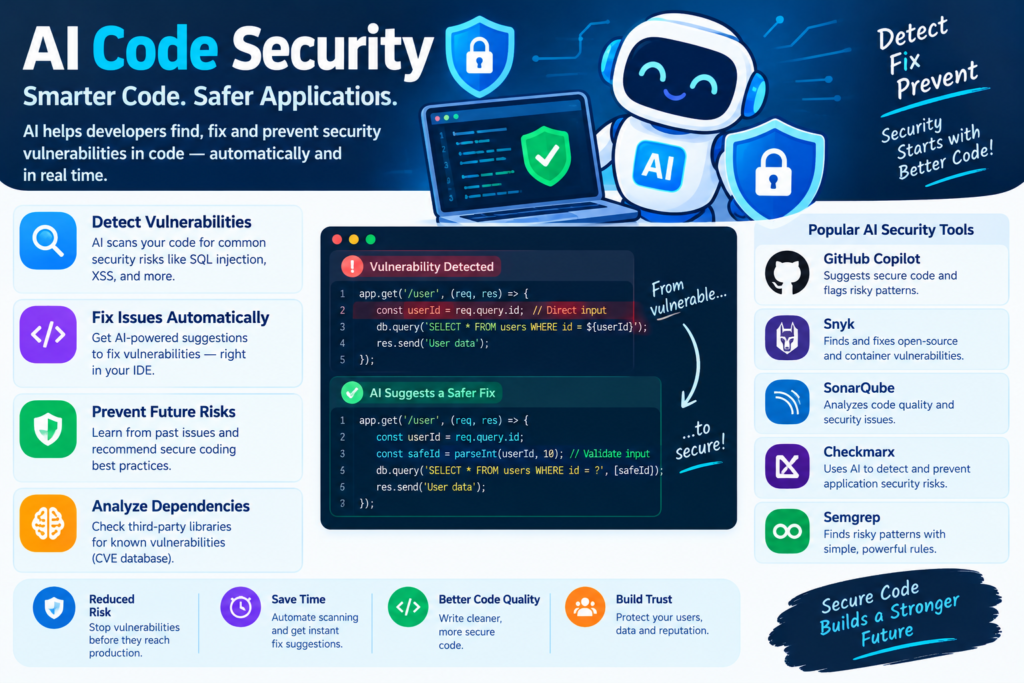
AI Code Security: 7 Powerful Ways to Detect Vulnerabilities
Software security is one of the most important responsibilities in modern development. Applications process personal information, connect to business systems, and handle financial transactions. A small coding mistake can expose confidential information, interrupt services, or create opportunities for cyberattacks.
As applications grow more complex, developers must identify security weaknesses without slowing down the development process. Traditional security testing remains essential, but manually reviewing every function, dependency, and configuration can be challenging.
This is where AI code security becomes valuable.
Artificial intelligence can help developers examine source code, recognize suspicious patterns, explain potential weaknesses, and recommend safer programming techniques. AI-powered tools can also assist with code reviews, vulnerability assessment, and automated security testing.
However, AI isn’t a complete security solution. Its findings may be inaccurate, and some vulnerabilities require deeper investigation. The best results come from combining AI with established security tools, automated tests, and human expertise.
In this guide, you’ll learn how AI helps developers identify security vulnerabilities in code, which threats these tools can detect, how to use AI for secure coding, and which practices help build safer software.
1. Understanding AI Code Security
AI code security refers to using artificial intelligence to help identify, analyze, prioritize, and fix security weaknesses in software.
Traditional security tools often rely on predefined rules, known vulnerability patterns, or specific testing techniques. AI can complement these methods by recognizing relationships between code elements and explaining why particular operations may be unsafe.
For example, a conventional scanner might flag a database query containing a suspicious string operation. An AI assistant could explain how user input reaches that query, describe the potential SQL injection risk, and suggest a safer implementation.
AI can support several activities:
- AI code analysis: Examining source code for suspicious behavior.
- AI code review: Reviewing proposed changes for potential security problems.
- AI bug detection: Identifying programming errors that may introduce security risks.
- Vulnerability assessment: Helping developers investigate and prioritize findings.
- Secure coding assistance: Recommending safer implementations.
- Security documentation: Explaining findings and documenting remediation steps.
These capabilities are useful for experienced security engineers and developers who are still learning secure programming.
AI can also improve collaboration between development and security teams. Developers receive clearer explanations, while security specialists can spend more time investigating complex issues instead of repeatedly explaining common mistakes.
Still, a suspicious code pattern doesn’t automatically prove a vulnerability exists. The surrounding application, runtime environment, and existing safeguards must also be considered.
2. Why Traditional Security Testing Needs AI
Traditional application security testing includes static application security testing, dynamic application security testing, penetration testing, and dependency scanning.
Each method has a different purpose.
Static analysis examines code without executing the application. Dynamic testing examines application behavior while it runs. Penetration testing investigates whether weaknesses can be exploited under realistic conditions. Dependency scanning checks external libraries against known vulnerability information.
These methods remain valuable, but large development projects can generate many findings that require investigation.
AI can help make this process more manageable.
|
Security Challenge |
How AI Can Help |
|
Large source code repositories |
Summarize code and identify suspicious areas |
|
Repetitive code reviews |
Automate initial analysis and explanations |
|
Complex data flows |
Help trace untrusted input to sensitive operations |
|
Limited security knowledge |
Explain vulnerabilities in accessible language |
|
Numerous security alerts |
Group related findings and support prioritization |
|
Time-consuming remediation |
Suggest fixes and generate test ideas |
Consider a team maintaining a large e-commerce application. A traditional scanner might report numerous potential input-validation problems across several modules.
An AI-assisted workflow can help summarize the findings, identify related code paths, and suggest which issues deserve closer attention.
Developers must still verify each result. AI may overlook an existing safeguard or incorrectly interpret a harmless operation as dangerous.
Therefore, AI should strengthen conventional application security testing rather than replace it.
3. How AI Security Vulnerability Detection Works
AI security vulnerability detection uses different techniques to identify potentially unsafe code. The exact approach depends on the product, programming language, model, and available context.
Machine Learning and Pattern Recognition
Machine learning models can identify relationships between code structures and examples of secure or insecure programming.
For instance, an AI tool may recognize suspicious input handling, unsafe memory operations, or the use of dangerous functions.
Suppose an application accepts a filename from a user and passes it directly to a file-reading operation. An AI-assisted scanner might flag the code for further investigation because the filename could contain path traversal sequences.
The tool may suggest validating the path, restricting access to an approved directory, and checking that the final resolved path remains within the intended location.
This is more useful than simply flagging a function because it helps developers understand the possible attack and investigate a solution.
However, pattern recognition alone cannot confirm whether the issue is exploitable. Application context remains important.
AI-Assisted Static Code Analysis
Static code analysis examines source code without running the program.
AI can improve this process by explaining scanner findings, identifying suspicious relationships between functions, and helping developers understand why a particular operation might be unsafe.
For example, a conventional analyzer may flag a query constructed using string concatenation. An AI assistant can explain how untrusted input might change the meaning of the query and recommend parameterized database operations.
Combining rule-based analysis with AI offers two advantages. Traditional analyzers provide structured, repeatable checks, while AI helps interpret findings and suggest possible remediation.
Contextual Code Analysis
Some vulnerabilities appear only when several parts of an application interact.
A function may validate its input correctly, while another function bypasses that validation. Similarly, an endpoint may authenticate users but fail to check whether they are authorized to access a particular record. AI can help developers trace these relationships when the relevant source files and application context are available.
This makes repository-level analysis especially useful for complex projects. Nevertheless, developers should confirm that the assistant has examined the relevant files. A model that sees only one function may overlook safeguards elsewhere in the application.
4. Seven Powerful Ways AI Improves Code Security
1. Detecting Suspicious Code Patterns
AI tools can flag patterns associated with common vulnerabilities, such as unsafe input handling, insecure deserialization, weak cryptographic practices, and dangerous command execution. These alerts help developers focus their attention on areas that deserve further investigation.
2. Improving Security Code Reviews
AI-assisted code review can examine proposed changes and identify potential problems before they reach the main branch.
For example, a review assistant might notice that a new API endpoint accepts a user identifier without checking whether the authenticated user has permission to access that account.
This feedback can encourage developers to fix issues earlier in the development process.
3. Explaining Security Findings
Security alerts often contain technical descriptions that are difficult for beginners to understand.
AI can translate these findings into plain English, explain possible attack scenarios, and recommend ways to verify the problem.
This is particularly helpful for teams without dedicated security specialists.
4. Suggesting Safer Code
AI coding assistants can recommend alternatives to unsafe implementations.
Examples include parameterized SQL queries, safe output encoding, stronger validation, and more appropriate cryptographic libraries.
However, generated code must be reviewed and tested. A proposed fix can introduce compatibility problems or leave part of the vulnerability unresolved.
5. Supporting Automated Security Testing
AI can help generate test cases for unusual inputs, authentication boundaries, and error conditions.
Developers can use these suggestions to improve unit tests, integration tests, and security-focused testing.
Generated tests should be checked to ensure they verify the intended security property rather than merely reproduce the existing implementation.
6. Prioritizing Security Findings
Not every vulnerability has the same impact.
AI can help summarize evidence, group related alerts, and explain why certain findings may deserve immediate attention.
Prioritization should still rely on verified severity, exposure, exploitability, affected assets, and business impact.
7. Helping Developers Learn Secure Coding
AI can act as a learning assistant by explaining secure programming principles, comparing safe and unsafe examples, and describing the reasoning behind recommended fixes.
Over time, this feedback can help developers recognize common mistakes before they reach a security scanner.
5. Common Vulnerabilities AI Can Help Detect
AI cybersecurity tools can support detection across several vulnerability categories. Accuracy varies according to the language, framework, available context, and analysis method.
SQL Injection Detection
SQL injection occurs when untrusted input influences a database query in an unsafe way.
Consider this Python example:
query = “SELECT * FROM users WHERE email = ‘” + email + “‘”
cursor.execute(query)
The query combines SQL syntax with a variable. If the variable contains malicious input, the resulting statement may behave differently than intended.
A safer approach uses parameterized queries:
cursor.execute(
“SELECT * FROM users WHERE email = %s”,
(email,)
)
The precise parameter syntax depends on the database driver.
An AI code review tool may flag the original implementation, explain the risk, and suggest parameterized queries. Developers should then verify the revised code against the actual database library and test relevant inputs.
Cross-Site Scripting Prevention
Cross-site scripting, commonly called XSS, occurs when untrusted content is handled in a way that allows unwanted scripts to execute in a user’s browser.
AI-assisted code analysis can help identify unsafe HTML rendering, missing output encoding, and risky use of browser APIs.
For example, inserting user-controlled content into a page as HTML can be dangerous when the application doesn’t handle the content safely.
A security assistant may recommend safe text insertion or context-appropriate output encoding.
The correct solution depends on where the content appears, such as an HTML text node, attribute, URL, or JavaScript context.
Authentication and Authorization Problems
Authentication verifies identity, while authorization determines which resources and actions a user is allowed to access.
AI can help developers review login flows, session handling, account recovery, and access-control checks.
Potential problems include:
- Missing authorization checks on protected endpoints.
- Weak session management.
- Unsafe password-reset logic.
- Inconsistent permissions across API routes.
- Improper handling of authentication tokens.
- Inadequate protection against repeated login attempts.
These vulnerabilities require contextual investigation. A function may appear secure in isolation but become vulnerable when another endpoint calls it without enforcing permissions.
Buffer Overflows and Memory Errors
Buffer overflows can occur when software writes beyond the boundaries of an allocated memory region. Such errors can cause crashes, corrupt data, or create opportunities for exploitation.
AI-assisted analysis may flag unsafe memory operations, suspicious buffer handling, and missing length checks. These problems are especially relevant to languages such as C and C++, where developers have greater control over memory management. Specialized static analysis, fuzz testing, and careful code review remain important because memory vulnerabilities may depend on complex runtime behavior.
Exposed Secrets and Vulnerable Dependencies
Developers sometimes accidentally commit API keys, passwords, private tokens, or other credentials to source code repositories.
AI-assisted code review may identify suspicious hardcoded values, but dedicated secret-scanning tools should also be used.
Dependency scanners can identify packages associated with known vulnerabilities. AI can help explain the potential impact, summarize upgrade options, and identify compatibility concerns.
Always verify dependency findings against trustworthy security advisories. Test upgrades before deploying them, and rotate credentials that may have been exposed.
6. Best AI Tools for Code Security Analysis
Different tools address different parts of the development process. Some focus on AI coding assistance, while others provide static analysis, dependency checks, or broader application security testing.
|
Tool |
Primary Purpose |
Suitable Use |
|
GitHub Copilot |
AI coding assistance and code explanations |
Developer workflows and supported code reviews |
|
Snyk Code |
Static application security testing |
Finding security issues in source code |
|
Semgrep |
Rule-based code scanning and security analysis |
Customizable code checks |
|
CodeQL |
Semantic code analysis |
Investigating complex code vulnerabilities |
|
SonarQube |
Code quality and security analysis |
Continuous code inspection |
|
Checkmarx |
Application security testing |
Broader enterprise security programs |
Features and integrations vary by product, plan, and configuration. Check the official documentation before selecting a solution.
The best tool is not necessarily the one with the most AI features. Consider supported languages, false-positive rates, repository integration, reporting quality, privacy controls, and how well the product fits your existing workflow.
For additional application security guidance, visit the OWASP Foundation.
7. How to Use AI for Secure Code Reviews
Developers can introduce AI-assisted security reviews through a simple, repeatable workflow.
Step 1: Select an approved tool. Choose a security scanner or AI coding assistant that supports your programming language and repository platform.
Step 2: Scan relevant code. Begin with changed files or a specific module. Combine AI analysis with static analysis and dependency scanning.
Step 3: Request a focused review. Ask the assistant to investigate SQL injection, XSS, access-control problems, exposed secrets, unsafe deserialization, and other relevant threats.
Step 4: Examine each finding. Review the affected code, determine whether the issue is real, and understand the conditions required for exploitation.
Step 5: Apply a controlled fix. Treat generated code as a proposed solution, not as automatically secure production code.
Step 6: Run verification tests. Use unit tests, integration tests, static analysis, and security testing to confirm that the fix works.
Step 7: Document the outcome. Record the finding, remediation, verification evidence, and any remaining risks.
A useful prompt is:
“Review the supplied code for security vulnerabilities. Focus on untrusted input, SQL injection, cross-site scripting, authentication, authorization, unsafe deserialization, and secret exposure. Explain the affected code, potential impact, conditions required for exploitation, confidence level, and safer alternatives. Clearly distinguish confirmed issues from possible risks.”
Never provide confidential source code, customer information, or production secrets to an AI service that hasn’t been approved to process them.
8. Benefits and Limitations of AI Code Security
AI offers several advantages for software development teams.
First, it can reduce the time required to investigate common security alerts. Second, it can make technical findings easier to understand. Third, it can help developers generate safer code and more thorough tests.
AI can also support continuous security checks throughout the software development lifecycle, from initial coding through pull request review and release preparation.
However, important limitations remain.
AI may report false positives, overlook subtle vulnerabilities, misunderstand application behavior, or recommend incomplete fixes. Its results may also vary across programming languages and frameworks.
For this reason, security decisions should not depend on AI alone. Human review, established analysis tools, and testing remain essential.
9. Best Practices for Secure Software Development
To get the most from AI cybersecurity tools, follow these practices:
- Combine AI code review with established security scanners.
- Prioritize findings using verified severity and application context.
- Require human review for security-sensitive changes.
- Test fixes against realistic attack scenarios.
- Keep dependencies and security rules updated.
- Protect confidential code and credentials.
- Document false positives and unresolved findings.
- Review generated tests before relying on them.
- Use peer review and automated checks before deployment.
- Monitor applications after release.
Security is an ongoing process, not a one-time activity. Regular testing and continuous improvement help teams adapt to changing threats.
AI is changing how developers approach software security. By identifying suspicious code patterns, explaining vulnerabilities, recommending safer implementations, and supporting automated reviews, AI-powered tools can make secure development more efficient.
The best results come from combining AI assistance with established security practices. Developers should investigate potential weaknesses early, verify every important fix, and maintain human oversight of critical decisions.
Know More:
”FAQs”
1. How does AI find security vulnerabilities in code?
AI can analyze code patterns, data flows, and programming context to identify suspicious behavior. Depending on the tool, it may combine machine learning with static analysis and security rules to flag potential vulnerabilities and suggest fixes. Developers must verify the findings.
2. Can AI detect coding security flaws accurately?
AI can identify many common coding risks, but accuracy varies by tool, language, and vulnerability type. False positives and missed issues are possible. Combining AI with established security testing provides stronger coverage.
3. What are the best AI tools for code security analysis?
GitHub Copilot supports coding assistance, while Snyk Code, Semgrep, CodeQL, and SonarQube provide various forms of code security and quality analysis. The best choice depends on your requirements, programming languages, and development workflow.
4. Can AI detect SQL injection and cross-site scripting?
AI-assisted tools can flag unsafe database queries, risky HTML rendering, and missing protections. Developers should verify findings and test the application using appropriate security techniques.
5. Is AI code review enough to secure an application?
No. AI code review should complement dependency scanning, secret detection, access-control testing, dynamic testing, secure configuration, and human security reviews.
6. How can beginners use AI for secure coding?
Beginners can ask AI to explain vulnerabilities, compare safe and unsafe examples, review small code snippets, and generate test cases. They should learn fundamental security principles and verify recommendations before using them.
7. Does AI replace security engineers?
No. AI can automate repetitive analysis and simplify explanations, but security engineers remain essential for threat modeling, complex investigations, risk assessment, and validating protections across complete systems.
8. Can AI automatically fix vulnerabilities?
Some tools can suggest or generate code changes, and certain workflows can automate parts of remediation. Every security-sensitive change should be reviewed and tested because a proposed fix may introduce new problems or fail to address the underlying weakness.