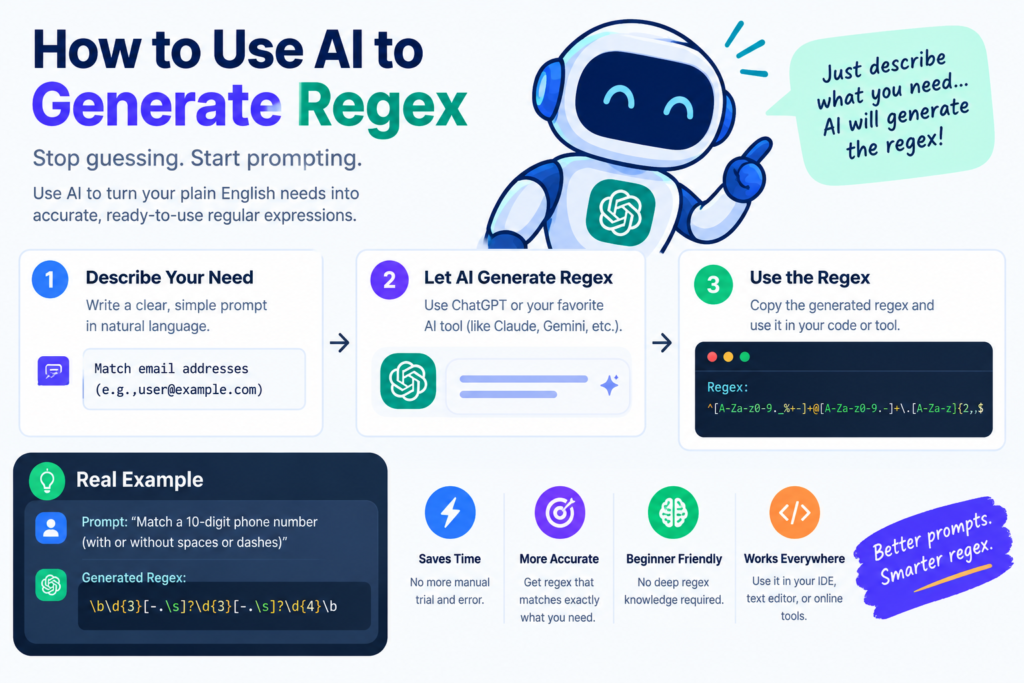
1. How to Use AI to Generate Regex: Introduction
Developers regularly work with text that must follow specific formats. Email addresses, phone numbers, postal codes, dates, usernames, product identifiers, and other data often need validation before an application can process them. Regular expressions, commonly called regex, provide a powerful way to identify patterns in text. However, writing complex expressions can be difficult. A small mistake can cause valid information to be rejected or invalid input to be accepted.
Artificial intelligence offers a practical solution. An AI regular expression generator can convert a plain-language description into a proposed regex pattern. Developers can then test, refine, and integrate that pattern into their applications. For example, a developer could ask an AI assistant to create a regular expression that checks whether a username contains between four and sixteen characters and uses only letters, numbers, and underscores. The assistant can produce an initial pattern and explain how each part works.
AI can also help developers validate structured data, extract information from text, and identify inconsistencies in datasets. When combined with conventional validation rules, these capabilities can reduce repetitive coding work and make development more efficient. However, AI-generated expressions are not automatically correct. Developers must understand the required format, test valid and invalid examples, and consider security risks before using a generated pattern in production. This guide explains how to use AI to generate regular expressions and validate data, with practical examples for Python, JavaScript, and web development.
2. What Are Regular Expressions?
A regular expression is a sequence of characters that describes a pattern in text. Programming languages and text-processing tools use regex to search, match, extract, or replace text that follows a specified structure. For example, the following regular expression matches a string containing exactly five digits:
^[0-9]{5}$
This pattern can be useful for checking a five-digit code, provided that the application actually uses that format.
Common Regex Symbols
|
Symbol |
Meaning |
|
^ |
Beginning of the string or line, depending on the regex mode |
|
$ |
End of the string or line, depending on the regex mode |
|
. |
Matches most single characters, depending on the mode |
|
\d |
Matches a digit in many regex engines |
|
\w |
Matches word characters; the exact definition varies by engine |
|
\s |
Matches whitespace |
|
* |
Matches zero or more repetitions |
|
+ |
Matches one or more repetitions |
|
? |
Makes a preceding item optional or modifies quantifier behavior |
|
{n} |
Matches exactly n repetitions |
|
{n,m} |
Matches between n and m repetitions |
|
[abc] |
Matches one character from the specified set |
|
(…) |
Groups part of a pattern |
|
| |
Represents alternation, meaning one alternative or another |
Regex syntax varies across programming languages and engines. Some expressions that work in JavaScript may require changes for Python or another environment.
Why Developers Use Regex
Regular expressions can help with:
- Validating input formats.
- Extracting identifiers from text.
- Finding specific patterns in logs.
- Checking whether strings follow naming rules.
- Replacing text in bulk.
- Filtering records based on textual patterns.
Regex is particularly useful when the required format is well-defined. It is less suitable as the only method for checking complex business rules or determining whether a piece of information is genuinely correct.
3. What Is an AI Regex Generator?
An AI regex generator is a tool that uses artificial intelligence to convert a natural-language requirement into a proposed regular expression.
Instead of manually combining character classes, quantifiers, anchors, and groups, developers describe the desired behavior in plain English.
For example:
Prompt: Create a JavaScript regular expression that matches usernames containing 4–16 characters, using only English letters, numbers, and underscores.
Possible output:
const usernameRegex = /^[A-Za-z0-9_]{4,16}$/;
The expression checks that the entire string contains between four and sixteen allowed characters.
The developer should still test boundary cases such as three characters, seventeen characters, spaces, and punctuation.
How AI Improves Regex Creation
AI assistants can do more than generate a pattern. They can explain its components, identify potential edge cases, translate it between supported regex dialects, and suggest test cases.
For example, a developer can ask for separate patterns for a date, a phone number, and a username, then request explanations of the assumptions behind each one.
AI Regex Generator vs. Traditional Regex Builder
A traditional regex builder often relies on menus, visual controls, or manually assembled patterns. An AI regex generator allows users to describe requirements conversationally.
Both approaches can be useful. Visual builders may make pattern structure easier to inspect, while AI can help translate complex requirements into an initial expression quickly.
The best choice depends on the task, the user’s experience, and the importance of precise control over the final pattern.
4. How AI Generates Regular Expressions
AI-powered regex generation generally follows a simple process.
Step 1: Interpret the Requirement
The AI system analyzes the natural-language description to identify the expected characters, length restrictions, boundaries, and other constraints.
A request such as “match a six-digit verification code” suggests a fixed-length digit pattern.
Step 2: Produce a Candidate Pattern
The model generates a regex that appears to satisfy the requirement. The result may include anchors, character classes, groups, or quantifiers.
Step 3: Explain the Pattern
A useful assistant describes what each component does. This helps developers detect misunderstandings and adapt the expression to their chosen programming language.
Step 4: Generate Test Cases
The AI can suggest strings that should match and strings that should fail. These tests are essential because a pattern may look correct while still accepting unwanted input.
Step 5: Refine the Expression
If the pattern fails a test, the developer can provide the failing example and clarify the intended behavior. The AI can then suggest a revision.
Step 6: Integrate and Verify
The final expression is tested in the actual runtime environment and integrated with the application’s broader validation logic.
This process is best treated as assisted programming rather than automatic proof of correctness.
5. Benefits of Using AI for Regex Creation
Faster Development
Complex regex patterns can take time to write and debug. AI can generate a starting point in seconds, allowing developers to focus on requirements and testing.
Easier Learning
Beginners can ask AI to explain symbols, groups, character classes, and quantifiers. This makes regex easier to understand than studying complicated patterns without guidance.
Fewer Manual Syntax Errors
AI may reduce common syntax mistakes by producing a complete expression. However, it can still generate unsupported syntax or overlook requirements, so testing remains necessary.
Better Test Coverage
Developers can request positive examples, negative examples, boundary cases, and unusual inputs to create a more complete test suite.
Faster Pattern Translation
A developer may need similar functionality in JavaScript, Python, Java, or another language. AI can help adapt the pattern while explaining differences between regex engines.
More Efficient Data Cleaning
Regex can identify records that violate expected formats. AI can help draft the patterns and validation scripts needed to inspect large datasets.
Improved Documentation
AI can explain why a pattern exists and how it should behave. This can help teams document validation requirements for future maintenance.
6. Best AI Tools for Generating Regular Expressions
Several types of tools can help developers generate and validate regex patterns.
General-Purpose AI Assistants
AI assistants such as ChatGPT can generate expressions from plain-language requirements, explain their structure, and suggest tests.
They are especially useful when the developer needs to discuss assumptions, compare approaches, or integrate the expression into application code.
IDE Coding Assistants
Coding assistants integrated into development environments can generate regex patterns in the context of existing code. This may help them account for the programming language, variable names, and surrounding validation logic.
Review the proposed expression and tests before accepting changes.
Online Regex Testers
Regex testing websites allow developers to enter a pattern and sample text to observe matching behavior. They are useful for experimenting with expressions and understanding why a particular string matches.
Use trusted tools, and avoid pasting confidential customer information or proprietary data into public testing websites.
Language-Specific Testing Tools
JavaScript, Python, Java, and other languages provide their own regex implementations. Testing in the actual target environment helps identify differences in syntax and behavior.
For example, Python developers can consult the official documentation at https://docs.python.org/3/library/re.html.
JavaScript developers can refer to https://developer.mozilla.org/en-US/docs/Web/JavaScript/Guide/Regular_expressions.
How to Choose the Right Tool
Compare tools based on supported regex dialects, explanation quality, privacy controls, integration features, and testing capabilities.
A good tool should help you verify the expression, not merely produce a pattern that looks convincing.
7. Step-by-Step Guide to Generating Regex with AI
Follow these steps to create a regular expression that is useful in a real application.
Step 1: Define the Required Format
Write down exactly what should be accepted and rejected. For example, a product identifier might need to contain two uppercase letters, a hyphen, and six digits.
Avoid vague requirements such as “validate a correct product code.” Specify the length, allowed characters, separators, and case sensitivity.
Step 2: Choose the Programming Language
Tell the AI whether the pattern will run in JavaScript, Python, Java, PHP, or another environment.
This matters because regex features and string escaping differ between languages.
Step 3: Describe the Rules in Plain English
A useful prompt might be:
“Generate a Python regular expression that matches a product code consisting of two uppercase English letters, a hyphen, and exactly six digits. The entire string must match. Explain the pattern and provide valid and invalid examples.”
Step 4: Review the Generated Pattern
Check whether the expression uses the intended character classes, quantifiers, and boundaries.
Ask the assistant to explain any part you do not understand.
Step 5: Test Valid Inputs
Create examples that should match. Include the shortest and longest allowed values where applicable.
Step 6: Test Invalid Inputs
Try strings that contain extra spaces, unexpected punctuation, missing characters, or excessive length.
Step 7: Test Edge Cases
Consider empty strings, Unicode characters, line breaks, case differences, and extremely long inputs where relevant.
Step 8: Integrate the Expression
Add the regex to the correct part of the application. For web forms, this may include client-side feedback and server-side validation.
Step 9: Review Performance and Security
Check whether the expression could take excessive time on specially crafted input. Avoid unnecessarily complicated patterns.
Step 10: Maintain Tests
Store the test cases with the application so future code changes do not silently weaken validation.
8. Practical Regex Examples for Developers
The following examples demonstrate how AI can help create useful patterns. Each expression assumes a specific input format; adjust it to match your actual requirements.
Example 1: Validate a Username
Requirement: Allow 4–16 characters using English letters, digits, and underscores.
^[A-Za-z0-9_]{4,16}$
This pattern rejects spaces, hyphens, and other punctuation. It also rejects usernames shorter than four characters or longer than sixteen.
If your application allows Unicode letters or additional symbols, the pattern must be changed accordingly.
Example 2: Validate a Five-Digit Postal Code
^[0-9]{5}$
This expression matches exactly five digits.
It is suitable only for systems that use five-digit numeric codes. Postal-code formats vary across countries, so an international application needs country-specific rules.
Example 3: Check a Basic Email Format
^[^\s@]+@[^\s@]+\.[^\s@]+$
This pattern checks for a simple email-like structure containing an @ symbol and a dot in the domain portion.
It does not fully validate every legal email address or prove that the mailbox exists. Production applications should use appropriate email validation and confirmation procedures.
Example 4: Match a Product Identifier
Requirement: Two uppercase letters, a hyphen, and six digits.
^[A-Z]{2}-[0-9]{6}$
Examples that should match include AB-123456 and XY-987654.
Examples that should fail include A-123456, ab-123456, and AB123456.
Example 5: Extract Dates in YYYY-MM-DD Format
\b[0-9]{4}-[0-9]{2}-[0-9]{2}\b
This pattern can locate strings shaped like 2026-10-27.
However, it does not establish that a date is valid. It can also match impossible dates such as 2026-19-42. Use a date-parsing library or explicit calendar validation to check whether a date exists.
Example 6: Match a Simple International-Style Phone Number
^\+[1-9][0-9]{7,14}$
This pattern accepts a plus sign followed by a digit from 1–9 and between seven and fourteen additional digits.
It is a simplified format check, not a complete telephone-number validator. Real phone numbers vary by country and numbering plan, so use a suitable phone-number library when accuracy matters.
Example 7: Match a Hexadecimal Color Code
^#(?:[0-9A-Fa-f]{3}|[0-9A-Fa-f]{6})$
This expression matches three-digit and six-digit hexadecimal color codes that begin with #.
Examples include #FFF and #12A4EF.
Example 8: Validate a Simple Slug
^[a-z0-9]+(?:-[a-z0-9]+)*$
This pattern allows lowercase letters and digits separated by single hyphens. It rejects leading hyphens, trailing hyphens, and consecutive hyphens.
It may be suitable for simple URL slugs, although a content management system may have additional rules.
9. How to Use AI for Data Validation
Data validation checks whether information meets defined requirements before an application stores or processes it.
Regex can validate text patterns, but data validation is broader. It can include required fields, numeric ranges, data types, relationships between fields, database constraints, and business rules.
Define Validation Rules
Start by specifying what makes a record acceptable.
For a registration form, rules might require a valid email format, a password meeting security requirements, and an age value within an allowed range.
The AI can help translate these requirements into code, but the rules must come from the application’s actual requirements.
Generate Validation Code
AI can draft functions that apply regex patterns and return understandable error messages.
For example, it can help create a reusable function for validating product codes or extracting identifiers from uploaded text.
Detect Inconsistent Records
For larger datasets, AI can help develop scripts that identify suspicious formats, missing values, duplicates, or inconsistent labels.
However, AI-generated classifications should not automatically be treated as ground truth. Validate the results against known examples and reliable business rules.
Combine Regex with Other Validation Methods
Regex is useful for syntax. Other methods are needed to establish whether a value is meaningful.
A date string can match a date pattern but still represent an impossible date. An email address can have a plausible structure but belong to no real mailbox.
Use appropriate parsers, database constraints, domain-specific libraries, and verification steps to validate information beyond its textual shape.
10. AI Regex Generation for Web Forms
Web forms are a common place to use AI-generated regex patterns.
Examples include account registration, contact forms, search fields, booking systems, and product submissions.
Validate Usernames and Identifiers
Regex can check length and allowed characters before a value is submitted.
Provide helpful error messages that explain the requirement instead of simply displaying “Invalid input.”
Validate Input on the Client and Server
Client-side validation improves usability by providing immediate feedback. However, users can bypass browser-side checks, so the server must independently validate incoming data.
Do not rely on JavaScript validation as a security boundary.
Avoid Overly Restrictive Rules
A pattern that rejects legitimate names, addresses, or international phone numbers can exclude valid users.
Before enforcing a format, consider whether the restriction is necessary and whether it accommodates the intended user population.
Use Semantic HTML Where Appropriate
HTML input types and built-in constraints can handle many common validation tasks. For example, type=”email” provides basic browser-level email-format checks.
Regex should be used when a specific custom format is required, not simply because it is available.
11. Using AI Regex in Python and JavaScript
AI can help generate code that uses regex in different programming languages. The final implementation should be tested in the target runtime.
Python Example
The following example validates a product identifier consisting of two uppercase letters, a hyphen, and six digits.
import re
pattern = re.compile(r”^[A-Z]{2}-[0-9]{6}$”)
def is_valid_product_code(value):
return pattern.fullmatch(value) is not None
print(is_valid_product_code(“AB-123456”)) # True
print(is_valid_product_code(“A-123456”)) # False
print(is_valid_product_code(“ab-123456”)) # False
Using fullmatch() makes the intention clear: the entire string must satisfy the pattern. The anchors are therefore not strictly necessary in this specific Python example, although they are often included when sharing patterns across contexts.
JavaScript Example
The equivalent JavaScript pattern can be used with the test() method.
const productCodeRegex = /^[A-Z]{2}-[0-9]{6}$/;
console.log(productCodeRegex.test(“AB-123456”)); // true
console.log(productCodeRegex.test(“A-123456”)); // false
console.log(productCodeRegex.test(“ab-123456”)); // false
For production validation, consider input types, whitespace handling, normalization requirements, and the application’s error-handling strategy.
Ask AI to Explain the Code
After generating an expression, request an explanation of each component and a list of test cases. This helps you identify assumptions and understand the code you are maintaining.
12. How to Test and Debug AI-Generated Regex
Testing is one of the most important parts of AI-powered pattern matching.
Create Positive and Negative Tests
Positive tests contain examples that should match. Negative tests contain examples that should not match.
For a username rule, test valid values, values that are too short, values that are too long, spaces, and prohibited punctuation.
Check Boundary Conditions
If a field accepts between four and sixteen characters, test lengths of three, four, sixteen, and seventeen characters.
Boundary tests help reveal incorrect quantifiers and off-by-one mistakes.
Check the Actual Regex Engine
A pattern may behave differently across languages or execution modes. Test it in the same environment where it will run.
Pay particular attention to Unicode behavior, multiline mode, escaping, and features that are not supported in every engine.
Ask AI to Find Weaknesses
You can ask:
“Review this regex against the stated requirement. Identify strings that should match but do not, and strings that incorrectly match. Explain the assumptions and provide a test matrix.”
Treat the answer as a source of test ideas rather than proof of correctness.
Test Performance
Some complex expressions can exhibit excessive backtracking on carefully crafted input. This can cause slow requests and, in severe cases, denial-of-service conditions.
Test performance with realistic and unusually long inputs. Prefer simpler expressions, and use input-length limits where appropriate.
13. Security Risks and Limitations
AI-generated regex can introduce problems if developers accept it without review.
ReDoS and Excessive Backtracking
Regular expression denial of service, or ReDoS, occurs when a pattern takes an excessive amount of time to process certain inputs.
Avoid unnecessarily nested repetition and test suspicious patterns with long inputs. Where supported, use safer regex features or engines and enforce suitable input limits.
Incorrect Validation
An expression may accept values that should be rejected or reject valid values. This can create account registration problems, corrupted records, or security weaknesses.
Use explicit requirements, test cases, and independent validation where appropriate.
Overreliance on Regex
Regex is not the best tool for every validation task. Parsing structured formats, validating dates, verifying domain rules, and checking database relationships often require specialized code.
Use regex for the parts of the problem it handles well.
Exposure of Sensitive Data
When using an online AI assistant or regex testing tool, avoid submitting private customer records, passwords, authentication tokens, or other confidential information unless the service is approved for that use.
Misleading Confidence
AI can provide a convincing explanation for an incorrect pattern. The explanation does not establish correctness. Automated tests and review are more reliable ways to verify behavior.
14. Best Practices for AI-Powered Pattern Matching
Follow these practices to make AI-generated regex safer and easier to maintain.
Write precise requirements. Define the allowed characters, length, boundaries, and exceptions before requesting a pattern.
Specify the regex engine. State whether the expression will be used in JavaScript, Python, Java, or another environment.
Request an explanation. Understand the pattern before using it in production.
Test edge cases. Include boundary values, unexpected characters, whitespace, and invalid examples.
Use full-string matching when required. Anchors or language-specific full-match methods help ensure the entire input follows the intended format.
Combine validation techniques. Use parsers, type checks, domain rules, and verification procedures where regex alone is insufficient.
Avoid unnecessary complexity. Prefer a readable pattern over a complicated expression that is difficult to maintain.
Consider performance. Check for excessive backtracking and limit input sizes when appropriate.
Document assumptions. Explain which formats are accepted and why.
Revalidate on the server. Browser-side checks are useful for convenience but do not replace server-side validation.
15. Common Mistakes to Avoid
Using Vague Prompts
A request such as “create a regex for an email” leaves many details unspecified. Explain the intended use, target language, and acceptable format.
Skipping Tests
A generated pattern can look correct while failing important cases. Always test both matching and non-matching values.
Assuming a Format Check Proves Validity
Matching a date pattern does not prove the date exists. Matching an email pattern does not prove that an inbox is active.
Copying Patterns Between Languages Without Checking
Regex dialects differ. Verify that the target engine supports the pattern’s features and interprets its escaping as intended.
Ignoring Unicode
Patterns limited to English letters may reject names or text in other writing systems. Decide whether the application needs international character support.
Treating Client-Side Validation as Security
Users can modify browser requests. Validate all important rules on the server and enforce permissions independently of regex.
Accepting AI Output Without Understanding It
Developers should know what a pattern accepts, what it rejects, and how it behaves on unusual input.
16. The Future of AI Data Validation
AI-assisted programming is making it easier to translate validation requirements into code. Future tools may provide stronger integration with test generation, static analysis, IDE diagnostics, and automated quality checks.
Developers may increasingly describe data requirements in plain language and receive candidate validators, test suites, and explanations together.
AI may also help identify inconsistent patterns in large datasets and suggest rules for further investigation. Human review and domain knowledge will remain important because unusual data is not always incorrect data.
The most reliable systems will combine AI-generated code with deterministic validation, automated testing, security analysis, and clear business requirements.
AI can reduce the effort involved in writing regular expressions, but the goal should be dependable data handling rather than simply generating patterns faster.
AI regex generators can make regular expression creation more accessible by converting plain-language requirements into candidate patterns. They can help developers validate text, build form checks, extract information, clean datasets, and create automated tests.
The best results come from a structured workflow: define the requirement, specify the programming language, generate a pattern, review its explanation, test edge cases, and verify the final implementation.
Remember that regex is only one part of data validation. Complex formats, real-world identifiers, dates, and business rules may require specialized libraries or additional checks. Security, performance, and privacy must also be considered before deployment.
By combining AI assistance with precise requirements and thorough testing, developers can build more maintainable validation systems while reducing repetitive coding effort.
Know More:
”FAQs”
1. What is an AI regex generator?
An AI regex generator uses artificial intelligence to turn a natural-language requirement into a proposed regular expression. It may also explain the pattern, suggest examples, and help debug problems.
2. Can AI generate regular expressions for Python and JavaScript?
Yes. AI assistants can generate regex patterns and usage examples for Python, JavaScript, and many other languages. Always test the expression in the target language because regex engines differ.
3. Is AI-generated regex accurate?
It can be useful, but it is not guaranteed to be correct. Accuracy depends on the clarity of the requirement, the pattern's complexity, and the model's output. Test positive, negative, and boundary cases before using it.
4. Can AI help validate email addresses?
AI can generate a basic email-format pattern and help implement validation logic. However, regex alone cannot establish whether an email address exists or whether its mailbox can receive messages. Confirmation workflows may be needed.
5. Can I use AI-generated regex in production applications?
Yes, after appropriate review and testing. Verify correctness, compatibility, performance, and security. Use additional validation methods when the requirement involves more than a simple text pattern.
6. How can AI help clean large datasets?
AI can help develop scripts that identify missing values, inconsistent formats, suspicious records, and potential duplicates. The proposed rules should be checked against the dataset's meaning and business requirements.
7. Is regex enough for data validation?
No. Regex is useful for matching text formats, but comprehensive validation may require parsing, type checks, database constraints, authorization, and business logic.
8. What is the biggest risk of AI-generated regex?
One major risk is accepting an incorrect or inefficient expression without testing it. Incorrect patterns can reject valid users, allow invalid values, or consume excessive processing time.
9. How do I improve an AI-generated regular expression?
Clarify the requirements, specify the target language, ask for an explanation, and provide examples that should match or fail. Then test the revised expression using automated tests and realistic edge cases.
10. Do beginners need to learn regex if they use AI?
Yes. Developers do not need to memorize every regex feature, but understanding character classes, quantifiers, groups, and matching behavior makes it easier to review AI output and diagnose errors.