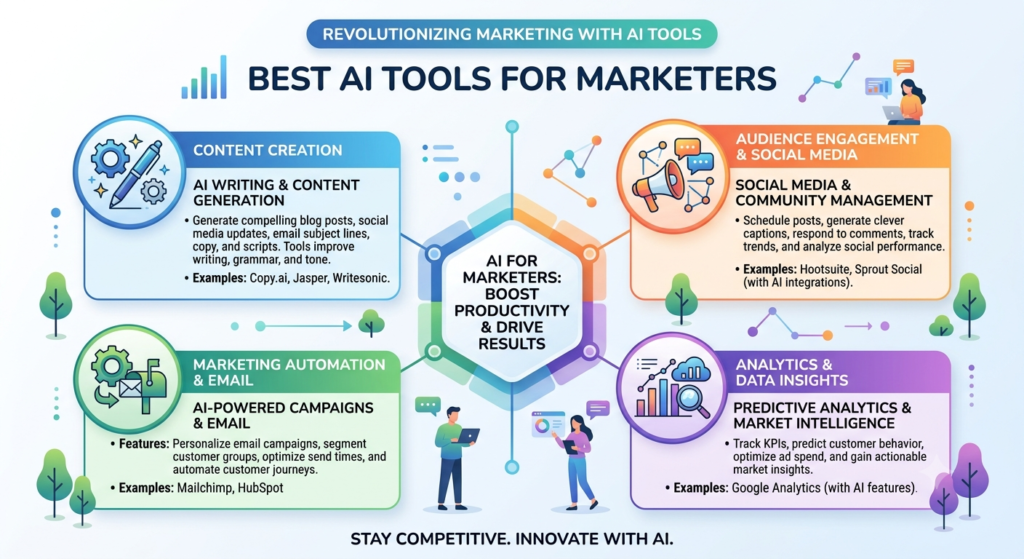
15 Best AI Tools for Marketers in 2026 to Boost Growth
Artificial intelligence is changing how businesses plan campaigns, create content, reach customers, and measure results. The best AI tools for marketers can help teams save time, improve targeting, understand customer needs, and make better marketing decisions.
Today, marketers use AI to research keywords, write content, create social media posts, automate emails, manage advertising, and study website traffic. These tools don’t replace every marketing task. Instead, they help people work faster and focus on strategy, creativity, and customer relationships.
Whether you’re a beginner, a freelancer, a small business owner, or an experienced marketing professional, choosing the right AI marketing tools can make your work easier.
This guide covers 15 useful tools, their main features, practical applications, and selection criteria. It also explains how to use AI responsibly and build effective AI-driven marketing strategies in 2026.
What Are AI Marketing Tools?
AI marketing tools are software applications that use artificial intelligence to support marketing activities. They can analyze data, generate text and images, identify patterns, suggest improvements, and automate repeated tasks.
For example, a marketer can use an AI writing assistant to develop a blog outline. An SEO platform can identify keyword opportunities. An email platform can help personalize messages, while an analytics tool can reveal how visitors interact with a website.
These applications support several areas of digital marketing.
- Content creation: Develop blog ideas, product descriptions, emails, and advertisements.
- Search engine optimization: Research keywords, analyze competitors, and improve website content.
- Email marketing: Create campaigns, organize audiences, and automate follow-ups.
- Social media: Plan posts, prepare creative assets, and review engagement.
- Paid advertising: Test creative variations, optimize bidding, and improve campaign targeting.
- Analytics: Study customer behavior and measure marketing performance.
- Lead generation: Identify prospects, organize leads, and support follow-up activities.
The right platform depends on your goals, budget, team size, and existing software.
Why Marketers Need AI Tools in 2026
Marketing involves many tasks, and each one requires time and attention. AI can help reduce repetitive work and make large amounts of information easier to understand.
1. Save Time on Repetitive Tasks
Marketers often spend hours preparing reports, writing first drafts, organizing campaign ideas, and reviewing performance data.
AI can speed up these activities. For example, a marketer can generate five email subject lines in seconds instead of writing every option from scratch.
Human review is still important. The goal is to reduce manual effort without lowering quality.
2. Improve Audience Targeting
Audience targeting AI can help marketers group customers based on behavior, interests, previous purchases, and engagement.
A business might create separate campaigns for first-time visitors and returning customers. Each group can receive messages that match its needs.
Better targeting can make campaigns more relevant, although results depend on data quality and campaign design.
3. Support Campaign Optimization
AI advertising platforms can help identify useful audience segments, test creative variations, and adjust bids.
Marketing teams can review these recommendations and decide which changes make sense.
Google explains its AI-powered advertising options in its official Google Ads tools guide.
4. Understand Customer Behavior
Customer analytics AI can help identify patterns in website visits, purchases, email clicks, and other interactions. These insights may reveal which pages attract attention, where customers leave a sales funnel, and which campaigns generate valuable leads.
However, AI predictions aren’t guarantees. Marketers should compare them with actual results.
5. Make Better Use of Marketing Budgets
Small businesses often have limited budgets. AI tools can help prioritize important tasks and reduce unnecessary manual work.
For example, a company might use an AI writing assistant, a basic SEO platform, and an analytics solution instead of purchasing several overlapping applications.
The best approach is to choose tools that solve real problems rather than adopting AI simply because it’s popular.
15 Best AI Tools for Marketers in 2026
The following tools support different parts of the marketing process. They’re not all direct competitors, so compare them according to your specific needs.
1. ChatGPT: Best for Marketing Ideas and Content
ChatGPT is a flexible AI assistant for planning, research support, content development, and marketing analysis.
Marketers can use it to create campaign briefs, generate blog outlines, draft email sequences, prepare social media captions, and organize customer feedback.
Key uses:
- Develop content calendars and campaign concepts.
- Generate headline and advertisement variations.
- Summarize research supplied by the marketing team.
- Brainstorm lead magnets and landing page ideas.
- Analyze structured information and prepare report summaries.
Example: A digital marketer launching a new product can ask ChatGPT to develop a campaign plan for search, email, and social media. The marketer can then refine the plan based on the brand’s audience and budget.
Best for: Freelancers, content marketers, agencies, and marketing teams.
Limitation: Generated content may contain errors or unsupported claims. Verify facts, use trusted sources, and edit the final copy before publishing.
Explore ChatGPT.
2. Jasper: Best for Brand-Focused Content
Jasper is an AI content platform designed for marketing workflows. It can help teams develop campaign copy and maintain a more consistent brand voice. Marketing teams may use it for advertisements, landing pages, product descriptions, email copy, and other promotional content.
Key uses:
- Create marketing copy for different channels.
- Develop campaign variations.
- Support brand voice consistency.
- Speed up content production.
Best for: Teams producing large amounts of branded content.
Limitation: Brand consistency still requires clear guidelines and editorial review. Check current features and plan limits before subscribing.
Explore Jasper.
3. Semrush: Best for SEO Research
Semrush is a digital marketing platform with tools for keyword research, competitor analysis, site audits, and content optimization.
Its SEO capabilities can help marketers understand search demand, discover keyword opportunities, and identify technical website problems. Available AI features depend on the product and subscription.
Key uses:
- Find relevant keywords and related search terms.
- Review competitor websites and search visibility.
- Identify technical SEO issues.
- Monitor keyword rankings and backlinks.
- Plan content around search intent.
Best for: SEO professionals, agencies, and businesses focused on organic traffic.
Limitation: Keyword difficulty and traffic estimates are estimates, not guaranteed outcomes. Confirm important decisions with website data and search performance reports.
Explore Semrush.
4. Surfer: Best for Content Optimization
Surfer helps content teams analyze search results and improve the structure and relevance of their pages. It can support content briefs, keyword coverage, and on-page optimization. Its recommendations can be useful during content planning and editing.
Key uses:
- Build SEO content briefs.
- Review keyword coverage.
- Identify related topics to consider.
- Improve content organization.
- Support content optimization workflows.
Best for: SEO writers, editors, and content marketing teams.
Limitation: Following every recommendation can make an article sound unnatural. Write for readers first, and use optimization suggestions as guidance.
Explore Surfer.
5. HubSpot: Best for Marketing Automation
HubSpot combines customer relationship management with marketing, sales, and customer service features. Its marketing capabilities can help businesses manage leads and coordinate campaigns.
Depending on the products and plan selected, teams can use automation, forms, email marketing, reporting, and AI-assisted features.
Key uses:
- Organize leads and customer records.
- Build automated follow-up workflows.
- Manage email campaigns.
- Track interactions across the customer journey.
- Connect marketing activities with sales outcomes.
Best for: Businesses that need an integrated CRM and marketing system.
Limitation: Advanced features may require paid plans. Review contact limits, automation access, and total costs before committing.
Explore HubSpot.
6. Mailchimp: Best for Email Marketing
Mailchimp helps businesses create email campaigns, manage subscribers, and measure campaign engagement. Its available AI-assisted features can support content creation and campaign workflows, depending on the plan and account.
Key uses:
- Create newsletters and promotional emails.
- Organize subscriber lists.
- Develop email subject lines.
- Schedule campaigns.
- Review opens, clicks, and conversions where tracking is available.
Best for: Small businesses, online stores, and email marketing beginners.
Limitation: Some automation and optimization features have plan restrictions. Email engagement metrics should be interpreted carefully, since tracking methods can affect their accuracy.
Explore Mailchimp.
7. ActiveCampaign: Best for Automated Customer Journeys
ActiveCampaign focuses on email marketing, marketing automation, and customer relationship management. It can help businesses send messages based on customer actions, lead information, and campaign interactions.
Key uses:
- Create welcome email sequences.
- Send follow-ups after specific actions.
- Organize contacts using tags and segments.
- Build lead nurturing workflows.
- Support personalized customer communication.
Best for: Businesses with established email campaigns and multi-step customer journeys.
Limitation: Complex workflows need careful testing. Incorrect conditions can send the wrong message or create unwanted repetition.
Explore ActiveCampaign.
8. Canva: Best for Marketing Design
Canva helps marketers create visual content without requiring advanced design skills. Its AI-powered features can support content generation and creative editing.
Teams can prepare social media graphics, presentations, advertisements, promotional materials, and other brand assets.
Key uses:
- Design social media posts.
- Create presentation slides.
- Prepare campaign graphics.
- Develop visual concepts.
- Adapt designs for different formats.
Best for: Small teams, social media managers, and content creators.
Limitation: AI-generated visuals may contain errors or inconsistent details. Check text, logos, product images, and brand guidelines before publishing.
Explore Canva.
9. Buffer: Best for Social Media Scheduling
Buffer helps marketers plan and publish social media content across supported platforms. AI-assisted writing features can help generate ideas and adapt captions.
Key uses:
- Plan a content calendar.
- Draft social media captions.
- Schedule posts.
- Organize publishing workflows.
- Review available engagement metrics.
Best for: Freelancers, creators, and small marketing teams.
Limitation: Platform features and publishing options vary. Review posts for tone, context, and accuracy before scheduling them.
Explore Buffer.
10. Hootsuite: Best for Social Media Management
Hootsuite provides tools for social media publishing, monitoring, reporting, and team collaboration. Some features support AI-assisted content creation and social media workflows.
Key uses:
- Manage multiple social accounts.
- Plan and schedule content.
- Monitor conversations and mentions.
- Review social performance.
- Coordinate team publishing activities.
Best for: Agencies and organizations managing several social accounts.
Limitation: Costs and available features depend on the plan. Teams should evaluate whether they need its broader management capabilities or a simpler scheduling tool.
Explore Hootsuite.
11. Google Ads: Best for AI-Assisted Advertising
Google Ads offers advertising tools that use machine learning to support bidding, targeting, creative optimization, and campaign delivery.
Options such as Performance Max and Smart Bidding can help advertisers optimize campaigns toward selected goals. Their performance depends on conversion tracking, campaign setup, and the quality of the data supplied.
Key uses:
- Manage search and other supported ad campaigns.
- Optimize bids toward conversion goals.
- Test ad creative and messaging.
- Review campaign performance.
- Discover new audience and search opportunities.
Best for: Businesses running paid search, shopping, or other supported Google advertising campaigns.
Limitation: Automation doesn’t remove the need for budget controls and monitoring. Check conversion tracking, search relevance, and actual return on ad spend.
Explore Google Ads.
12. Meta Advantage+: Best for AI-Assisted Social Advertising
Meta’s Advantage+ suite provides automation options for supported advertising campaigns across Meta platforms. Depending on the campaign type, these features can help with audience selection, creative delivery, placements, and campaign optimization.
Key uses:
- Run supported automated campaigns.
- Test creative assets.
- Reach relevant audiences.
- Manage campaign delivery.
- Review conversion and advertising performance.
Best for: Businesses advertising on Facebook and Instagram.
Limitation: Results depend on creative quality, tracking, audience signals, and campaign objectives. Keep testing new ideas instead of relying on automation alone.
Explore Meta for Business.
13. Adobe Marketo Engage: Best for Enterprise Marketing Automation
Adobe Marketo Engage is a marketing automation platform built to support lead management, campaign execution, and customer engagement. It can help larger organizations coordinate complex campaigns and align marketing activities with sales processes.
Key uses:
- Manage lead nurturing.
- Create multi-step campaigns.
- Support account-based marketing.
- Organize customer engagement workflows.
- Measure campaign influence.
Best for: Large businesses with complex marketing and sales operations.
Limitation: Implementation and administration can require specialist skills. Smaller businesses may find a simpler platform more suitable.
Explore Adobe Marketo Engage.
14. Salesforce Marketing Cloud: Best for Customer Personalization
Salesforce Marketing Cloud supports customer engagement across multiple channels. Its capabilities vary by product, edition, and integration. Organizations can use it to coordinate customer journeys, personalize communications, and connect marketing activity with customer information.
Key uses:
- Build customer journeys.
- Coordinate communications across channels.
- Use customer data to personalize messages.
- Automate selected campaign activities.
- Measure engagement and conversions.
Best for: Organizations with large customer databases and complex marketing requirements.
Limitation: Costs, setup, and integration requirements can be substantial. Businesses should define their needs before choosing an enterprise solution.
Explore Salesforce Marketing Cloud.
15. Google Analytics 4: Best for Customer Behavior Analysis
Google Analytics 4 helps marketers understand how people interact with websites and apps. Its reporting and predictive capabilities can support data-driven marketing decisions.
It can help teams review acquisition sources, engagement, conversions, and user journeys. Available insights depend on tracking configuration, data volume, and reporting features.
Key uses:
- Analyze traffic sources.
- Identify popular landing pages.
- Track important website events.
- Review conversion paths.
- Understand customer engagement.
Best for: Businesses that want to measure website and campaign performance.
Limitation: Analytics data can be incomplete if tracking is incorrectly configured or consent choices limit collection. Validate important events before using the results to make decisions.
Explore Google Analytics.
How to Choose the Right AI Marketing Software
Choosing software should begin with a clear business problem. A tool that works well for an enterprise may be unnecessary for a small business.
1. Define Your Marketing Goals
Decide what you want to improve. Your goal might be to increase organic traffic, generate leads, improve email engagement, reduce reporting time, or increase conversions.
Choose a tool that directly supports that goal.
2. Set a Realistic Budget
AI marketing software can range from free tools to expensive enterprise platforms.
Consider the total cost, including subscriptions, setup, training, integrations, and additional users. A free plan can be a good starting point, but check its usage limits.
3. Review Integration Options
Your tools should work with your existing website, CRM, analytics platform, email service, and advertising accounts. Good integration reduces duplicate work and makes reporting easier.
4. Check Data Privacy and Security
Avoid sharing sensitive customer details, confidential business information, or personal data with an AI service unless its data handling meets your organization’s requirements. Review privacy policies, access controls, retention settings, and applicable data protection rules.
5. Test Before You Commit
Use a trial or small pilot project when possible. Compare results against your existing process. For example, measure how much time a tool saves when creating content or whether an email automation workflow improves qualified leads.
Which Tools Fit Different Business Needs?
|
Business need |
Suggested starting point |
|
Content ideas and first drafts |
ChatGPT |
|
Keyword research and SEO audits |
Semrush |
|
On-page content optimization |
Surfer |
|
Basic email campaigns |
Mailchimp |
|
Lead nurturing |
HubSpot or ActiveCampaign |
|
Visual content creation |
Canva |
|
Social media scheduling |
Buffer |
|
Paid search campaigns |
Google Ads |
|
Website performance analysis |
Google Analytics 4 |
|
Complex enterprise campaigns |
Marketo Engage or Salesforce Marketing Cloud |
These are starting points, not universal rankings. Your current systems and budget should guide the final choice.
How to Use AI Marketing Tools Successfully
Buying software is only the first step. Effective results come from combining AI capabilities with a clear strategy and human judgment.
Step 1: Research Your Audience
Start by understanding customer needs, common questions, search intent, and buying barriers.
Use surveys, website analytics, sales conversations, and reliable market research. AI can help organize this information and identify possible themes.
Don’t assume that generated customer profiles are facts. Confirm them with real evidence.
Step 2: Build a Content Plan
Use AI to brainstorm topics and create a publishing calendar.
For SEO, organize topics by search intent and business relevance. Include informational articles, comparison pages, product content, and useful resources where appropriate.
Create content that answers real questions rather than publishing large numbers of similar pages.
Step 3: Improve SEO and Content Quality
AI SEO tools can help identify keyword opportunities and improve content structure.
However, rankings depend on many factors, including relevance, usefulness, competition, technical performance, and site authority.
Review facts, add original insights, cite trustworthy sources, and make the content easy to understand.
Step 4: Automate Campaigns Carefully
Marketing automation software can send welcome emails, follow up with leads, and deliver messages based on customer actions.
Begin with a simple workflow. Test every trigger, condition, link, and unsubscribe option before launch.
Use customer data responsibly and avoid sending excessive or irrelevant messages.
Step 5: Optimize Paid Campaigns
AI tools for PPC advertising can assist with bids, creative testing, and campaign delivery.
Set clear conversion goals before enabling automation. Review cost per lead, conversion rate, revenue, and return on ad spend.
If performance drops, investigate tracking, landing page quality, audience relevance, and budget allocation.
Step 6: Measure Results
Use analytics and reporting tools to understand what is working.
Track metrics such as:
- Organic search clicks and conversions.
- Qualified leads generated.
- Email clicks and meaningful conversions.
- Advertising cost per acquisition.
- Landing page conversion rate.
- Customer acquisition cost.
- Revenue attributable to marketing.
Choose metrics that reflect business goals. More traffic or engagement doesn’t always mean more revenue.
Step 7: Improve Through Testing
Test one major change at a time where practical. Compare different subject lines, landing page messages, creative assets, or audience approaches.
Use sufficient data to avoid making decisions based on random fluctuations.
This process helps marketers turn AI recommendations into measurable improvements.
Common Mistakes to Avoid When Using AI for Marketing
AI is useful, but poor implementation can waste time and money.
Publishing Content Without Fact-Checking
AI-generated content may contain incorrect information, outdated details, or invented references. Check facts before publication.
Relying on Automation Too Much
Automated campaigns still need monitoring. Incorrect settings can waste budgets, create irrelevant messages, or damage customer trust.
Ignoring Brand Voice
Generic content may sound similar to competitors. Add real examples, original perspectives, and clear brand guidelines.
Using Poor-Quality Data
Customer behavior analysis is only as useful as the data behind it. Fix tracking problems and review data quality before trusting predictions.
Buying Too Many Tools
Several platforms may perform overlapping tasks. Start with a small set, evaluate their value, and add more only when necessary.
Measuring the Wrong Outcomes
Likes, impressions, and clicks can be useful, but they don’t always show business success. Measure qualified leads, sales, retention, and profit when relevant.
Know More: